Currently the name of the used tag source is not always visible at a prominent place, e.g. in the title bar of the window frames of the dialog boxes used to retrieve data from a web source.
Especially the first dialog step "Search by" misses the name of the tag source completly:
If I use Crtl+I to call the last used tag source again, I can't see which tag source I used at last and if it's the one I want to use now. Also, if I take a screenshot like above, it's not self explaining because it misses the name of the database that's searched in.
The next message box in the workflow, indicating the progress, has the tag source name twice, in the title bar and again in the message itself. That's more than needed. (No screenshot available, sorry.)
Thereafter the "List of search results" appears and it looks like that:
Here I suggest to show the name of the tag source in the title bar of the window instead of having the text "List of search results" twice side by side.
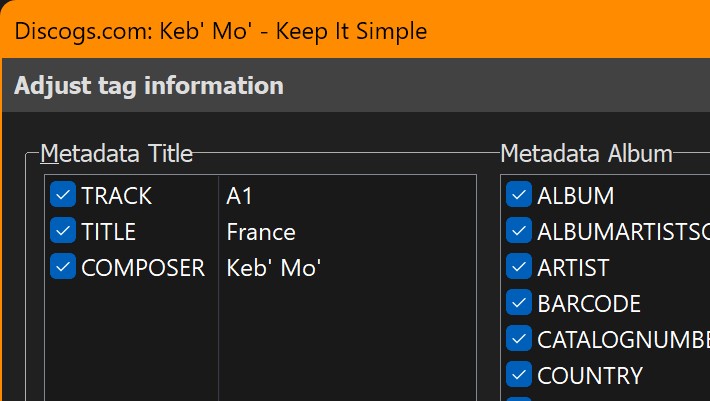
The final box "Adjust tag information" already uses the proposed design and it shows additionally the Artist and Album tags:
If all dialogs would use this design in a similar way, it would always be clear, which tag source we are using, because its name always is visible at the same place.
I think this could be improved without great programming effort.
I've revised the dialog captions and headers with Mp3tag v3.37-beta.6 and (beyond some other minor changes) added the Tag Source name to the Tag Sources dialog captions.
I tried out the new changes with the TMDB tag source that tries to tag ARTIST where possible but in the example given, it stretches out the header a little much. Granted it's unlikely for that many artists to be included in one song yet that tag source crams the equivalent of an entire album into one file, based on @yorickausyps's concept maybe "ALBUMARTIST/COMPOSER - ALBUM" might be more concise.
This has been like that all the time, it's not new to this beta version.
I would say, that the whole concept of an album, that this dialog window uses, does not really apply to tagging a single video file. That's because video files do not contain tracks, at least in my use cases. I'm working on a suggestion for this topic, e.g. to distinguish audio albums from single file videos by the presence (audio album) or absence (single file videos) of output buffers TRACK and TRACKS in the web source scripts output. For a video the two columns Metadata Title and Metadata Album could collapse into a single column with Metadata Video.