# Adding info to a filename
**URL:** https://community.mp3tag.de/t/adding-info-to-a-filename/11973
**Category:** Support
**Created:** [May 5, 2011, 11:53am UTC](https://community.mp3tag.de/t/adding-info-to-a-filename/11973 "2011-05-05T11:53:33Z")
**Posts on this page:** 5
**Page:** 1
### Author:  [@jimmynog](https://community.mp3tag.de/u/jimmynog)
#### Post date: [May 5, 2011, 11:53am UTC](https://community.mp3tag.de/t/adding-info-to-a-filename/11973/1 "2011-05-05T11:53:33Z")
Hi, can anyone tell me how I can convert a list of filenames starting with something like this:
## 01 - this song
-
22 - that song
to:
Jimi Hendrix Experience - 01 - this song
I haven't seen an example of that so far. Thanks if you can help.
---
### Author:  [@DJ\_Mucke](https://community.mp3tag.de/u/DJ_Mucke)
#### Post date: [May 5, 2011, 1:07pm UTC](https://community.mp3tag.de/t/adding-info-to-a-filename/11973/2 "2011-05-05T13:07:44Z")
> [@jimmynog](#):
>
> 01 - this song
> to: \> Jimi Hendrix Experience - 01 - this song
> Thanks if you can help.
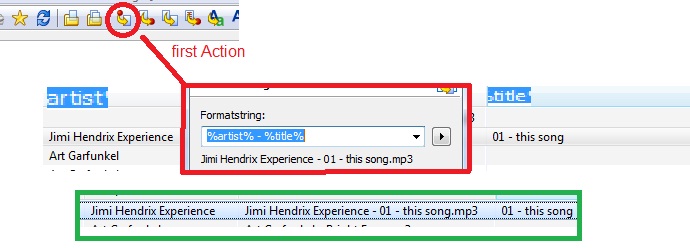
i hope you such this answer for your Question
DJ Mucke are a german

---
### Author:  [@ohrenkino](https://community.mp3tag.de/u/ohrenkino)
#### Post date: [May 5, 2011, 5:24pm UTC](https://community.mp3tag.de/t/adding-info-to-a-filename/11973/3 "2011-05-05T17:24:18Z")
> [@jimmynog](#):
>
> 01 - this song
> Jimi Hendrix Experience - 01 - this song
If you really ONLY want to convert the filenames for a single artist then use the converter
filename - filename
Enter as first mask:
%1
and as target mask:
Jimi Hendrix Experience - %1
The disadvatage of this method is that it will work only for tracks by Jimi Hendrix Experience.
For another artist you would have to enter a different name.
It would be a superior proceeding to first import information into the file-internal tags.
For this use the converter "Filename - Tag". The mask would be
%track% - %title%
for filenames of the pattern "01 - this song".
If you have stored your files in a directory structure like
Jimi Hendrix Experience\01 - this song
then use a mask like this:
%artist%\%track% - %title%
You may then use the converter "Tag - Filename"
with a mask like this:
%artist% - %track% - %title%
---
### Author:  [@jimmynog](https://community.mp3tag.de/u/jimmynog)
#### Post date: [May 6, 2011, 10:33am UTC](https://community.mp3tag.de/t/adding-info-to-a-filename/11973/4 "2011-05-06T10:33:57Z")
Thanks for the info, I can probably figure out what to do from what you gave me. I wish I had this utility 19,000 MP3 albums ago! 😆
---
### Author:  [@system](https://community.mp3tag.de/u/system)
#### Post date: [February 9, 2026, 12:23pm UTC](https://community.mp3tag.de/t/adding-info-to-a-filename/11973/5 "2026-02-09T12:23:04Z")