# Advanced script for folders
**URL:** https://community.mp3tag.de/t/advanced-script-for-folders/4901
**Category:** Support
**Created:** [May 19, 2007, 9:35pm UTC](https://community.mp3tag.de/t/advanced-script-for-folders/4901 "2007-05-19T21:35:07Z")
**Posts on this page:** 6
**Page:** 1
### Author:  [@isthisthingon](https://community.mp3tag.de/u/isthisthingon)
#### Post date: [May 19, 2007, 9:35pm UTC](https://community.mp3tag.de/t/advanced-script-for-folders/4901/1 "2007-05-19T21:35:07Z")
Hi there, I did already post that question in the german support forum, sorry for the doublepost!
I want to sort my music in 7 different folders, according to the artist's starting character either Other, A-D, E-H, I-L, M-P, Q-T or V-Z.
For example:
¡Forward, Russia! -\> Other
Bob Dylan -\> A-D
Radiohead -\> Q-T
and so on...
I just had a look at the script commands but that's far over my head! Does anyone have a clue how this could work?
Thanks a lot!
---
### Author:  [@Forrest\_Gump](https://community.mp3tag.de/u/Forrest_Gump)
#### Post date: [May 19, 2007, 10:39pm UTC](https://community.mp3tag.de/t/advanced-script-for-folders/4901/2 "2007-05-19T22:39:39Z")
Sorry, I just can give you a little wink.
Use Tag - Filename, **A-D\%artist% - %year% - %album% - $num(%track%,2) - %title%**
**A-D\ creates a subfolder named A-D**
Just replace A-D with a code.
Pseudocode: if first letter of artist is uppercase and from A to D, then A-D else...
With **..\%artist% - %year% - %album% - $num(%track%,2) - %title%** you can put the files up one folder level. Watch for the 2 point at the beginning. **....\ up 2 levels.**

---
### Author:  [@isthisthingon](https://community.mp3tag.de/u/isthisthingon)
#### Post date: [May 20, 2007, 8:06am UTC](https://community.mp3tag.de/t/advanced-script-for-folders/4901/3 "2007-05-20T08:06:32Z")
Yeah, so far i know what to do, my problem actually is the code...
---
### Author:  [@isthisthingon](https://community.mp3tag.de/u/isthisthingon)
#### Post date: [May 20, 2007, 4:29pm UTC](https://community.mp3tag.de/t/advanced-script-for-folders/4901/4 "2007-05-20T16:29:40Z")
Allright, solved it, it works like this:
```
$if($leql($left(%artist%,1),?),Other,
$if($leql($left(%artist%,1),D),A-D,
$if($leql($left(%artist%,1),H),E-H,
$if($leql($left(%artist%,1),L),I-L,
$if($leql($left(%artist%,1),P),M-P,
$if($leql($left(%artist%,1),T),Q-T,V-Z))))))
```
But thanks a lot though!
---
### Author:  [@Forrest\_Gump](https://community.mp3tag.de/u/Forrest_Gump)
#### Post date: [May 21, 2007, 1:35am UTC](https://community.mp3tag.de/t/advanced-script-for-folders/4901/5 "2007-05-21T01:35:29Z")
Below you see the content of my MTA-file called **Sort by album in grouped folders.mta**.
Explanation:
#0 With Tag-Field formate creates a new Tag called **NEWTAG** , puts the first letter of the albumname in it and formates this letter to uppercase.
#1-#7 With Replace with RegEx formates the Tag **NEWTAG** to the wanted foldernames.
#8 With Tag-Field formate formates the **filename** and puts the files up one folderlevel in the desired folders.
Files without albumnames get moved beside this new folderstruktur, so you can edit them manualy.
Attention, my version is 2.32a
```
[#0]
T=5
F=NEWTAG
1=$upper($left(%album%,1))
[#1]
T=4
F=NEWTAG
1=^[A-D]
2=A-D
3=0
[#2]
T=4
F=NEWTAG
1=^[E-H]
2=E-H
3=0
[#3]
T=4
F=NEWTAG
1=^[I-L]
2=I-L
3=0
[#4]
T=4
F=NEWTAG
1=^[Q-T]
2=Q-T
3=0
[#5]
T=4
F=NEWTAG
1=^[M-P]
2=M-P
3=0
[#6]
T=4
F=NEWTAG
1=^[V-Z]
2=V-Z
3=0
[#7]
T=4
F=NEWTAG
1=^[^A-Z]
2=Other
3=0
[#8]
T=5
F=_FILENAME
1=..\\%newtag%\\\\$if(%artist%,%artist%,no artist) - $if(%year%,%year%,no year) - $if(%album%,%album%,no album) - $if(%track%,$num(%track%,2),no number) - $if(%title%,%title%,no title)
```
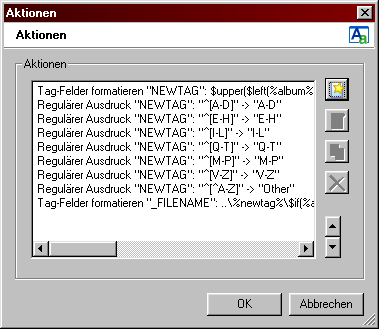
klick on pic to see the action-pallete of the action **Sort by album in grouped folders**
[sort\_by\_album\_in\_grouped\_folders.mta](https://community.mp3tag.de/uploads/default/original/2X/3/3456e0f12ada7b31b766b978e2ce1f936a1763de.mta) (579 Bytes)
Good luck, have fun 

[sort\_by\_album\_in\_grouped\_folders.mta](https://community.mp3tag.de/uploads/default/original/2X/3/3456e0f12ada7b31b766b978e2ce1f936a1763de.mta) (579 Bytes)
---
### Author:  [@system](https://community.mp3tag.de/u/system)
#### Post date: [February 9, 2026, 12:20pm UTC](https://community.mp3tag.de/t/advanced-script-for-folders/4901/6 "2026-02-09T12:20:18Z")