# After the dashes into parentheses
**URL:** https://community.mp3tag.de/t/after-the-dashes-into-parentheses/63256
**Category:** Support
**Created:** [December 30, 2023, 4:17pm UTC](https://community.mp3tag.de/t/after-the-dashes-into-parentheses/63256 "2023-12-30T16:17:01Z")
**Posts on this page:** 14
**Page:** 1
### Author:  [@mbrazil05](https://community.mp3tag.de/u/mbrazil05)
#### Post date: [December 30, 2023, 4:17pm UTC](https://community.mp3tag.de/t/after-the-dashes-into-parentheses/63256/1 "2023-12-30T16:17:01Z")
is there a way to put everything after the "-" into parenthese
example :
This Is Your Night - Berman S House Mix
renamed to
This Is Your Night (Berman S House Mix)
---
### Author:  [@LyricsLover](https://community.mp3tag.de/u/LyricsLover)
#### Post date: [December 30, 2023, 4:41pm UTC](https://community.mp3tag.de/t/after-the-dashes-into-parentheses/63256/2 "2023-12-30T16:41:34Z")
You don't tell us, if this is the content of your TITLE tag or filename something else.
However, a simple approach could be to replace the `- ` (dash space) with an opening brace like this:
`$replace(%TITLE%,- ,'(')`
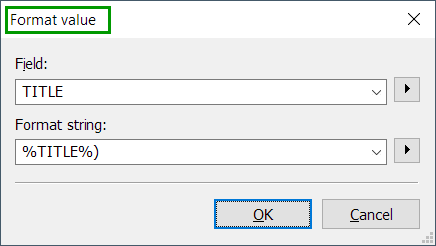
and in a second step you add a closing brace at the end of your tag, for example
`%TITLE%)`
You can do this in Convert Tag-\>Tag (with a preview of the result) or in an Action like "Format Value".
Please be aware that this only works if you have only one `-` (dash space) in your tag.
This will not work for examples with mutliple `-` (dash space) like:
`This Is Your Night - Berman S House Mix - expanded version`
---
### Author:  [@mbrazil05](https://community.mp3tag.de/u/mbrazil05)
#### Post date: [December 30, 2023, 4:42pm UTC](https://community.mp3tag.de/t/after-the-dashes-into-parentheses/63256/3 "2023-12-30T16:42:50Z")
yes, it's for the title, sorry
---
### Author:  [@mbrazil05](https://community.mp3tag.de/u/mbrazil05)
#### Post date: [December 30, 2023, 4:46pm UTC](https://community.mp3tag.de/t/after-the-dashes-into-parentheses/63256/4 "2023-12-30T16:46:04Z")
i don't understand. are you saying i need to do 2 separate actions?
---
### Author:  [@LyricsLover](https://community.mp3tag.de/u/LyricsLover)
#### Post date: [December 30, 2023, 4:47pm UTC](https://community.mp3tag.de/t/after-the-dashes-into-parentheses/63256/5 "2023-12-30T16:47:41Z")
With the above easy to understand solution
> [@mbrazil05](#):
>
> i need to do 2 separate actions
Yes.
Of course you can group the two steps together in 1 [Action Group](https://docs.mp3tag.de/actions/#action-groups).
---
### Author:  [@mbrazil05](https://community.mp3tag.de/u/mbrazil05)
#### Post date: [December 30, 2023, 4:50pm UTC](https://community.mp3tag.de/t/after-the-dashes-into-parentheses/63256/6 "2023-12-30T16:50:27Z")
but so far it's now working.

---
### Author:  [@LyricsLover](https://community.mp3tag.de/u/LyricsLover)
#### Post date: [December 30, 2023, 4:51pm UTC](https://community.mp3tag.de/t/after-the-dashes-into-parentheses/63256/7 "2023-12-30T16:51:36Z")
> [@LyricsLover](#):
>
> You can do this in Convert Tag-\>Tag (with a preview of the result) or in an Action like "Format Value".
There is no indication to use a "Replace" action.
---
### Author:  [@mbrazil05](https://community.mp3tag.de/u/mbrazil05)
#### Post date: [December 30, 2023, 4:53pm UTC](https://community.mp3tag.de/t/after-the-dashes-into-parentheses/63256/8 "2023-12-30T16:53:23Z")
i don't know what you mean ?
---
### Author:  [@LyricsLover](https://community.mp3tag.de/u/LyricsLover)
#### Post date: [December 30, 2023, 4:54pm UTC](https://community.mp3tag.de/t/after-the-dashes-into-parentheses/63256/9 "2023-12-30T16:54:55Z")
First Action:

Second Action:
---
### Author:  [@mbrazil05](https://community.mp3tag.de/u/mbrazil05)
#### Post date: [December 30, 2023, 4:59pm UTC](https://community.mp3tag.de/t/after-the-dashes-into-parentheses/63256/11 "2023-12-30T16:59:14Z")
Great. this is what i needed. perfect.
---
### Author:  [@poster](https://community.mp3tag.de/u/poster)
#### Post date: [December 30, 2023, 8:34pm UTC](https://community.mp3tag.de/t/after-the-dashes-into-parentheses/63256/12 "2023-12-30T20:34:56Z")
There is no need for 2 actions. You can also achieve the goal with just 1 action or the converter Tag -\>Tag.
Action Format Value or Converter Tag - \> Tag
Field: TITLE
Format string: `$replace(%title%,- ,'('))`
---
### Author:  [@LyricsLover](https://community.mp3tag.de/u/LyricsLover)
#### Post date: [December 30, 2023, 9:32pm UTC](https://community.mp3tag.de/t/after-the-dashes-into-parentheses/63256/13 "2023-12-30T21:32:06Z")
Sure, there are always several ways.
Could you please explain how your solution exactly works?
---
### Author:  [@poster](https://community.mp3tag.de/u/poster)
#### Post date: [December 30, 2023, 10:38pm UTC](https://community.mp3tag.de/t/after-the-dashes-into-parentheses/63256/14 "2023-12-30T22:38:09Z")
The replace-function replaces the dash with an opening bracket and at the end a closing bracket is added.
---
### Author:  [@system](https://community.mp3tag.de/u/system)
#### Post date: [January 29, 2024, 10:38pm UTC](https://community.mp3tag.de/t/after-the-dashes-into-parentheses/63256/15 "2024-01-29T22:38:30Z")
This topic was automatically closed 30 days after the last reply. New replies are no longer allowed.