# Album art column not displaying
**URL:** https://community.mp3tag.de/t/album-art-column-not-displaying/70430
**Category:** Support
**Created:** [December 30, 2025, 12:13pm UTC](https://community.mp3tag.de/t/album-art-column-not-displaying/70430 "2025-12-30T12:13:44Z")
**Posts on this page:** 12
**Page:** 1
### Author:  [@martinsmith1955](https://community.mp3tag.de/u/martinsmith1955)
#### Post date: [December 30, 2025, 12:13pm UTC](https://community.mp3tag.de/t/album-art-column-not-displaying/70430/1 "2025-12-30T12:13:44Z")
I have used Mp3tag for many years with no problems,
Today I opened Mp3tag and the album art is not displaying.
There is a narrow column on the left but I cannot alter its width.
I have explored options but can find nothing helpful.
I have reset the PC and un-installed and re-installed mp3tag- no change.
Using v 3.32 and Windows 11. Any ideas?
---
### Author:  [@ohrenkino](https://community.mp3tag.de/u/ohrenkino)
#### Post date: [December 30, 2025, 12:16pm UTC](https://community.mp3tag.de/t/album-art-column-not-displaying/70430/2 "2025-12-30T12:16:58Z")
The Windows version has never displayed the embedded picture in the file list. Also, the current version 3.32 does not do it.
---
### Author:  [@LyricsLover](https://community.mp3tag.de/u/LyricsLover)
#### Post date: [December 30, 2025, 12:18pm UTC](https://community.mp3tag.de/t/album-art-column-not-displaying/70430/3 "2025-12-30T12:18:49Z")
> [@martinsmith1955](#):
>
> Today I opened Mp3tag and the album art is not displaying.
Maybe a [screenshot](https://community.mp3tag.de/t/hints-for-asking-support-requests/56190#p-168842-use-screenshots-to-exemplify-the-issue-2) would help to understand what exactly you are missing - and where?
Are you referring to the cover art in the bottom left corner?

---
### Author:  [@martinsmith1955](https://community.mp3tag.de/u/martinsmith1955)
#### Post date: [December 30, 2025, 12:34pm UTC](https://community.mp3tag.de/t/album-art-column-not-displaying/70430/4 "2025-12-30T12:34:48Z")
Sorry but it has done so for me, and did until this morning _**(update: apologies I now realise that what I thought was a column was actually the panel -thanks for the help.)**_
---
### Author:  [@AreDigg](https://community.mp3tag.de/u/AreDigg)
#### Post date: [December 30, 2025, 12:37pm UTC](https://community.mp3tag.de/t/album-art-column-not-displaying/70430/5 "2025-12-30T12:37:16Z")
Installed anything new on your PC?
---
### Author:  [@martinsmith1955](https://community.mp3tag.de/u/martinsmith1955)
#### Post date: [December 30, 2025, 12:37pm UTC](https://community.mp3tag.de/t/album-art-column-not-displaying/70430/6 "2025-12-30T12:37:30Z")
For me , if I s

elected an album, the cover art was in the left-most column
---
### Author:  [@martinsmith1955](https://community.mp3tag.de/u/martinsmith1955)
#### Post date: [December 30, 2025, 12:38pm UTC](https://community.mp3tag.de/t/album-art-column-not-displaying/70430/7 "2025-12-30T12:38:20Z")
not knowingly, who knows what Microsoft do behind the scenes
---
### Author:  [@LyricsLover](https://community.mp3tag.de/u/LyricsLover)
#### Post date: [December 30, 2025, 12:47pm UTC](https://community.mp3tag.de/t/album-art-column-not-displaying/70430/8 "2025-12-30T12:47:56Z")
Do you mean this first column:
 which looks like this in my setting? 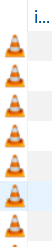
This is just the symbol of the default player software associated with your music format.
You can set it in your Windows OS to whatever (installed) player you like.
But as @ohrenkino said: The Windows version of Mp3tag has never had a real cover art preview in a column.
BTW: You can enable the Tag Panel on the left with Ctrl + Q.
And you can arrange it [wherever you like it](https://community.mp3tag.de/t/tag-panel-moved-to-top-of-window/67693/5).
---
### Author:  [@martinsmith1955](https://community.mp3tag.de/u/martinsmith1955)
#### Post date: [December 30, 2025, 2:49pm UTC](https://community.mp3tag.de/t/album-art-column-not-displaying/70430/9 "2025-12-30T14:49:15Z")
Thanks LyricsLover
The tag panel does show the album art in the way I am used to, this is certainly a useful work around.
BUT I really did used to have a column showing a preview of the album art, have had for years and now it has gone. _**(update: I now realise this was actually the panel on the left)**_
---
### Author:  [@martinsmith1955](https://community.mp3tag.de/u/martinsmith1955)
#### Post date: [December 30, 2025, 2:53pm UTC](https://community.mp3tag.de/t/album-art-column-not-displaying/70430/10 "2025-12-30T14:53:19Z")
In fact I realise I used to have the entire tag panel in a column on the left but now I have to invoke it by Ctrl Q. I will try to move it to the left of the screen, but I can live with if floating or at the top.
I have now discovered the thin double lines and so have moved the panel to the left.
I apologise to those I contradicted when they told me tat an art preview had never existed in a column. Because I had always had the panel on the left I had interpreted this as a column.
We live and learn!
---
### Author:  [@LyricsLover](https://community.mp3tag.de/u/LyricsLover)
#### Post date: [December 30, 2025, 3:05pm UTC](https://community.mp3tag.de/t/album-art-column-not-displaying/70430/11 "2025-12-30T15:05:39Z")
If you exit the app, Mp3tag remembers the state.
So, if you enable the **Tag Panel** (Ctrl + Q or Menu: View \> Tag Panel) and then exit Mp3tag, the panel - including the cover art section - will reappear automatically when you next start Mp3tag.
The same is true for the position of the **Tag Panel**.
Please take a look at this guide on how to manually move the tag panel to its 4 useful positions:
> [@Tag panel moved to top of window](https://community.mp3tag.de/t/tag-panel-moved-to-top-of-window/67693/5):
>
> For future readers: This AniGif could help how to use the drag & move function for the Tag Panel inside Mp3tag [TagPanelMoving] (By the way: this technique also works for the Filter - activated with F3) This illustrates @ohrenkinos advice:
---
### Author:  [@system](https://community.mp3tag.de/u/system)
#### Post date: [January 29, 2026, 3:06pm UTC](https://community.mp3tag.de/t/album-art-column-not-displaying/70430/12 "2026-01-29T15:06:13Z")
This topic was automatically closed 30 days after the last reply. New replies are no longer allowed.