# Apply (regex) action to multiple fields at once?
**URL:** https://community.mp3tag.de/t/apply-regex-action-to-multiple-fields-at-once/71804
**Category:** Support
**Created:** [September 2, 2026, 11:42am UTC](https://community.mp3tag.de/t/apply-regex-action-to-multiple-fields-at-once/71804 "2026-09-02T11:42:07Z")
**Posts on this page:** 7
**Page:** 1
### Author:  [@Casual\_Tea](https://community.mp3tag.de/u/Casual_Tea)
#### Post date: [September 2, 2026, 11:42am UTC](https://community.mp3tag.de/t/apply-regex-action-to-multiple-fields-at-once/71804/1 "2026-09-02T11:42:07Z")
My need is fairly simple.
I want to apply this regex action to `TITLE` and `ALBUM` (for now) without duplicating and maintaining two (or more) identical actions.
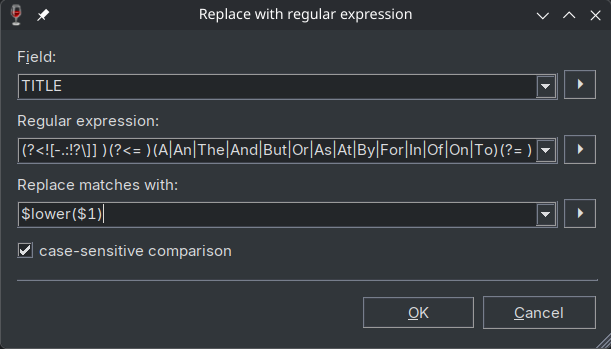
While searching for similar topics and solutions, I came across a few that target similar needs.
In [2006](https://community.mp3tag.de/t/multiple-fields-in-actions/3246), the solution was to apply an action globally to `_TAG` after exporting the tags that should not be touched and then to reimport those tags afterwards to restore them.
In [2011](https://community.mp3tag.de/t/q-actions-how-to-apply-to-multiple-fields-at-once/12089) the question remained unanswered, but I like the proposal to add a `self` placeholder to refer to each of the multiple delimited source fields.
In [2017](https://community.mp3tag.de/t/specifying-multiple-fields-for-an-action/19583), @ohrenkino provided the interesting idea to use a Guess Value action to achieve this goal.
While it worked for the simple $replace action example, I had no success getting my regular expression action to work in this way.
The first pitfall is having to further escape `[]` within the already fairly cryptic regular expression, turning:
```auto
(?
### Author:  [@ohrenkino](https://community.mp3tag.de/u/ohrenkino)
#### Post date: [September 2, 2026, 12:15pm UTC](https://community.mp3tag.de/t/apply-regex-action-to-multiple-fields-at-once/71804/2 "2026-09-02T12:15:57Z")
"Guess value" has 2 format strings:
the source is a generating format string and the target is a matching format string.
So if you can put together a source string that features all the transformations intended by the regular expression and also include a unique separator so that it is clear, which part of the source string should go to which field, you are done.
The challenge would be to create the source format string.
> [@Casual\_Tea](#):
>
> how I can escape `$lower()`
Try `\l` : `$lower($1)` -\> `\l$1`
---
### Author:  [@Casual\_Tea](https://community.mp3tag.de/u/Casual_Tea)
#### Post date: [September 3, 2026, 10:41am UTC](https://community.mp3tag.de/t/apply-regex-action-to-multiple-fields-at-once/71804/3 "2026-09-03T10:41:45Z")
Thank you for the idea. It's ironic, I used `\l` on [regex101](https://regex101.com/) while I was testing my regular expression but didn't know Mp3tag supports it as well.
### \l in the docs and the extended format string syntax
The [docs](https://docs.mp3tag.de/regex/) only list it as:
| `\l` | matches any lower case character |
| --- | --- |
and not that it can be used to alter the replacement.
They also state that
> The [Boost-Extended Format String Syntax](https://www.boost.org/doc/libs/1_78_0/libs/regex/doc/html/boost_regex/format/boost_format_syntax.html) is not enabled in Mp3tag.
Strangely, that same link lists the `\l` escape sequence:
> \l Causes the next character to be outputted, to be output in lower case.
So is the Extended Format String Syntax enabled or not? I find it a bit confusing.
### Execution\evaluation order by design or bug?
After thinking about it some more, the `$lower()` issue probably stems from a different evaluation/execution order.
In a `Replace with regular expression` action, the regex is applied first, the `$1` variable is expanded and its value passed to `lower()`, which is why it works in that context.
However in a `$regexp()` scripting function, `$lower()` is evaluated before the `$1` from the regular expression is expanded, working on the variable name/literal string `$1` instead and `$` has no case.
@Florian is this by design or should `$lower()` work in this context and this is a bug?
Simple reproduction:
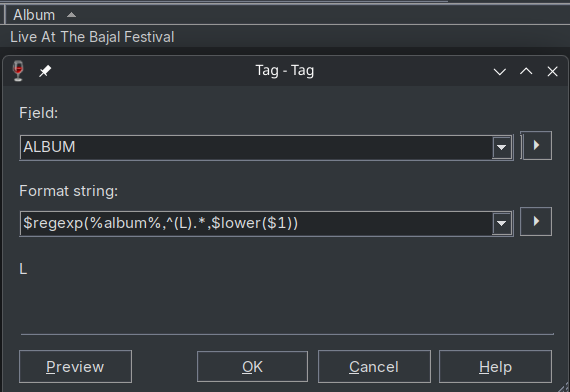
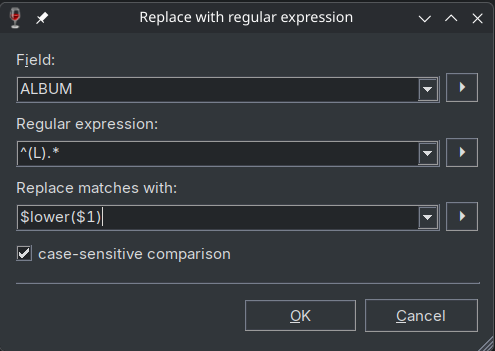
Intuitively these 2 should be identical, but `$regexp()` yields `L` while the action yields `l`.
### Adjusted and now working workaround for the core issue
Anyhow, after adjusting the Guess Value workaround to use `\l` instead of `$lower()` (and adding dinosaur emojis instead of `=` because I doubt they'd ever be part of a tag), this now works:
Action type:
```auto
Guess Value
```
Source format:
```auto
$regexp(%title%🦕🦖🌋%album%,(?
### Author:  [@Florian](https://community.mp3tag.de/u/Florian)
#### Post date: [September 4, 2026, 7:53am UTC](https://community.mp3tag.de/t/apply-regex-action-to-multiple-fields-at-once/71804/4 "2026-09-04T07:53:36Z")
> [@Casual\_Tea](#):
>
> is this by design or should `$lower()` work in this context and this is a bug?
It's by design and a result of how the parameters are evaluated in nested expressions (from innermost to outermost). As a simplified example, consider `$upper($lower('Test'))`, which results in `TEST`.
In the regular expression example, `$lower()` is applied to the literal `$1`, not to the contents of the `$1` variable, because its value is not yet available at this point.
---
### Author:  [@Casual\_Tea](https://community.mp3tag.de/u/Casual_Tea)
#### Post date: [September 4, 2026, 11:54am UTC](https://community.mp3tag.de/t/apply-regex-action-to-multiple-fields-at-once/71804/5 "2026-09-04T11:54:23Z")
Thank you for clarifying.
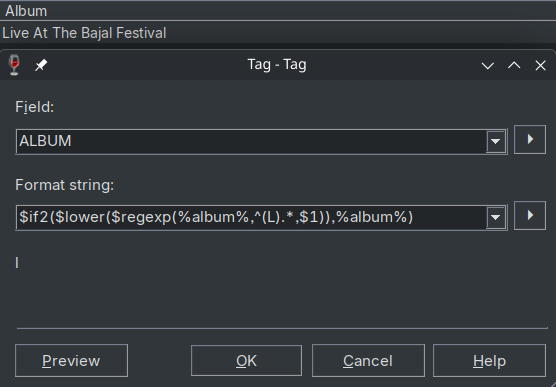
It's a pity that `$regexp()` always returns something (`$0` or in this case `%album%` when no match is found and the replacement when a match is found).
With my wordy and error prone workaround from [this thread](https://community.mp3tag.de/t/simple-way-to-abort-action-if-regex-does-not-match/66243), `$lower()` (and other string functions that do not have a regex internal replacement like `\l`) can be used without risking unwanted changes.
```auto
$if($neql($regexp(%album%,^(L).*,$1),%album%),$lower($regexp(%album%,^(L).*,$1)),%album%)
```
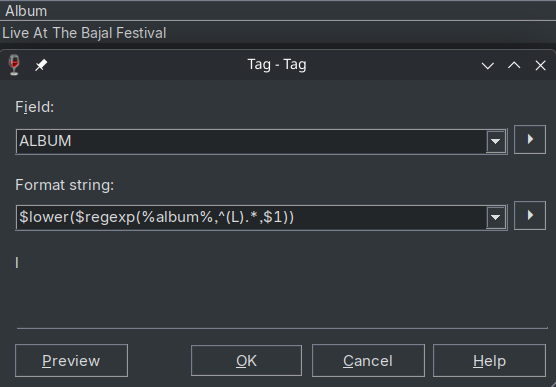
The check if the replacement is identical to the source field is needed because otherwise, `$lower()` would be applied to the source field in the case of no match as seen here:
Match:
No Match:
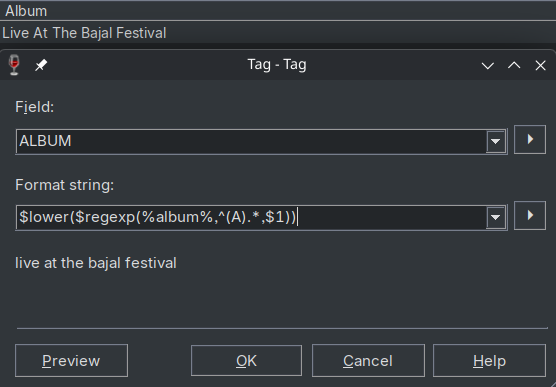
Which is why I still think it would be a good idea to either add a new string function that is identical to `$regexp()` except that it returns `false` when no match is found or to add a fifth parameter to `$regexp()` that changes the behavior from returning `$0` to `false` in the case of no match.
With such a new string function or with the addition of a fifth parameter, this **would** be a succinct solution for many problems that avoids maintaining the same regex twice:
---
### Author:  [@arb](https://community.mp3tag.de/u/arb)
#### Post date: [September 4, 2026, 2:39pm UTC](https://community.mp3tag.de/t/apply-regex-action-to-multiple-fields-at-once/71804/6 "2026-09-04T14:39:37Z")
I agree, a new action type something like **Format multiple values...** that's a reverse of **Remove fields except...** with greater control over which fields are included or excluded in a batch operation as that would still let you use `$regexp()`. Could then use the likes of `_CURRENT`/`%_current%` for inserting the value of the field being processed.
The **Guess values** method works great but as you say, gets trickier with regex when there's plenty of reserved characters needing dealt with.
> [@Casual\_Tea](#):
>
> Which is why I still think it would be a good idea to either add a new string function that is identical to `$regexp()` except that it returns `false` when no match is found or to add a fifth parameter to `$regexp()` that changes the behavior from returning `$0` to `false` in the case of no match.
Seconding this too, it gets difficult to maintain repeating a regex twice in a formula to check if it's actually processed any difference compared to the input before then actually doing anything with it.
Could be an idea too that such an additional parameter lets you output a custom string, say `false`, `Null`, `INVALID` or if left blank, nothing, but having it just return empty seems the more straight-forward option.
---
### Author:  [@system](https://community.mp3tag.de/u/system)
#### Post date: [September 10, 2026, 2:02pm UTC](https://community.mp3tag.de/t/apply-regex-action-to-multiple-fields-at-once/71804/7 "2026-09-10T14:02:41Z")
This topic was automatically closed 2 days after the last reply. New replies are no longer allowed.