# Artist and Music name inside the FILENAME field
**URL:** https://community.mp3tag.de/t/artist-and-music-name-inside-the-filename-field/13202
**Category:** Support
**Created:** [March 11, 2012, 1:02am UTC](https://community.mp3tag.de/t/artist-and-music-name-inside-the-filename-field/13202 "2012-03-11T01:02:56Z")
**Posts on this page:** 6
**Page:** 1
### Author:  [@jaaf](https://community.mp3tag.de/u/jaaf)
#### Post date: [March 11, 2012, 1:02am UTC](https://community.mp3tag.de/t/artist-and-music-name-inside-the-filename-field/13202/1 "2012-03-11T01:02:56Z")
Hi;
I´m new at this forum. Sorry for my bad english.
Well, I would like to know what is the way to separate Artist name and Music name that are toguether inside the FILENAME field. They are separated by "-" character. In fact I need to move the artist name to the correct field. I´m sending one example;
**09 - Henrique Cazes - With A Little Help From My Friends**
I need to move **Henrique Cazes** to artist field and to delete "- " from the filename.
I do not understand very well about scripts and actions.
I hope someone can help me with the procedure.
Thanks
Jaaf
---
### Author:  [@stevehero](https://community.mp3tag.de/u/stevehero)
#### Post date: [March 11, 2012, 1:44am UTC](https://community.mp3tag.de/t/artist-and-music-name-inside-the-filename-field/13202/2 "2012-03-11T01:44:41Z")
> [@jaaf](#):
>
> Well, I would like to know what is the way to separate Artist name and Music name that are toguether inside the FILENAME field. They are separated by "-" character. In fact I need to move the artist name to the correct field. I´m sending one example;
>
> **09 - Henrique Cazes - With A Little Help From My Friends**
>
> I need to move **Henrique Cazes** to artist field and to delete "- " from the filename.
Menu\>Convert\>Filename - Tag. (Alt + 2)
Then use mask:
%dummy% - %artist% - %dummy%
Afterwards use the following:
_Action type:_ **Replace**
_Field:_ **\_FILENAME**
_Original:_ **'- '**
_Replace with:_ BLANK
[] only as whole word
case-sensitive comparison
---
### Author:  [@DetlevD](https://community.mp3tag.de/u/DetlevD)
#### Post date: [March 11, 2012, 5:14am UTC](https://community.mp3tag.de/t/artist-and-music-name-inside-the-filename-field/13202/3 "2012-03-11T05:14:07Z")
> [@jaaf](#):
>
> ... Well, I would like to know what is the way to separate Artist name and Music name that are toguether inside the FILENAME field. They are separated by "-" character. In fact I need to move the artist name to the correct field. I´m sending one example;
> **09 - Henrique Cazes - With A Little Help From My Friends**
> I need to move **Henrique Cazes** to artist field and to delete "- " from the filename. ...
See following pictures how to disassemble the filename using the dialog
"Mp3tag/Convert/Filename - Tag" ...

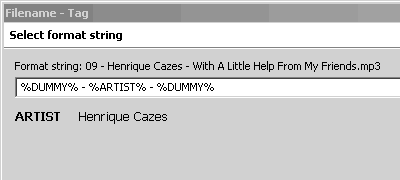
See following picture how to assemble the filename using the dialog
"Mp3tag/Convert/Tag - Filename" ...
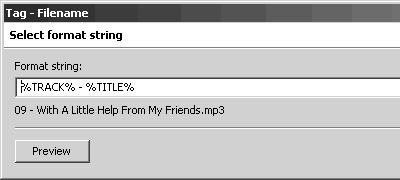
I want to mention that the parts are _not_ separated by the character "-" ().
In the given example file name the parts are separated by the " - " string ().
DD.20120311.0722.CET



---
### Author:  [@jaaf](https://community.mp3tag.de/u/jaaf)
#### Post date: [March 11, 2012, 12:54pm UTC](https://community.mp3tag.de/t/artist-and-music-name-inside-the-filename-field/13202/4 "2012-03-11T12:54:34Z")
> [@stevehero](#):
>
> Menu\>Convert\>Filename - Tag. (Alt + 2)
>
> Then use mask:
> %dummy% - %artist% - %dummy%
>
> Afterwards use the following:
>
> _Action type:_ **Replace**
> _Field:_ **\_FILENAME**
> _Original:_ **'- '**
> _Replace with:_ BLANK
>
> [] only as whole word
>
> case-sensitive comparison
So many thanks for this help. It´s exactally what I need.
Regards
---
### Author:  [@jaaf](https://community.mp3tag.de/u/jaaf)
#### Post date: [March 11, 2012, 1:03pm UTC](https://community.mp3tag.de/t/artist-and-music-name-inside-the-filename-field/13202/5 "2012-03-11T13:03:17Z")
> [@DetlevD](#):
>
> See following pictures how to disassemble the filename using the dialog
> "Mp3tag/Convert/Filename - Tag" ...
> 
> 
>
> See following picture how to assemble the filename using the dialog
> "Mp3tag/Convert/Tag - Filename" ...
> 
>
> I want to mention that the parts are _not_ separated by the character "-" ().
> In the given example file name the parts are separated by the " - " string ().
>
> DD.20120311.0722.CET
What a wonderfull explanation! Thanks. I´ll try to learn a little bit more about this great MP3 tool.
BTW, are there some scripts to get rid of all those characters that are not standard, and do not appear correctlly on display, just like accents an others Example: ~ ^ ´ ` etc?
Maybe another topic about this is already posted.
Best regards
---
### Author:  [@system](https://community.mp3tag.de/u/system)
#### Post date: [February 9, 2026, 12:23pm UTC](https://community.mp3tag.de/t/artist-and-music-name-inside-the-filename-field/13202/6 "2026-02-09T12:23:43Z")