# Automatic deleted world of Album
**URL:** https://community.mp3tag.de/t/automatic-deleted-world-of-album/12433
**Category:** Support
**Created:** [August 24, 2011, 8:55am UTC](https://community.mp3tag.de/t/automatic-deleted-world-of-album/12433 "2011-08-24T08:55:28Z")
**Posts on this page:** 8
**Page:** 1
### Author:  [@dsf70](https://community.mp3tag.de/u/dsf70)
#### Post date: [August 24, 2011, 8:55am UTC](https://community.mp3tag.de/t/automatic-deleted-world-of-album/12433/1 "2011-08-24T08:55:28Z")
Hi I have some problems.
My brother changes all the albums format to this way:
1984 - Hello AAC
2005 - Good Morning MP3
...
...
And I want it back to the original name: Hello
I have try to do it by automatic actions to deleted the 7 first words (Year - ) and the last 4 words ( AAC) but I cannot do it.
Maybe I cannot do it only in one acction but I don' mind if is in two actions
Any sugestion?
Thanks for your help.
---
### Author:  [@pone](https://community.mp3tag.de/u/pone)
#### Post date: [August 24, 2011, 9:25am UTC](https://community.mp3tag.de/t/automatic-deleted-world-of-album/12433/2 "2011-08-24T09:25:56Z")
Action: **Format Value**
Field: **ALBUM**
to delete the first seven and the last four **characters** :
Formatstring: **$regexp(%album%,.......(.+)....,$1)**
or, if it is also possible that it ends with FLAC (five letters including the space):
Formatstring: **$regexp(%album%,.......(.+) .+,$1)**
_(deletes everything from the last space)_
or, if other things than in front ar also possible:
Formatstring: **$regexp(%album%,.+? - (.+) .+,$1)**
_(deletes everything until " - ")_
---
### Author:  [@dsf70](https://community.mp3tag.de/u/dsf70)
#### Post date: [August 24, 2011, 9:40am UTC](https://community.mp3tag.de/t/automatic-deleted-world-of-album/12433/3 "2011-08-24T09:40:28Z")
Hey thanks!!!!!!!!
But now the more difficult part, would you mind to explain me how it works, why this way if I need to change in the future other things will be easier, for you and for me.
Thanks for your super fast reply.
David.
---
### Author:  [@pone](https://community.mp3tag.de/u/pone)
#### Post date: [August 24, 2011, 10:15am UTC](https://community.mp3tag.de/t/automatic-deleted-world-of-album/12433/4 "2011-08-24T10:15:32Z")
> [@dsf70](#):
>
> But now the more difficult part, would you mind to explain me how it works, why this way if I need to change in the future other things will be easier, for you and for me.
I used the action Fomat Value:
[https://docs.mp3tag.de/actions/format](https://docs.mp3tag.de/actions/format)
For this, i used $regexp(), one (and maybe the most complicated) of the many scripting functions available for Mp3tag:
[https://docs.mp3tag.de/scripting](https://docs.mp3tag.de/scripting)
$regexp() stand for Regular Expressions, the special syntax for this is explained here:
[https://docs.mp3tag.de/actions/replace-regexp](https://docs.mp3tag.de/actions/replace-regexp)
In my examples I used $regexp() the first paramter %album%. This is equivalent to:
Action: **Replace with Regular Expression**
Field: **ALBUM**
Next I defined three different regular expressions:
**.......(.+)....**
**.......(.+) .+**
**.+? - (.+) .+**
and replaced them always with:
**$1**
. = any character
() = defines what is later represented by $1
- = repeat a character any number of times
+? = limits the repeat to the shortes possible string
- = is a litteraral character, as well as the spaces. I used them because they appear in your album names a seperator between year and album name
$1 = is what has been put in parenthesis before
---
### Author:  [@DetlevD](https://community.mp3tag.de/u/DetlevD)
#### Post date: [August 24, 2011, 11:35am UTC](https://community.mp3tag.de/t/automatic-deleted-world-of-album/12433/5 "2011-08-24T11:35:54Z")
> [@dsf70](#):
>
> Hi I have some problems. My brother changes all the albums format to this way:
> 1984 - Hello AAC
> 2005 - Good Morning MP3
> And I want it back to the original name: Hello
> ... Any sugestion? Thanks for your help.
Although user pone has already demonstrated in this thread one way to solve the task, I step in to demonstrate some alternative ways too.
1.
Generally use the Mp3tag Filter to set the file list view to the related set of files.
Filter:
"$right(%ALBUM%,4)" IS " MP3"
"$right(%ALBUM%,4)" IS " AAC"
"$right(%ALBUM%,5)" IS " FLAC"
ALBUM MATCHES "\d{4}\s-\s(.+?)\s(?:MP3|AAC|FLAC)"
1.
Filter: "$right(%ALBUM%,4)" IS " MP3" OR "$right(%ALBUM%,4)" IS " AAC"
Action: Format value
Field: ALBUM
Formatstring: $cutRight($cutLeft(%ALBUM%,7),4)
From:
1984 - Hello AAC
2000 - Mello MP3
To:
Hello
Mello
1.
Filter: "$right(%ALBUM%,5)" IS " FLAC"
Action: Format value
Field: ALBUM
Formatstring: $cutRight($cutLeft(%ALBUM%,7),5)
From:
2011 - Bello FLAC
To:
Bello
1.
Filter: ALBUM MATCHES "\d{4}\s-\s(.+?)\s(?:MP3|AAC|FLAC)"
Action: Format value
Field: ALBUM
Formatstring: $regexp(%ALBUM%,'\d{4}\s-\s(.+?)\s(?:MP3|AAC|FLAC)','$1')
From:
1984 - Hello AAC
2000 - Mello MP3
2011 - Bello FLAC
To:
Hello
Mello
Bello
1.
Filter: "$right(%ALBUM%,4)" IS " MP3"
Action: Guess values
Sourceformat: %ALBUM%
Formatstring: %DUMMY% - %ALBUM% MP3
From:
2000 - Mello MP3
To:
Mello
Have fun trying out!
DD.20110824.1536.CEST
---
### Author:  [@stevehero](https://community.mp3tag.de/u/stevehero)
#### Post date: [August 24, 2011, 2:18pm UTC](https://community.mp3tag.de/t/automatic-deleted-world-of-album/12433/6 "2011-08-24T14:18:29Z")
I'm newish to this Reg lark,
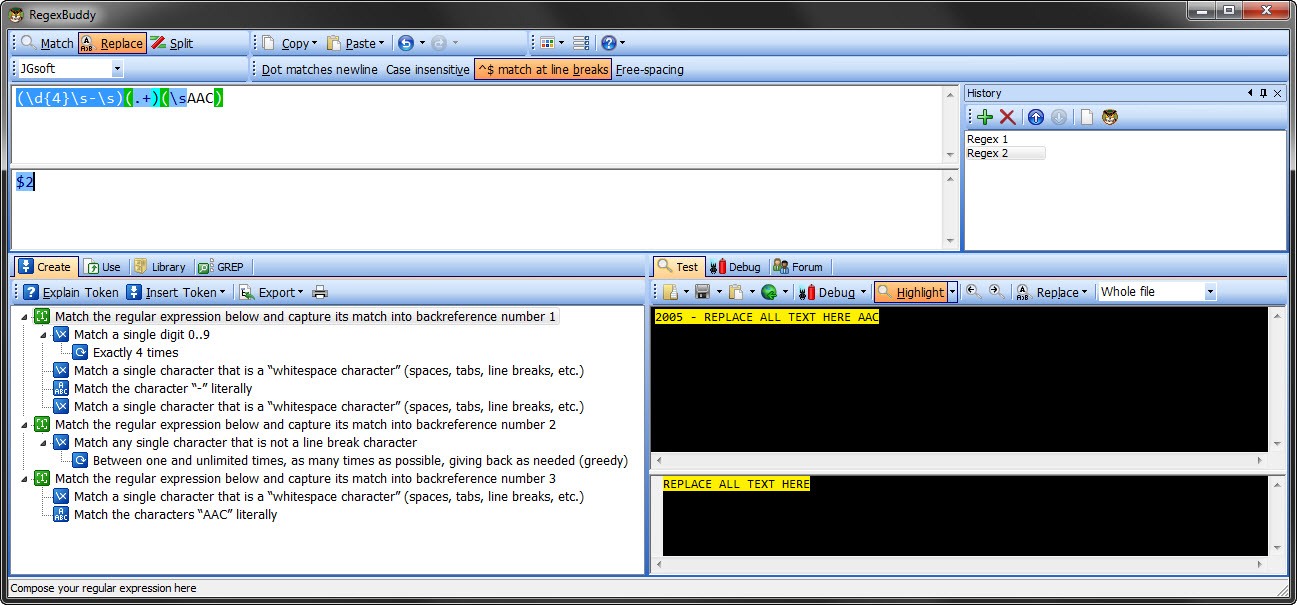
So please point me out where I'm going wrong. I've recently bought a copy of RegexBuddy which I have to say is a great learning tool for Reg'in 😛 ... I've dug deep this last few days and tried learning what makes regexp tick. So here is my solution to the problem which is probably more simpler to understand and implement.
_Action type:_ **Replace with regular expression**
_Field:_ **ALBUM**
_Regular expression:_ **(\d{4}\s-\s)(.+)(\sAAC)**
_Replace matches with:_ **$2**
[] case-sensitive comparison
I'll explain what all does:
**(** starts capture 1
**\d** digit 0-9
**{4}** match exactly 4 times
**\s** white space
**-** match the character "-" literally
**\s** white space
**)** ends capture 1
**(** starts capture 2
**.** match ANY single character
**+** match between 1 and as many times as possible
**)** ends capture 2
**(** starts capture 3
**\s** white space
**AAC** match the characters "AAC" literally
**)** ends capture 3
_Replace matches with:_ **$2**
**(**.+**)** was the 2nd capture therefore whatever is inside the **()** it output to the _Field:_ **ALBUM**
The only thing that meeds chaging is the "AAC" to "MP3" "FLAC" etc which for a newbie is ideal 🙂
pone, DetlevD: Please feel free to lend your comment to this solution.
BTW this works 😛, and if you are interested in learning and creating regexp then I would suggest getting RegexBuddy [http://www.regexbuddy.com/](http://www.regexbuddy.com/) @ €30.00. But its an amazing little program with a lot of preset regexp.
I've added a screenshot of what the solution looks like in RegexBuddy so you can see its interface and breakdown to the repexp.
Hope this helps.
---
### Author:  [@dsf70](https://community.mp3tag.de/u/dsf70)
#### Post date: [October 29, 2011, 11:23am UTC](https://community.mp3tag.de/t/automatic-deleted-world-of-album/12433/7 "2011-10-29T11:23:59Z")
Thanks so much for your explanations and help.
Now I undestand very well and I know how to do it by my self.
🙂
David.
---
### Author:  [@system](https://community.mp3tag.de/u/system)
#### Post date: [February 9, 2026, 12:23pm UTC](https://community.mp3tag.de/t/automatic-deleted-world-of-album/12433/8 "2026-02-09T12:23:18Z")