# Backslash in Song Title splits the title into a seperate folder
**URL:** https://community.mp3tag.de/t/backslash-in-song-title-splits-the-title-into-a-seperate-folder/71287
**Category:** Support
**Created:** [May 17, 2026, 5:54am UTC](https://community.mp3tag.de/t/backslash-in-song-title-splits-the-title-into-a-seperate-folder/71287 "2026-05-17T05:54:02Z")
**Posts on this page:** 20
**Page:** 1
### Author:  [@skipnyip](https://community.mp3tag.de/u/skipnyip)
#### Post date: [May 17, 2026, 5:54am UTC](https://community.mp3tag.de/t/backslash-in-song-title-splits-the-title-into-a-seperate-folder/71287/1 "2026-05-17T05:54:02Z")
Hello,
I've noticed on Windows, when using the Tag -\> Filename feature, if the song title has a Backslash ( \ ) in it, it will incorrectly move that song to a sub folder instead of replacing the Backslash character similarly to how it treats other invalid or undesired characters.
Action:
When using `Tag -> Filename` on an album where one of the songs has a track name with a Backslash in it (`40 Years Back\Come`) using the string `%artist%\%album%\$num(%track%,3) - %title%`
Current Outcome:
Only the song with the \ in the name gets moved to a subfolder, while other songs get correctly processed.

Expected Outcome:
All the songs would be in the same folder, and the \ is either deleted from the file name, or replaced with some other placeholder character.

Mp3tag v3.34.1
---
### Author:  [@ohrenkino](https://community.mp3tag.de/u/ohrenkino)
#### Post date: [May 17, 2026, 6:58am UTC](https://community.mp3tag.de/t/backslash-in-song-title-splits-the-title-into-a-seperate-folder/71287/2 "2026-05-17T06:58:23Z")
> [@skipnyip](#):
>
> Expected Outcome:
> All the songs would be in the same folder, and the \ is either deleted from the file name, or replaced with some other placeholder character.
The converter replaces invalid characters with some other character.
But the `\` is a valid character for the Windows file system.
The use of the `\` to create new folders is actually a feature, see here:
> **[Create Folder Structures based on Tags - Rename Files – Mp3tag Documentation](https://docs.mp3tag.de/converters/rename-files/#create-folder-structures-based-on-tags)**
>
> Renaming files, creating folders and complete directory structures from tags can be done by using Convert → Tag - Filename with a format string. The format string is used to describe the structure of the desired filename. | Documentation on Tag to...
So if you have files with the `\` in the tags then either replace it with a similar looking character that does not have the same function for the OS or add $replace() to your format string.
See e.g. here:
> [@How to use two or more backslashes in a field without creating another field?](https://community.mp3tag.de/t/how-to-use-two-or-more-backslashes-in-a-field-without-creating-another-field/65672/2):
>
> I do not think that you can really escape them. You would have to look for characters that look similar but are not backslashes. I wonder what the use-case would be.
See also here (and you are free to search for more threads about the `\` in format strings:
> [@\[X\] Renaming from tags with "\\" character creates a new folder!](https://community.mp3tag.de/t/x-renaming-from-tags-with-character-creates-a-new-folder/6166):
>
> As I said in the title: Renaming from tags with "" character creates a new folder! (wtf?) Maybe you won't consider this as a bug, but think of it! Are you sure the user pretends to create a new folder when he is just remaming his files from the title? I think not, and it's not so strange to find song titles with rare characters like that. What it should do is just skip those characters when renaming, or at least give you that option, wich would be still better, but of course the default opt…
---
### Author:  [@skipnyip](https://community.mp3tag.de/u/skipnyip)
#### Post date: [May 17, 2026, 2:21pm UTC](https://community.mp3tag.de/t/backslash-in-song-title-splits-the-title-into-a-seperate-folder/71287/3 "2026-05-17T14:21:17Z")

Windows states that \ is not a valid character for a file name. So why should we expect that it's treated differently from any other invalid file name character?
I'm willing to bet that 99.9% of the time where there is a \ in a Track Title, the user is not expecting to have it be put in it's own special subfolder, that just doesn't make sense. Because it's part of the file name, it should be treated the same as any other invalid file name character.
---
### Author:  [@ohrenkino](https://community.mp3tag.de/u/ohrenkino)
#### Post date: [May 17, 2026, 2:34pm UTC](https://community.mp3tag.de/t/backslash-in-song-title-splits-the-title-into-a-seperate-folder/71287/4 "2026-05-17T14:34:24Z")
Unfortunately, you do not pick up the discussion that has already taken place.
The converter interprets a format string which gets checked for invalid characters after all components have been stitched together. In that state, it cannot be determined where the backslash originated: user-input to define a path or from data in a field.
If the backslash should be excluded, then it is the task of the user to treat the fields in which it may be an unwanted character.
This format string may also contain path components (which is a described feature) and in a path the backslash (and the the colon) is a valid character it therefore it does not and will not get removed.
---
### Author:  [@skipnyip](https://community.mp3tag.de/u/skipnyip)
#### Post date: [May 17, 2026, 4:46pm UTC](https://community.mp3tag.de/t/backslash-in-song-title-splits-the-title-into-a-seperate-folder/71287/5 "2026-05-17T16:46:09Z")
That sounds to me like there needs to be a seperate check for the tags to determine if it's an invalid file name character that is independent from the main check at the end.
---
### Author:  [@ohrenkino](https://community.mp3tag.de/u/ohrenkino)
#### Post date: [May 17, 2026, 4:55pm UTC](https://community.mp3tag.de/t/backslash-in-song-title-splits-the-title-into-a-seperate-folder/71287/6 "2026-05-17T16:55:46Z")
That option is already available with $replace() as part of the format string.
---
### Author:  [@skipnyip](https://community.mp3tag.de/u/skipnyip)
#### Post date: [May 18, 2026, 4:44am UTC](https://community.mp3tag.de/t/backslash-in-song-title-splits-the-title-into-a-seperate-folder/71287/7 "2026-05-18T04:44:34Z")
So your solution is to rely on each end user to one-by-one, sanitize each tag so they behave how a normal user would expect them to behave by default?
`$replace(%artist%,\,)\$replace(%album%,\,)\$replace($num(%track%,3),\,) - $replace(%title%,\,)`
While technically correct, that sure seems like a lot of faffing about for something that a normal user wouldn't think they would need to do in the first place.
While I'm sure that probably works (assuming I got the syntax correct), that is pretty intimidating to normal users than them just being able to click some tag values, put in \ to make their own folders, and have it just work as expected out of the box.
---
### Author:  [@MotleyG](https://community.mp3tag.de/u/MotleyG)
#### Post date: [May 18, 2026, 12:32pm UTC](https://community.mp3tag.de/t/backslash-in-song-title-splits-the-title-into-a-seperate-folder/71287/8 "2026-05-18T12:32:30Z")
> [@skipnyip](#):
>
> So your solution is to rely on each end user to one-by-one, sanitize each tag so they behave how a normal user would expect them to behave by default?
The OS doesn't ask how one expects them to behave. If the back slash exists in any string used in a directory it separates it into folders. My suggestion is to consider using alternative Unicode characters that look similar but are not reserved by the OS.
---
### Author:  [@Florian](https://community.mp3tag.de/u/Florian)
#### Post date: [May 22, 2026, 2:53pm UTC](https://community.mp3tag.de/t/backslash-in-song-title-splits-the-title-into-a-seperate-folder/71287/10 "2026-05-22T14:53:27Z")
I've addressed this with [Mp3tag v3.35-beta.1](https://community.mp3tag.de/t/455), which now prevents the creation of subfolders at **Convert → Tag - Filename** if a referenced field value contains the backslash character `\`.
---
### Author:  [@ohrenkino](https://community.mp3tag.de/u/ohrenkino)
#### Post date: [May 23, 2026, 8:04am UTC](https://community.mp3tag.de/t/backslash-in-song-title-splits-the-title-into-a-seperate-folder/71287/11 "2026-05-23T08:04:18Z")
The new function treats special characters for filenames differently:
The previously ingnored characters like `*/` etc. are skipped, the newly added character `\` is replaced by `_`.
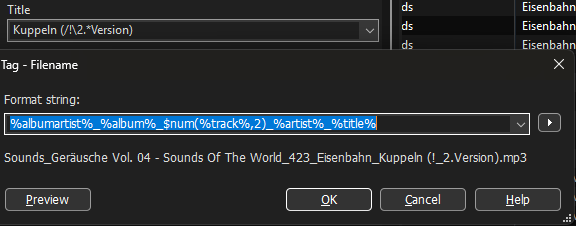
(The `/` is skipped, the `\` is replaced by `_` as can be seen at the `!` as separator in the middle of `/\`.
Always.
Even in $validate() with a set replacement character it stays the underscore.
Example with $validate()
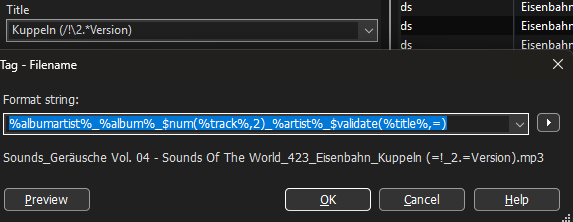
For me this is unfortunate, as I use the underscore as separator between fields in the filename so that I can import data from the filename if it should become necessary.
TBH I am not really content with this solution as I can neither revert to the old behaviour nor set a more suitable replacement for me.
My suggestion would be: replace the `\` with a similar looking character but one that does not upset the OS.
Something like `⧹` `﹨`
U+29F9 : BIG REVERSE SOLIDUS
U+FE68 : SMALL REVERSE SOLIDUS
---
### Author:  [@Florian](https://community.mp3tag.de/u/Florian)
#### Post date: [May 23, 2026, 9:27am UTC](https://community.mp3tag.de/t/backslash-in-song-title-splits-the-title-into-a-seperate-folder/71287/12 "2026-05-23T09:27:03Z")
> [@ohrenkino](#):
>
> The new function treats special characters for filenames differently
The implemented change only treats the backslash character differently, if it's in the value of a tag field. It's then replaced by the underscore character `_` to ensure that no new folders are created unintentionally (and so that not anyone who's experiencing this either posts a bug report or contacts me via email).
---
### Author:  [@ohrenkino](https://community.mp3tag.de/u/ohrenkino)
#### Post date: [May 23, 2026, 9:35am UTC](https://community.mp3tag.de/t/backslash-in-song-title-splits-the-title-into-a-seperate-folder/71287/13 "2026-05-23T09:35:21Z")
I know that the new folder may cause irritation. And I support the idea to replace or ignore it but not to make it accidentally create a folder.
But as the the `\` is replaced anyway - I would suggest not to use the underscore but a character that looks similar like the backslash.
Examples in previous post.
---
### Author:  [@Florian](https://community.mp3tag.de/u/Florian)
#### Post date: [May 23, 2026, 9:57am UTC](https://community.mp3tag.de/t/backslash-in-song-title-splits-the-title-into-a-seperate-folder/71287/14 "2026-05-23T09:57:05Z")
OK, from your previous post it looked like you referred to special character **s** and a different behaviour of `$validate()` (which never replaced the backslash).
* * *
I'm not sure yet about the Unicode char. Ideally, it would be configurable, but there are already so many configuration options. I'm also pretty confident that the instant I'm making the backslash replacement configurable, at least someone will request to make replacements for all other special characters configurable too.
---
### Author:  [@ohrenkino](https://community.mp3tag.de/u/ohrenkino)
#### Post date: [May 23, 2026, 1:46pm UTC](https://community.mp3tag.de/t/backslash-in-song-title-splits-the-title-into-a-seperate-folder/71287/15 "2026-05-23T13:46:32Z")
I am not so keen on a configuration option - I just found the underscore an unlucky choice.
Whereas the really invalid characters for filenames get simply skipped (deleted), the backslash is replaced by another character, which, in my case, collides with my choice of separator in filenames.
IMHO, the backslash should also be left out / skipped / deleted just like all the other problematic characters.
Everybody who wants a special replacement should use $replace() so that no further option should be required.
I recognize the compatibility problem with unicode characters, so that suggestion of mine might not have been the wisest.
---
### Author:  [@Florian](https://community.mp3tag.de/u/Florian)
#### Post date: [May 23, 2026, 2:34pm UTC](https://community.mp3tag.de/t/backslash-in-song-title-splits-the-title-into-a-seperate-folder/71287/16 "2026-05-23T14:34:04Z")
> [@ohrenkino](#):
>
> Everybody who wants a special replacement should use $replace() so that no further option should be required.
Unfortunately, this is not possible as the replacement needs to happen _before_ the actual value gets passed to any scripting functions.
Otherwise it's not possible anymore to distinguish between a backslash from a field value and a backslash that's intentionally provided to denote folders to be created.
---
### Author:  [@ohrenkino](https://community.mp3tag.de/u/ohrenkino)
#### Post date: [May 23, 2026, 2:54pm UTC](https://community.mp3tag.de/t/backslash-in-song-title-splits-the-title-into-a-seperate-folder/71287/17 "2026-05-23T14:54:23Z")
The $replace() would have to be applied to individual fields like before, when there was no automatism to avoid the backslash from field data - only that now the underscore has to be replaced.
Here is an example of a TITLE with `/!\` which is translated to "`!_`"
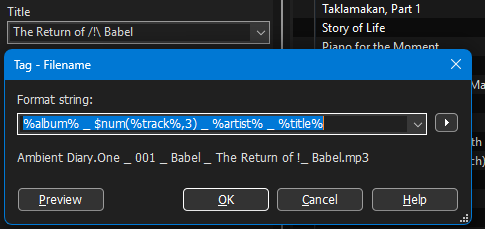
If I apply $replace() to the automatically cleaned-up string and replace the underscore with nothing, then I get rid of the added underscore (which I don't want in the middle of the field data)
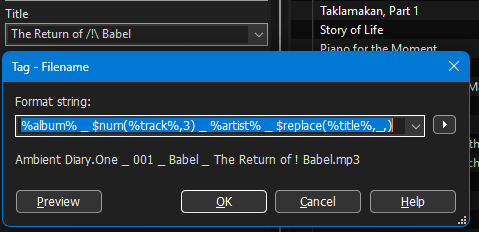
in the example `/!\` now becomes only `!` as the `/` is removed by the cleansing mechanism and the `\` which was transformed to `_` got replaced by $replace().
I have no problem with characters being omitted but I do not favour that the service for fields with `\` as part of the data leads to extra work for me as I now have to remove the program-generated underscore.
I would much more like it if the backslash (as data part) would be left out just like all the other problematic characters but not substituted with a visible character.
---
### Author:  [@skipnyip](https://community.mp3tag.de/u/skipnyip)
#### Post date: [May 23, 2026, 6:09pm UTC](https://community.mp3tag.de/t/backslash-in-song-title-splits-the-title-into-a-seperate-folder/71287/18 "2026-05-23T18:09:03Z")
I tend to agree that it might make more sense to have the \ be replaced with nothing instead of \_.
One possible thought I had regarding not being able to tell user entered \ and ones generated by replaces... would it be a good idea to have a separate like %newfolderlevel% tag or something like that which tells the software where to actually split into new folders instead of just relying on \ ? I'm not sold on it myself as it adds more complexity, but also allows more flexibility for users so they can replace forbidden characters ahead of time with whatever they desire, and then right before it spits the final output out, replace all the invalid characters remaining with nothings, and then if for some reason there ends up being nothing between two %newfolderlevel% tags, then make it so there is a single \_ there to prevent a completely blank folder or file name?
Just thinking out loud, not sure if any of that is feasible (or even a good idea for that matter...)
Thanks for the good program!
---
### Author:  [@Florian](https://community.mp3tag.de/u/Florian)
#### Post date: [May 23, 2026, 6:18pm UTC](https://community.mp3tag.de/t/backslash-in-song-title-splits-the-title-into-a-seperate-folder/71287/19 "2026-05-23T18:18:59Z")
> [@skipnyip](#):
>
> One possible thought I had regarding not being able to tell user entered \ and ones generated by replaces... would it be a good idea to have a separate like %newfolderlevel% tag or something like that which tells the software where to actually split into new folders instead of just relying on \ ?
It'd break countless format strings out there, so it's no option for me.
---
### Author:  [@Florian](https://community.mp3tag.de/u/Florian)
#### Post date: [May 30, 2026, 11:51am UTC](https://community.mp3tag.de/t/backslash-in-song-title-splits-the-title-into-a-seperate-folder/71287/20 "2026-05-30T11:51:52Z")
I've added a configuration option with [Mp3tag v3.35-beta.2](https://community.mp3tag.de/t/455) for the replacement of folder separators that's used when renaming files from tags (see newly added **Options → Files** ).
---
### Author:  [@system](https://community.mp3tag.de/u/system)
#### Post date: [June 6, 2026, 11:52am UTC](https://community.mp3tag.de/t/backslash-in-song-title-splits-the-title-into-a-seperate-folder/71287/21 "2026-06-06T11:52:30Z")
This topic was automatically closed 7 days after the last reply. New replies are no longer allowed.