# Batch add cover arts to multiple mp3 files
**URL:** https://community.mp3tag.de/t/batch-add-cover-arts-to-multiple-mp3-files/65776
**Category:** Support
**Created:** [August 31, 2024, 8:19am UTC](https://community.mp3tag.de/t/batch-add-cover-arts-to-multiple-mp3-files/65776 "2024-08-31T08:19:59Z")
**Posts on this page:** 7
**Page:** 1
### Author:  [@Lydeth](https://community.mp3tag.de/u/Lydeth)
#### Post date: [August 31, 2024, 8:19am UTC](https://community.mp3tag.de/t/batch-add-cover-arts-to-multiple-mp3-files/65776/1 "2024-08-31T08:19:59Z")
I have a folder of around 1000 mp3 filess as well as the same number of cover art pictures. I have rename both the mp3 and the jpg to be the same. How can I bulk add each cover art to each mp3 file? This is not adding 1 album art to all 1000 mp3 files.
---
### Author:  [@ohrenkino](https://community.mp3tag.de/u/ohrenkino)
#### Post date: [August 31, 2024, 8:24am UTC](https://community.mp3tag.de/t/batch-add-cover-arts-to-multiple-mp3-files/65776/2 "2024-08-31T08:24:18Z")
Load the files.
Select the files.
Create an action (quick) of the type "Import cover from file"
> **[Import Cover from File – Mp3tag Documentation](https://docs.mp3tag.de/actions/import-cover/)**
>
> Documentation on the Import Cover action type that can be performed as Quick Action or as reusable workflow from Action Groups. Mp3tag is the universal Tag Editor.
> [@Lydeth](#):
>
> I have rename both the mp3 and the jpg to be the same
enter as Filename format string:
`%_filename%.jpg`
Click OK.
When the action has run, use a filter to check which files did not get a picture:
%\_covers% MISSING
Ideally, the file list is empty after you applied the filter.
---
### Author:  [@Lydeth](https://community.mp3tag.de/u/Lydeth)
#### Post date: [September 2, 2024, 4:00am UTC](https://community.mp3tag.de/t/batch-add-cover-arts-to-multiple-mp3-files/65776/3 "2024-09-02T04:00:14Z")
> [@ohrenkino](#):
>
> enter as Filename format string:
> `%_filename%.jpg`
> Click OK.
Thanks so much. I think I'm on the right track now. What do you mean by below?
"enter as Filename format string:
`%_filename%.jpg`
Click OK."
---
### Author:  [@ohrenkino](https://community.mp3tag.de/u/ohrenkino)
#### Post date: [September 2, 2024, 4:56am UTC](https://community.mp3tag.de/t/batch-add-cover-arts-to-multiple-mp3-files/65776/4 "2024-09-02T04:56:10Z")
> [@Lydeth](#):
>
> What do you mean by below?
as soon as you start to create the suggested action you are asked to enter some parameters. And these are my suggestions.
---
### Author:  [@LyricsLover](https://community.mp3tag.de/u/LyricsLover)
#### Post date: [September 2, 2024, 6:13am UTC](https://community.mp3tag.de/t/batch-add-cover-arts-to-multiple-mp3-files/65776/5 "2024-09-02T06:13:45Z")
> [@Lydeth](#):
>
> What do you mean by below?
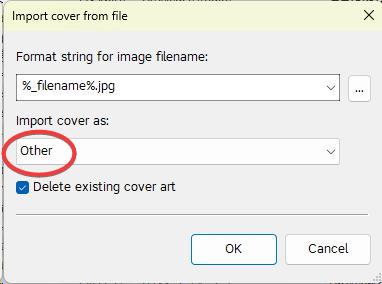
This is the input box from the Action where you can enter @ohrenkino's suggestion:

---
### Author:  [@Lydeth](https://community.mp3tag.de/u/Lydeth)
#### Post date: [September 4, 2024, 3:05am UTC](https://community.mp3tag.de/t/batch-add-cover-arts-to-multiple-mp3-files/65776/6 "2024-09-04T03:05:10Z")
I got it. Thank you very much. It works super smooth. No error at all. Initially, it doesn't work as I chosed "Other" in "Import cover as:". After chaning to "Front Cover", I was able to process all the files in a minute or so. Again, highly appreciated for your answer.
---
### Author:  [@system](https://community.mp3tag.de/u/system)
#### Post date: [October 4, 2024, 3:05am UTC](https://community.mp3tag.de/t/batch-add-cover-arts-to-multiple-mp3-files/65776/7 "2024-10-04T03:05:11Z")
This topic was automatically closed 30 days after the last reply. New replies are no longer allowed.