# Bigger/Expandable Comments box/field
**URL:** https://community.mp3tag.de/t/bigger-expandable-comments-box-field/53849
**Category:** General Discussion
**Created:** [July 24, 2021, 2:15pm UTC](https://community.mp3tag.de/t/bigger-expandable-comments-box-field/53849 "2021-07-24T14:15:51Z")
**Posts on this page:** 10
**Page:** 1
### Author:  [@JoeBoatman](https://community.mp3tag.de/u/JoeBoatman)
#### Post date: [July 24, 2021, 2:15pm UTC](https://community.mp3tag.de/t/bigger-expandable-comments-box-field/53849/1 "2021-07-24T14:15:51Z")
It would be great to have a larger Comments field. I know that vertical space is at a premium so maybe a large pop-up version could be employed which can be displayed using F2 and contains a vertical scroll bar. I'd suggest that enter creates a new line and pressing tab would hide the larger box.
---
### Author:  [@ohrenkino](https://community.mp3tag.de/u/ohrenkino)
#### Post date: [July 24, 2021, 2:28pm UTC](https://community.mp3tag.de/t/bigger-expandable-comments-box-field/53849/2 "2021-07-24T14:28:14Z")
If you check the tag panel configuration, then you might see that you can set the property of the displayed fields to various sizes including a multi-line field
---
### Author:  [@okayynot](https://community.mp3tag.de/u/okayynot)
#### Post date: [July 26, 2021, 1:56pm UTC](https://community.mp3tag.de/t/bigger-expandable-comments-box-field/53849/3 "2021-07-26T13:56:32Z")
This would actually be useful to me. I use multiple multi-line texts and obviously they take up the most space even when set to the minimum height while still being usable.
This issue would be solved if the fields instead took up one row but expanded in some way when accessed.
Or had the thing that HTML resize:vertical textboxes have.
Alternative idea: Make some interaction bring up an "Edit tag info"-style pop up for that tag. Basically just some pop-up window with a textbox that takes the input text from the tag panel and when OKd outputs it back to the tag panel.
The simplest interaction I can think of would be double-clicking the tag name, although that might not be so simple since tag names aren't currently designed to be individually interactable. Double-clicking the textbox itself would interfere with default textbox interactions, and right-clicking the textbox... well I'm not sure the context windows of textboxes want to be edited.
---
### Author:  [@JoeBoatman](https://community.mp3tag.de/u/JoeBoatman)
#### Post date: [July 29, 2021, 5:35pm UTC](https://community.mp3tag.de/t/bigger-expandable-comments-box-field/53849/4 "2021-07-29T17:35:52Z")
I looked in File \> Options \> Tag Panel but can only find the means to tick/untick fields to show or hide them. No indication of how to make Comments a multi-line field.
I searched elsewhere and tried right clicking Comments... Can you point me in the right direction?
---
### Author:  [@ohrenkino](https://community.mp3tag.de/u/ohrenkino)
#### Post date: [July 29, 2021, 5:38pm UTC](https://community.mp3tag.de/t/bigger-expandable-comments-box-field/53849/5 "2021-07-29T17:38:17Z")
See File\>Options\>Tag Panel.
Select the field for Comment and click the Edit button on the right of the list of fields. In the subsequent settings dialogue, you find the siz configuration at the bottom.
---
### Author:  [@JoeBoatman](https://community.mp3tag.de/u/JoeBoatman)
#### Post date: [July 29, 2021, 7:24pm UTC](https://community.mp3tag.de/t/bigger-expandable-comments-box-field/53849/6 "2021-07-29T19:24:22Z")
Thank you, ohrenkino, I found it. It's well hidden 😃
---
### Author:  [@ledilettante](https://community.mp3tag.de/u/ledilettante)
#### Post date: [August 12, 2026, 10:05am UTC](https://community.mp3tag.de/t/bigger-expandable-comments-box-field/53849/7 "2026-08-12T10:05:42Z")
I use le V3.35.1 . When I want to edit the field comment I have only the choise of big or bigger, but not multiline as before. The field doesn't expand to add several iines of comment
---
### Author:  [@ohrenkino](https://community.mp3tag.de/u/ohrenkino)
#### Post date: [August 12, 2026, 10:44am UTC](https://community.mp3tag.de/t/bigger-expandable-comments-box-field/53849/8 "2026-08-12T10:44:17Z")
> [@ledilettante](#):
>
> I have only the choise of big or bigger
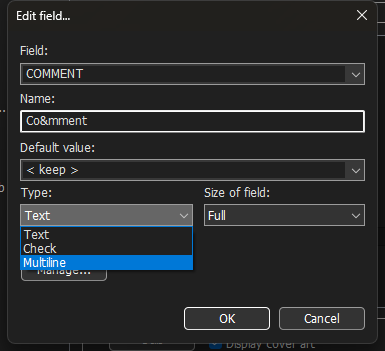
Do not look at "Size" but at "Type"
---
### Author:  [@LyricsLover](https://community.mp3tag.de/u/LyricsLover)
#### Post date: [August 12, 2026, 11:23am UTC](https://community.mp3tag.de/t/bigger-expandable-comments-box-field/53849/9 "2026-08-12T11:23:56Z")
> [@ledilettante](#):
>
> I have only the choise of big or bigger, but not multiline as before.
There are 3 field display types, two of them offers 7 sizes and one 9 rows.
You can see the 3 types (Text, Check, Multiline) in the screenshot from ohrenkino above.
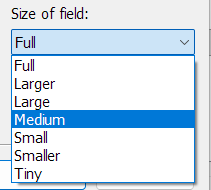
The two types **Text** and **Check** have 7 field sizes:
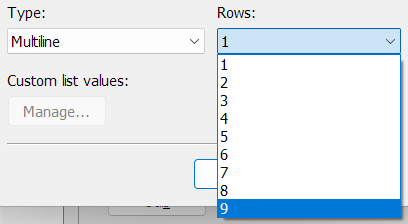
The 3rd type **Multiline** can display up to 9 rows:
For more details, please check the documentation:
> **[Editing Fields - Tag Panel – Mp3tag Documentation](https://docs.mp3tag.de/customization/tag-panel/#editing-fields)**
>
> The Tag Panel is the sidebar on the left of the File List that shows the fields to enter metadata. Besides the standard fields, you can add user-defined tag fields to the Tag Panel via Options → Tag Panel. | Customization options for the Tag Panel,...
---
### Author:  [@system](https://community.mp3tag.de/u/system)
#### Post date: [August 16, 2026, 7:41am UTC](https://community.mp3tag.de/t/bigger-expandable-comments-box-field/53849/10 "2026-08-16T07:41:50Z")
This topic was automatically closed 2 days after the last reply. New replies are no longer allowed.