# "Can not delete the selected files!" - Which one? Why?
**URL:** https://community.mp3tag.de/t/can-not-delete-the-selected-files-which-one-why/71698
**Category:** Support
**Created:** [August 5, 2026, 9:07am UTC](https://community.mp3tag.de/t/can-not-delete-the-selected-files-which-one-why/71698 "2026-08-05T09:07:12Z")
**Posts on this page:** 10
**Page:** 1
### Author:  [@LyricsLover](https://community.mp3tag.de/u/LyricsLover)
#### Post date: [August 5, 2026, 9:07am UTC](https://community.mp3tag.de/t/can-not-delete-the-selected-files-which-one-why/71698/1 "2026-08-05T09:07:12Z")
What I do
1. I load the files from an Album into Mp3tag
2. I filter for tracks where `(1).mp3` occurs
3. I want to delete ALL of those tracks, but I've chosen six of them for this example
4. I press **Edit** -\> **Delete** and get "Can not delete the selected files!"
The filtered list doesn't change, F5 doesn't change the list neither.
Which file can not be deleted?
Why can it not be deleted?
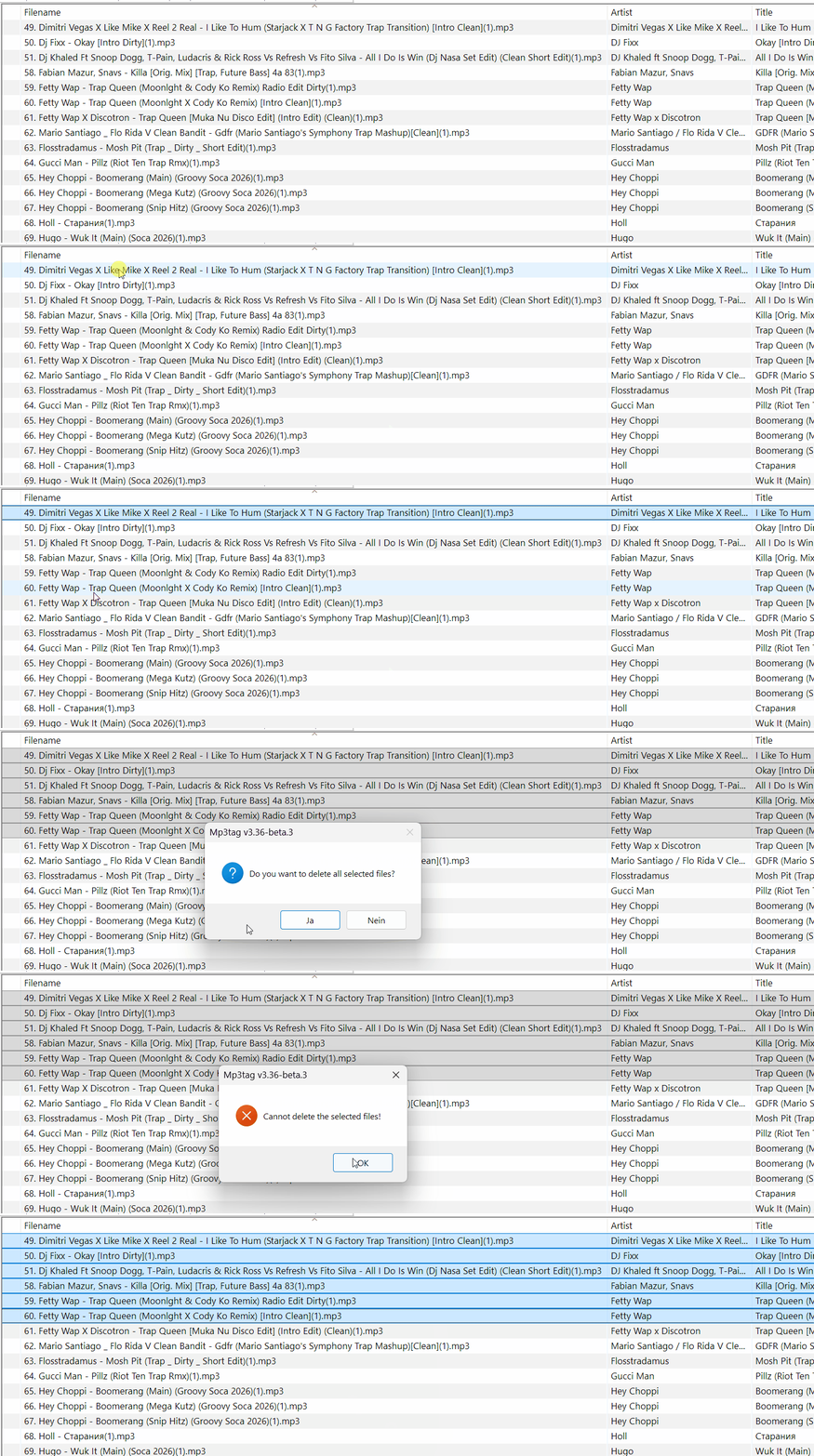
If I try another selection, some files can be deleted others not, but it seems pretty random.
The files are saved on a local NAS and accessed by SMB by `\\192.168.x.y\some\folders`
I'm sure this isn't an ACL or similar access rights issue.
Do you have any idea what could be causing this behaviour?
Mp3tag v3.36.-beta.3
OS: Windows 11 Pro
---
### Author:  [@Florian](https://community.mp3tag.de/u/Florian)
#### Post date: [August 5, 2026, 9:22am UTC](https://community.mp3tag.de/t/can-not-delete-the-selected-files-which-one-why/71698/2 "2026-08-05T09:22:34Z")
> [@LyricsLover](#):
>
> Which file can not be deleted?
Can you try deleting the files individually to identify the file in question? Maybe also make a copy of them on the NAS before, so that you still have the original file names (if it's related to the file names or the encoding of some characters).
---
### Author:  [@LyricsLover](https://community.mp3tag.de/u/LyricsLover)
#### Post date: [August 5, 2026, 9:33am UTC](https://community.mp3tag.de/t/can-not-delete-the-selected-files-which-one-why/71698/3 "2026-08-05T09:33:02Z")
Thank you for the quick answer.
It seems to be the third track in above example:
`51. Dj Khaled Ft Snoop Dogg, T-Pain, Ludacris & Rick Ross Vs Refresh Vs Fito Silva - All I Do Is Win (Dj Nasa Set Edit) (Clean Short Edit)(1).mp3`
Thats the output from procmon64 for this track:

and

I'm not sure whether the first screenshot shows a truncated file name or if this is just a ProcMon length restriction.
---
### Author:  [@Florian](https://community.mp3tag.de/u/Florian)
#### Post date: [August 5, 2026, 9:45am UTC](https://community.mp3tag.de/t/can-not-delete-the-selected-files-which-one-why/71698/4 "2026-08-05T09:45:40Z")
It's really hard to tell. Mp3tag is trying to delete the file using file operations from the Windows Shell and reports this generic error only if it fails. Usually, the Windows Shell displays an error if something is preventing the file from being deleted, but apparently not in all cases.
I'd check the filename for hidden Unicode/invisible characters or check if it uses a Unicode character that's normalized in a specific way.
I'd also check if the file is displayed differently in Windows Explorer and try deleting the file from there, maybe it produces a different error message.
---
### Author:  [@LyricsLover](https://community.mp3tag.de/u/LyricsLover)
#### Post date: [August 5, 2026, 9:52am UTC](https://community.mp3tag.de/t/can-not-delete-the-selected-files-which-one-why/71698/5 "2026-08-05T09:52:46Z")
Thanks again.
Could the problem be that the file path exceeds 256 characters in length?
The length from `\\192.168.1` to and including `(1).mp3` is currently 265 characters.
Attempting to copy this file (before I try to delete it manually) using the standard Ctrl+C and Ctrl+V shortcuts in Windows File Explorer results in
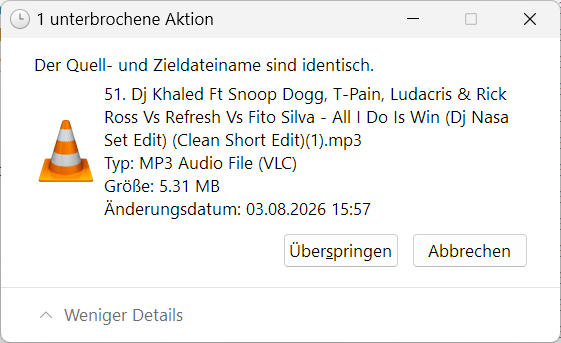
It does not insert "- (Kopie)" as it does for shorter names in the same directory on the NAS.
Update:
Using the WF-Explorer context-menu "Als Pfad kopieren" shows this for the above track #51:
`"\\192.168.1.x\some not shortened and some shortened directory names\_Music\GILCRV~Q.1\WXP0VM~7\5MGKBD~Y.MP3"`
---
### Author:  [@LyricsLover](https://community.mp3tag.de/u/LyricsLover)
#### Post date: [August 5, 2026, 10:23am UTC](https://community.mp3tag.de/t/can-not-delete-the-selected-files-which-one-why/71698/6 "2026-08-05T10:23:45Z")
Shortening the full path (especially the parent directory names) to the long track names makes everything work fine.
Mp3tag can delete the tracks as expected without displaying a message box.
As long as I can manually copy such files in the same target directory with the Windows File Explorer, Mp3tag can also delete them.
IMHO it would be very helpful if Mp3tag could provide a message in this "can not delete-situation", such as
"The complete full path including the file name exceeds nnn characters"
followed by instructions such as
"Try shortening the directory or file names first".
---
### Author:  [@poster](https://community.mp3tag.de/u/poster)
#### Post date: [August 5, 2026, 3:55pm UTC](https://community.mp3tag.de/t/can-not-delete-the-selected-files-which-one-why/71698/7 "2026-08-05T15:55:48Z")
> [@LyricsLover](#):
>
> Shortening the full path (especially the parent directory names) to the long track names makes everything work fine.
In a somewhat older thread, I posted this link, which sheds light on the various problems and potential solutions. I have frequently noticed that - despite the actual support for long file names - problems would crop up from time to time; however, when they did occur, I didn't have the patience to get to the bottom of the issue.
> **[Resolution 2: Rename or move a deep folder - Can't delete files on NTFS file...](https://learn.microsoft.com/en-us/troubleshoot/windows-server/backup-and-storage/cannot-delete-file-folder-on-ntfs-file-system#resolution-2-rename-or-move-a-deep-folder)**
>
> This article describes why can't delete a file or a folder on an NTFS file system volume. It also provides help to solve this issue. | Describes why you can't delete a file or folder on an NTS file system volume. Provides resolutions for each of the...
---
### Author:  [@Florian](https://community.mp3tag.de/u/Florian)
#### Post date: [August 7, 2026, 3:48pm UTC](https://community.mp3tag.de/t/can-not-delete-the-selected-files-which-one-why/71698/8 "2026-08-07T15:48:37Z")
I've modernized the code in this area to use `IFileOperation` and implemented a workaround for UNC paths that exceed `MAX_PATH` with [Mp3tag v3.36-beta.4](https://community.mp3tag.de/t/455).
If an error occurs, I try to construct an error message based on the API's return code.
---
### Author:  [@LyricsLover](https://community.mp3tag.de/u/LyricsLover)
#### Post date: [August 7, 2026, 6:17pm UTC](https://community.mp3tag.de/t/can-not-delete-the-selected-files-which-one-why/71698/9 "2026-08-07T18:17:27Z")
Using the newest Mp3tag v3.36-beta.4, I was able to delete music tracks with full file names longer than 255 characters without any problems. There was no message box, the selected files were simply deleted from my NAS UNC path as expected.
Thank you for this quick solution!
---
### Author:  [@system](https://community.mp3tag.de/u/system)
#### Post date: [August 9, 2026, 6:18pm UTC](https://community.mp3tag.de/t/can-not-delete-the-selected-files-which-one-why/71698/10 "2026-08-09T18:18:11Z")
This topic was automatically closed 2 days after the last reply. New replies are no longer allowed.