# Cannot replace "\\" or "\\\\" in any field with Actions
**URL:** https://community.mp3tag.de/t/cannot-replace-or-in-any-field-with-actions/71448
**Category:** Support
**Created:** [June 15, 2026, 8:07pm UTC](https://community.mp3tag.de/t/cannot-replace-or-in-any-field-with-actions/71448 "2026-06-15T20:07:17Z")
**Posts on this page:** 14
**Page:** 1
### Author:  [@D-S-N-9990](https://community.mp3tag.de/u/D-S-N-9990)
#### Post date: [June 15, 2026, 8:07pm UTC](https://community.mp3tag.de/t/cannot-replace-or-in-any-field-with-actions/71448/1 "2026-06-15T20:07:17Z")
Hello all, I'm new here, I need help with Mp3tag for one thing: I cannot replace the \ character in any field with the Replace action at all, Mp3tag ultimately ignores that, thus leaving me unable to change it to, for instance, ";".
---
### Author:  [@ohrenkino](https://community.mp3tag.de/u/ohrenkino)
#### Post date: [June 15, 2026, 8:10pm UTC](https://community.mp3tag.de/t/cannot-replace-or-in-any-field-with-actions/71448/2 "2026-06-15T20:10:32Z")
See e.g. here:
> [@Multiple field values and replacing the double backslash \\\\](https://community.mp3tag.de/t/multiple-field-values-and-replacing-the-double-backslash/71455):
>
> The double backslash \\ is Mp3tag's way of visually denoting multiple values for the same field. For example, Peter Gabriel\\Kate Bush in the ARTIST field indicates that there are two separate ARTIST values: Peter Gabriel and Kate Bush. You can inspect these values via View → Extended Tags... or by pressing Alt+T, where the individual field–value pairs are listed. If you want to combine multiple values into a single value separated by a different character sequence, you can use the [Merge dupli…](https://docs.mp3tag.de/actions/merge-duplicate-fields/)
---
### Author:  [@D-S-N-9990](https://community.mp3tag.de/u/D-S-N-9990)
#### Post date: [June 16, 2026, 11:45am UTC](https://community.mp3tag.de/t/cannot-replace-or-in-any-field-with-actions/71448/3 "2026-06-16T11:45:00Z")
How can I replace all the `\\` characters at once?
---
### Author:  [@ohrenkino](https://community.mp3tag.de/u/ohrenkino)
#### Post date: [June 16, 2026, 11:47am UTC](https://community.mp3tag.de/t/cannot-replace-or-in-any-field-with-actions/71448/4 "2026-06-16T11:47:35Z")
Yes. For each separately named field.
What have you tried so far?
---
### Author:  [@D-S-N-9990](https://community.mp3tag.de/u/D-S-N-9990)
#### Post date: [June 16, 2026, 6:43pm UTC](https://community.mp3tag.de/t/cannot-replace-or-in-any-field-with-actions/71448/5 "2026-06-16T18:43:40Z")
I tried replacing them in the GENRE field, but to no avail. Since I have multiple genres split, I would like to change all of them to ;.
---
### Author:  [@ohrenkino](https://community.mp3tag.de/u/ohrenkino)
#### Post date: [June 16, 2026, 7:16pm UTC](https://community.mp3tag.de/t/cannot-replace-or-in-any-field-with-actions/71448/6 "2026-06-16T19:16:12Z")
So, did you try the action "Merge duplicate fields" for GENRE?
---
### Author:  [@D-S-N-9990](https://community.mp3tag.de/u/D-S-N-9990)
#### Post date: [June 17, 2026, 11:21am UTC](https://community.mp3tag.de/t/cannot-replace-or-in-any-field-with-actions/71448/7 "2026-06-17T11:21:09Z")
Yeah, however it did not work as I expected
---
### Author:  [@ohrenkino](https://community.mp3tag.de/u/ohrenkino)
#### Post date: [June 17, 2026, 11:25am UTC](https://community.mp3tag.de/t/cannot-replace-or-in-any-field-with-actions/71448/8 "2026-06-17T11:25:24Z")
You do realize that statements like "did not work" do not really help to get better fitting suggestions.
Please tell us:
What did you do?
What did you get?
What did you expect?
Best illustrated with screenshots.
---
### Author:  [@D-S-N-9990](https://community.mp3tag.de/u/D-S-N-9990)
#### Post date: [June 17, 2026, 11:32am UTC](https://community.mp3tag.de/t/cannot-replace-or-in-any-field-with-actions/71448/9 "2026-06-17T11:32:53Z")
OK, I retried again just now (I changed \\ to \) and it did work, however I'm not sure how to replace all \'s to ; at once, since the action above only removes double \'s.
---
### Author:  [@ohrenkino](https://community.mp3tag.de/u/ohrenkino)
#### Post date: [June 17, 2026, 11:37am UTC](https://community.mp3tag.de/t/cannot-replace-or-in-any-field-with-actions/71448/10 "2026-06-17T11:37:38Z")
Again:
> [@ohrenkino](#):
>
> What did you do?
> What did you get?
> What did you expect?
Or, relating to
> [@D-S-N-9990](#):
>
> I retried again
What did you try again? Which action/function? Which parameters?
---
### Author:  [@D-S-N-9990](https://community.mp3tag.de/u/D-S-N-9990)
#### Post date: [June 17, 2026, 11:43am UTC](https://community.mp3tag.de/t/cannot-replace-or-in-any-field-with-actions/71448/11 "2026-06-17T11:43:41Z")
Oh sorry, I tried the "merge duplicate fields" action of course, and it finally gave me the expected results (I've set the field to GENRE and "`\`" for the separator). Now I need to know the action to replace all `\`'s with ;'s at once
---
### Author:  [@ohrenkino](https://community.mp3tag.de/u/ohrenkino)
#### Post date: [June 17, 2026, 11:45am UTC](https://community.mp3tag.de/t/cannot-replace-or-in-any-field-with-actions/71448/12 "2026-06-17T11:45:45Z")
If you set the separator to `;` in the action, then yo do not need the second step.
This was also mentionend in the linked thread. I would have expected you to take that link seriously.
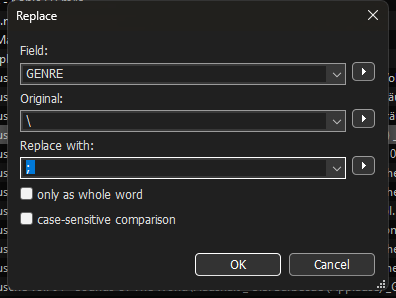
Now you have to use an action of the type "Replace" for GENRE
Original: `\`
Replace with: `; `
---
### Author:  [@LyricsLover](https://community.mp3tag.de/u/LyricsLover)
#### Post date: [June 17, 2026, 11:52am UTC](https://community.mp3tag.de/t/cannot-replace-or-in-any-field-with-actions/71448/13 "2026-06-17T11:52:08Z")
I'm not sure if you really understand the basic problem:
There are 3 possible situations:
a) You see one backslash \ or two backslashes `\\`
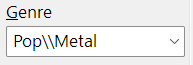
b) You have one field (like GENRE) with multiple entries, like `Pop\Metal`

c) You have several fields with the same name, with different entries in each field
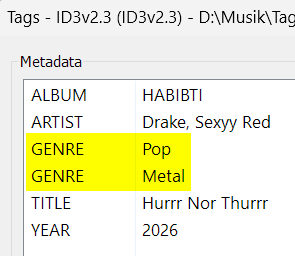
showed in the mp3tag Tag Panel as:
If you show us a screenshot from one of your files after pressing Alt + T we can help you better.
---
### Author:  [@system](https://community.mp3tag.de/u/system)
#### Post date: [June 24, 2026, 11:52am UTC](https://community.mp3tag.de/t/cannot-replace-or-in-any-field-with-actions/71448/14 "2026-06-24T11:52:14Z")
This topic was automatically closed 7 days after the last reply. New replies are no longer allowed.