# Can't put tracks in numerical order
**URL:** https://community.mp3tag.de/t/cant-put-tracks-in-numerical-order/70643
**Category:** Support
**Created:** [February 6, 2026, 4:44pm UTC](https://community.mp3tag.de/t/cant-put-tracks-in-numerical-order/70643 "2026-02-06T16:44:30Z")
**Posts on this page:** 9
**Page:** 1
### Author:  [@rswarthmore](https://community.mp3tag.de/u/rswarthmore)
#### Post date: [February 6, 2026, 4:44pm UTC](https://community.mp3tag.de/t/cant-put-tracks-in-numerical-order/70643/1 "2026-02-06T16:44:30Z")
I cannot get the tracks to be in numerical order top to bottom even though all tracks are labeled corrrectly. I click on the space just above the track numbers, and this rearranges the tracks, but almost never in the correct order, e.g. 1–10.
I tried this: $num(%track%,2)%title% - %artist% - %album%
from someone else’s post. The labeling is ok. But, once again, the tracks don’t line up in numerical order.
When I open the folder containing the tracks in Windows Explorer, the tracks appear in numerical order, top to bottom. And, as I said, all tracks are numbered correctly and appear in numerical order in whatever software I use - Plex, Lyrion, etc.
Thanks.
---
### Author:  [@ohrenkino](https://community.mp3tag.de/u/ohrenkino)
#### Post date: [February 6, 2026, 4:48pm UTC](https://community.mp3tag.de/t/cant-put-tracks-in-numerical-order/70643/2 "2026-02-06T16:48:47Z")
Where do you see the strange order? In MP3tag? The windows explorer?
Could you show us a screenshot of the filelist for the files that pose a problem for you?
The screenshot should show also the column by which you sort.
It could be that also a screenshot of the column definition for the track numbers could help
---
### Author:  [@rswarthmore](https://community.mp3tag.de/u/rswarthmore)
#### Post date: [February 6, 2026, 5:01pm UTC](https://community.mp3tag.de/t/cant-put-tracks-in-numerical-order/70643/4 "2026-02-06T17:01:31Z")
In MP3tag. Previously, alt+1 would arrange tracks in numerical order, top to bottom. No longer.

---
### Author:  [@ohrenkino](https://community.mp3tag.de/u/ohrenkino)
#### Post date: [February 6, 2026, 5:04pm UTC](https://community.mp3tag.de/t/cant-put-tracks-in-numerical-order/70643/5 "2026-02-06T17:04:22Z")
> [@rswarthmore](#):
>
> alt+1
Alt-1 opens Convert\>Tag-Filename. I doubt that it ever has sorted.
The screenshot does not show the column by which the file list is sorted. That is indicated by a little arrow in the column header.
Check `View>Sort by>`
that the column name for Track is selected.
---
### Author:  [@rswarthmore](https://community.mp3tag.de/u/rswarthmore)
#### Post date: [February 6, 2026, 5:10pm UTC](https://community.mp3tag.de/t/cant-put-tracks-in-numerical-order/70643/6 "2026-02-06T17:10:03Z")
Thanks.
Yeah - I have done that (view\>sort by\>track number. But next time I load an album, the tracks aren’t in the correct order so I have to do this for every album. It’s not that big a deal. I was just wondering if I’m doing something wrong or if there’s some way to have the tracks appear in order without doing it manually. And it seems I remember a time when the tracks appeared in numerical order without me doing anything.
---
### Author:  [@ohrenkino](https://community.mp3tag.de/u/ohrenkino)
#### Post date: [February 6, 2026, 5:15pm UTC](https://community.mp3tag.de/t/cant-put-tracks-in-numerical-order/70643/7 "2026-02-06T17:15:03Z")
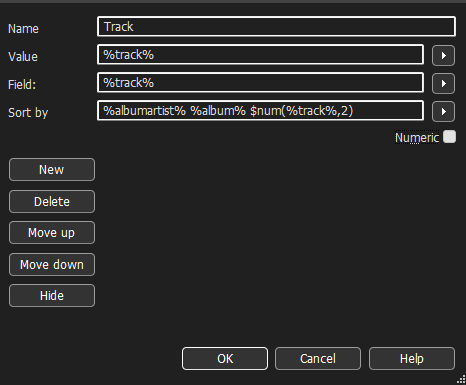
MP3tag usually remembers the column by which tracks were sorted.
If you want to get the files sorted by Albumartist-Album-Track, modify the settings for the track column:
---
### Author:  [@rswarthmore](https://community.mp3tag.de/u/rswarthmore)
#### Post date: [February 6, 2026, 5:20pm UTC](https://community.mp3tag.de/t/cant-put-tracks-in-numerical-order/70643/8 "2026-02-06T17:20:34Z")
Thanks. This works for me. $num(%track%,2). %title% - %artist% - %album%
I appreciate your amazingly prompt help. As far as I’m concerned, you can close this thread.
Thanks again. Some of this stuff I’ve forgotten - I’ve used MP3tag for a long time and I have senior moments occasionally.
---
### Author:  [@ohrenkino](https://community.mp3tag.de/u/ohrenkino)
#### Post date: [February 6, 2026, 5:24pm UTC](https://community.mp3tag.de/t/cant-put-tracks-in-numerical-order/70643/9 "2026-02-06T17:24:01Z")
> [@rswarthmore](#):
>
> This works for me. $num(%track%,2). %title% - %artist% - %album%
Please note that this sorting setting will put all tracks no. 1 first, then all the no. 2s and so on. So it would work only if you load only 1 album at a time.
The more universal approach is as I described.
If you are satisfied with a strict numerical order, you could try:

---
### Author:  [@system](https://community.mp3tag.de/u/system)
#### Post date: [March 8, 2026, 5:24pm UTC](https://community.mp3tag.de/t/cant-put-tracks-in-numerical-order/70643/10 "2026-03-08T17:24:48Z")
This topic was automatically closed 30 days after the last reply. New replies are no longer allowed.