# Case Conversion "McCrae"
**URL:** https://community.mp3tag.de/t/case-conversion-mccrae/71597
**Category:** Support
**Created:** [July 11, 2026, 6:09pm UTC](https://community.mp3tag.de/t/case-conversion-mccrae/71597 "2026-07-11T18:09:15Z")
**Posts on this page:** 4
**Page:** 1
### Author:  [@wayniesinclair](https://community.mp3tag.de/u/wayniesinclair)
#### Post date: [July 11, 2026, 6:09pm UTC](https://community.mp3tag.de/t/case-conversion-mccrae/71597/1 "2026-07-11T18:09:15Z")
Can someone help me. I want to be able to keep the word "McCrae" as it's showing now. But when I do case Conversion it puts it as "Mccrae". I want it to be "McCrae". Please dumb this down for me Step by Step. THANKS FOR YOUR HELP EVERYONE!!!
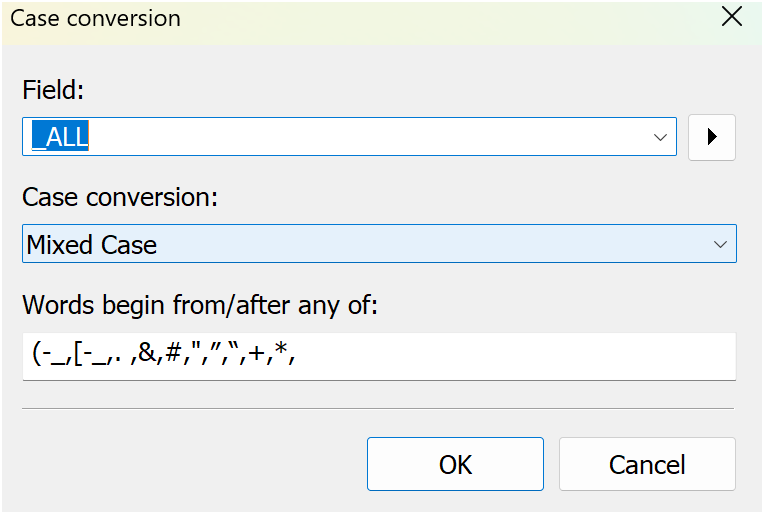
---
### Author:  [@ohrenkino](https://community.mp3tag.de/u/ohrenkino)
#### Post date: [July 11, 2026, 6:14pm UTC](https://community.mp3tag.de/t/case-conversion-mccrae/71597/2 "2026-07-11T18:14:05Z")
See if this helps:
> [@Case conversion on Performer field messed up artists names](https://community.mp3tag.de/t/case-conversion-on-performer-field-messed-up-artists-names/19234):
>
> I fear I may have screwed up royally... My "Performer" fields were originally formatted like this: PERFORMER: Paul McCartney (bass guitar) I wanted to change the case of the text inside the parentheses to Mixed Case so I created this action: Case Conversion Field: Performer Case Conversion: Mixed Case Words begin from/after any of: ( I ran that action on all my files and it seemed like it did exactly what is was suppose to. Until a few minutes ago when a light bulb went of in my head and …
and please follow also the links in that thread.
---
### Author:  [@wayniesinclair](https://community.mp3tag.de/u/wayniesinclair)
#### Post date: [July 14, 2026, 3:55am UTC](https://community.mp3tag.de/t/case-conversion-mccrae/71597/3 "2026-07-14T03:55:58Z")
Works perfectly...Thanks so much for your help.
Just unzip the file found here: [https://community.mp3tag.de/uploads/default/original/2X/2/25ca9becb0c76dc810a869fd4e2b92bf5e16a202.zip](https://community.mp3tag.de/uploads/default/original/2X/2/25ca9becb0c76dc810a869fd4e2b92bf5e16a202.zip) and paste it in "C:\Documents and Settings\ **User Profile** \Application Data\Mp3tag\data\actions" Where it says " **User Profile**" put in your computer's name.
OR "_%appdata%\Mp3tag\data\actions"_
---
### Author:  [@system](https://community.mp3tag.de/u/system)
#### Post date: [July 21, 2026, 3:56am UTC](https://community.mp3tag.de/t/case-conversion-mccrae/71597/4 "2026-07-21T03:56:11Z")
This topic was automatically closed 7 days after the last reply. New replies are no longer allowed.