# Convert Tag(s) to Filename
**URL:** https://community.mp3tag.de/t/convert-tag-s-to-filename/70931
**Category:** Support
**Created:** [March 23, 2026, 1:31am UTC](https://community.mp3tag.de/t/convert-tag-s-to-filename/70931 "2026-03-23T01:31:57Z")
**Posts on this page:** 17
**Page:** 1
### Author:  [@SteveD0](https://community.mp3tag.de/u/SteveD0)
#### Post date: [March 23, 2026, 1:31am UTC](https://community.mp3tag.de/t/convert-tag-s-to-filename/70931/1 "2026-03-23T01:31:57Z")
Issue when converting Tag (eg _ **Track** _ and _ **Title** _) with **\** included in Track - to _ **Filename** _ in version 3.33.1 (Windows). All characters preceding the \ are discarded in Filename (including the Track number). As an example, Track _ **06** _ with the Title _ **7 O'clock News\Silent Night** _ is converted to filename _ **Silent Night** _ instead of _ **06 -** _ _ **7 O'clock News - Silent Night** _ when using the format string %track% - %title%.
---
### Author:  [@poster](https://community.mp3tag.de/u/poster)
#### Post date: [March 23, 2026, 6:17am UTC](https://community.mp3tag.de/t/convert-tag-s-to-filename/70931/2 "2026-03-23T06:17:53Z")
A backslash is a forbidden character in windows-filenames. So Mp3tag interprets it as a wish to create a folder-structure.
> **[Naming Files, Paths, and Namespaces - Win32 apps](https://learn.microsoft.com/en-us/windows/win32/fileio/naming-a-file)**
>
> The file systems supported by Windows use the concept of files and directories to access data stored on a disk or device.
You can define which character should replace such not allowed characters with the scripting function $replace().
> **[String Functions - Scripting Functions – Mp3tag Documentation](https://docs.mp3tag.de/scripting/#string-functions)**
>
> Mp3tag offers various built-in scripting functions, which can be used at various places in the program. | Documentation on Mp3tag's scripting functions. Mp3tag is the universal Tag Editor.
I.e. this format string with $replace() would not just drop not allowed characters but replace all with an other character (--).
$replace(%track% - %title%,`\`,--)
If you want to replace forbidden characters individually you can create pairs within the brackets.
---
### Author:  [@LyricsLover](https://community.mp3tag.de/u/LyricsLover)
#### Post date: [March 23, 2026, 7:15am UTC](https://community.mp3tag.de/t/convert-tag-s-to-filename/70931/3 "2026-03-23T07:15:03Z")
To ensure that your Windows filename is "valid", you can also use the scripting function `$validate(x,y)`.
From the already mentionend [documentation](https://docs.mp3tag.de/scripting/#string-functions):
> `$validate(x,y)` returns the given file name/path x with all invalid characters `/?*"<>|:` replaced by the string y.
This will automatically replace every invalid character in your `TRACK` and `TITLE` with the given new character, like `_`:
`$validate(%track% - %title%,_)`
This would also replace`*` or `:` and `<>` and `?` and more "invalid" characters that appears in your `TITLE`.
---
### Author:  [@ohrenkino](https://community.mp3tag.de/u/ohrenkino)
#### Post date: [March 23, 2026, 7:18am UTC](https://community.mp3tag.de/t/convert-tag-s-to-filename/70931/4 "2026-03-23T07:18:48Z")
> [@SteveD0](#):
>
> _ **Track** _ and _ **Title** _) with \*_\*_ included in Track
Ar you sure that it is the `\` and not the `/`?
If you have a `\` it could be that you have now created a folder with the name e.g. `06\`.
---
### Author:  [@LyricsLover](https://community.mp3tag.de/u/LyricsLover)
#### Post date: [March 23, 2026, 7:37am UTC](https://community.mp3tag.de/t/convert-tag-s-to-filename/70931/5 "2026-03-23T07:37:36Z")
> [@SteveD0](#):
>
> Track _ **06** _ with the Title _ **7 O'clock News`\`Silent Night** _
with `%track% - %title%` would become a new subdirectory named
`06 - 7 O'clock News`
and **in** this new subdirectory a file only named
`Silent Night.mp3`
So if @SteveD0 really has a Backslash `\` in the TITLE, he should replace it with a [similar Unicode character](https://en.wikipedia.org/wiki/Backslash#Unicode) (valid in a Windows filename) like
```auto
U+005C \ REVERSE SOLIDUS
U+29F5 ⧵ REVERSE SOLIDUS OPERATOR
U+29F9 ⧹ BIG REVERSE SOLIDUS
U+2572 ╲ BOX DRAWINGS LIGHT DIAGONAL UPPER LEFT TO LOWER RIGHT
U+FE68 ﹨ SMALL REVERSE SOLIDUS
U+FF3C \ FULLWIDTH REVERSE SOLIDUS
U+244A ⑊ OCR DOUBLE BACKSLASH
U+2216 ∖ SET MINUS
U+1F67D 🙽 VERY HEAVY REVERSE SOLIDUS
```
---
### Author:  [@Florian](https://community.mp3tag.de/u/Florian)
#### Post date: [March 23, 2026, 7:45am UTC](https://community.mp3tag.de/t/convert-tag-s-to-filename/70931/6 "2026-03-23T07:45:09Z")
> [@ohrenkino](#):
>
> Ar you sure that it is the `\` and not the `/`?
This song's name is usually written with the forward slash character
> **[7 O'Clock News/Silent Night](https://en.wikipedia.org/wiki/7_O%27Clock_News/Silent_Night)**
>
> "7 O'Clock News/Silent Night" is a song by American music duo Simon & Garfunkel from their third studio album, Parsley, Sage, Rosemary and Thyme (1966). The track is a sound collage juxtaposing a rendition of the Christmas carol "Silent Night" with a simulated "7 O'Clock News" bulletin consisting of actual events from the summer of 1966.
> The track is a sound collage and simply constructed: it consists of the duo singing "Silent Night" in two-part harmony over an arpeggiated piano section. The vo...
---
### Author:  [@poster](https://community.mp3tag.de/u/poster)
#### Post date: [March 23, 2026, 10:31am UTC](https://community.mp3tag.de/t/convert-tag-s-to-filename/70931/7 "2026-03-23T10:31:38Z")
> [@LyricsLover](#):
>
> This will automatically replace every invalid character in your `TRACK` and `TITLE` with the given new character,
> $validate(%track% - %title%,\_)
But it does not replace the backslash.
I've always found `$validate()` too inflexible for my purposes, as it only allows you to define one character/string for all invalid characters. While using it might prevent characters from being dropped unnoticed. But if the format string contains, for example, a question mark (usually at the end), I personally prefer that the question mark is simply removed rather than being replaced by, say, an underscore.
---
### Author:  [@LyricsLover](https://community.mp3tag.de/u/LyricsLover)
#### Post date: [March 23, 2026, 11:30am UTC](https://community.mp3tag.de/t/convert-tag-s-to-filename/70931/8 "2026-03-23T11:30:20Z")
> [@poster](#):
>
> But it does not replace the backslash.
~~AFAIK `$validate()` would replace a Backslash.~~
You are right, the Backslash `\` will not be replaced with `$validate()` even tough it is an invalid character in a Windows filename.
The Backslash is used by Mp3tag to create directories and subdirectories.
But we still don't know if the \ Backslash is really the problem in the OPs question 😉
The main difference is IMHO:
Using the `$validate()` function means that you don't need to replace all invalid characters for a Windows filename manually. You don't even need to know them. The most common invalid characters in a filename are:
```auto
< (less than)
> (greater than)
: (colon)
" (double quote)
/ (forward slash)
\ (backslash)
| (vertical bar or pipe)
? (question mark)
* (asterisk)
```
There are some more in the already linked microsoft documentation.
Although `$replace()` gives you better control, you have to define at least every invalid character for a Windows filename that needs to be replaced. Some of them appear frequently in `TITLE` or `ARTIST` fields.
---
### Author:  [@ohrenkino](https://community.mp3tag.de/u/ohrenkino)
#### Post date: [March 23, 2026, 12:13pm UTC](https://community.mp3tag.de/t/convert-tag-s-to-filename/70931/9 "2026-03-23T12:13:10Z")
> [@LyricsLover](#):
>
> Although `$replace()` gives you better control, you have to define at least every invalid character for a Windows filename
If you stack like e.g. `$validate($replace(%artist% - %title%,?,),_)` you still only have to cater for the special ones and let $validate() do the rest.
---
### Author:  [@poster](https://community.mp3tag.de/u/poster)
#### Post date: [March 23, 2026, 2:21pm UTC](https://community.mp3tag.de/t/convert-tag-s-to-filename/70931/10 "2026-03-23T14:21:04Z")
> [@LyricsLover](#):
>
> But we still don't know if the \ Backslash is really the problem in the OPs question
The fact that the filename after conversion consists exclusively of `Silent Night` strongly suggests that it is a backslash (and that the file is now located in a newly created folder named `06 - 7 O'clock News`).
---
### Author:  [@LyricsLover](https://community.mp3tag.de/u/LyricsLover)
#### Post date: [March 23, 2026, 3:21pm UTC](https://community.mp3tag.de/t/convert-tag-s-to-filename/70931/11 "2026-03-23T15:21:02Z")
> [@ohrenkino](#):
>
> If you stack like e.g. `$validate($replace(%artist% - %title%,?,))`
This is all I get:

**Update 24.3.2026, 08:30 Uhr**
The last substitution in the command
`$validate($replace(%artist% - %title%,?,))`
was missing. It works fine if I use a comma and remove any invalid character
`$validate($replace(%artist% - %title%,?,),)`
or if I substitute the invalid characters with an underline (or any other valid character)
`$validate($replace(%artist% - %title%,?,),_)`

* * *
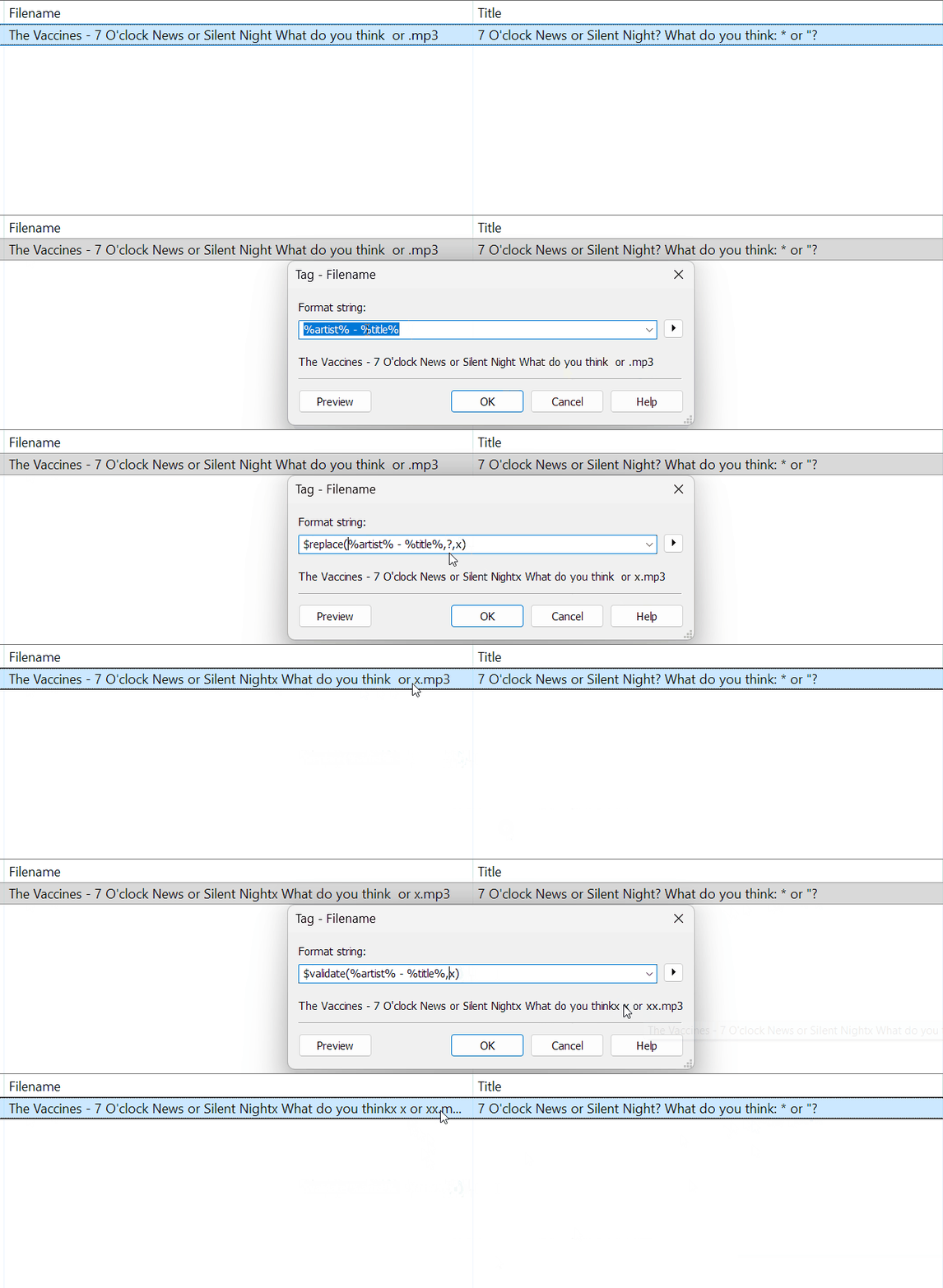
To my surprise the Convert Tag -\> Filename already "sanitises" some special characters automatically:
---
### Author:  [@SteveD0](https://community.mp3tag.de/u/SteveD0)
#### Post date: [March 24, 2026, 1:35am UTC](https://community.mp3tag.de/t/convert-tag-s-to-filename/70931/12 "2026-03-24T01:35:07Z")
It is definitely the \ character!
And Yes, on further checking it did in fact create a new folder _ **7 O'clock News** _ with the file _ **7 O'clock News - Silent Night.flac** _ in it.
Obviously I circumvented the issue my manually replacing characters.
---
### Author:  [@SteveD0](https://community.mp3tag.de/u/SteveD0)
#### Post date: [March 24, 2026, 1:49am UTC](https://community.mp3tag.de/t/convert-tag-s-to-filename/70931/13 "2026-03-24T01:49:18Z")
Actually I checked again with the original file and the folder created was: _ **06** _ - _ **7 O'clock News** _
and the track contained was : _ **Silent Night.flac** _
---
### Author:  [@ohrenkino](https://community.mp3tag.de/u/ohrenkino)
#### Post date: [March 24, 2026, 7:10am UTC](https://community.mp3tag.de/t/convert-tag-s-to-filename/70931/14 "2026-03-24T07:10:49Z")
Here is an example:

To clarify: The converter removes any file system invalid character.
$validate() works in a similar way but lets you define a substitute.
If that is not specific enough, use $replace() for the individual treatment of characters.
The backslash `\` is a valid file system character and therefore does not get replaced neither by $validate() nor by the converter automatism.
---
### Author:  [@LyricsLover](https://community.mp3tag.de/u/LyricsLover)
#### Post date: [March 24, 2026, 7:55am UTC](https://community.mp3tag.de/t/convert-tag-s-to-filename/70931/15 "2026-03-24T07:55:08Z")
> [@ohrenkino](#):
>
> To clarify: The converter removes any file system invalid character.
You are right!
Even the Converter Tag -\> Tag for `_FILENAME` or `_DIRECTORY` removes any invalid character automatically.
If you apply the same format string `%artist% - %title%` to another field - like COMMENT - no characters will be removed automatically.
---
### Author:  [@poster](https://community.mp3tag.de/u/poster)
#### Post date: [March 24, 2026, 7:59am UTC](https://community.mp3tag.de/t/convert-tag-s-to-filename/70931/16 "2026-03-24T07:59:35Z")
> [@LyricsLover](#):
>
> Even the Converter Tag -\> Tag for `_FILENAME` or `_DIRECTORY` removes any invalid character automatically.
It is not only the converter. An actions of the type Format Value for `_FILENAME` behaves the same.
---
### Author:  [@system](https://community.mp3tag.de/u/system)
#### Post date: [March 31, 2026, 7:59am UTC](https://community.mp3tag.de/t/convert-tag-s-to-filename/70931/17 "2026-03-31T07:59:50Z")
This topic was automatically closed 7 days after the last reply. New replies are no longer allowed.