# Cover art files are not shown when searching new picture
**URL:** https://community.mp3tag.de/t/cover-art-files-are-not-shown-when-searching-new-picture/71838
**Category:** Support
**Created:** [September 15, 2026, 9:57am UTC](https://community.mp3tag.de/t/cover-art-files-are-not-shown-when-searching-new-picture/71838 "2026-09-15T09:57:48Z")
**Posts on this page:** 14
**Page:** 1
### Author:  [@mim](https://community.mp3tag.de/u/mim)
#### Post date: [September 15, 2026, 9:57am UTC](https://community.mp3tag.de/t/cover-art-files-are-not-shown-when-searching-new-picture/71838/1 "2026-09-15T09:57:48Z")
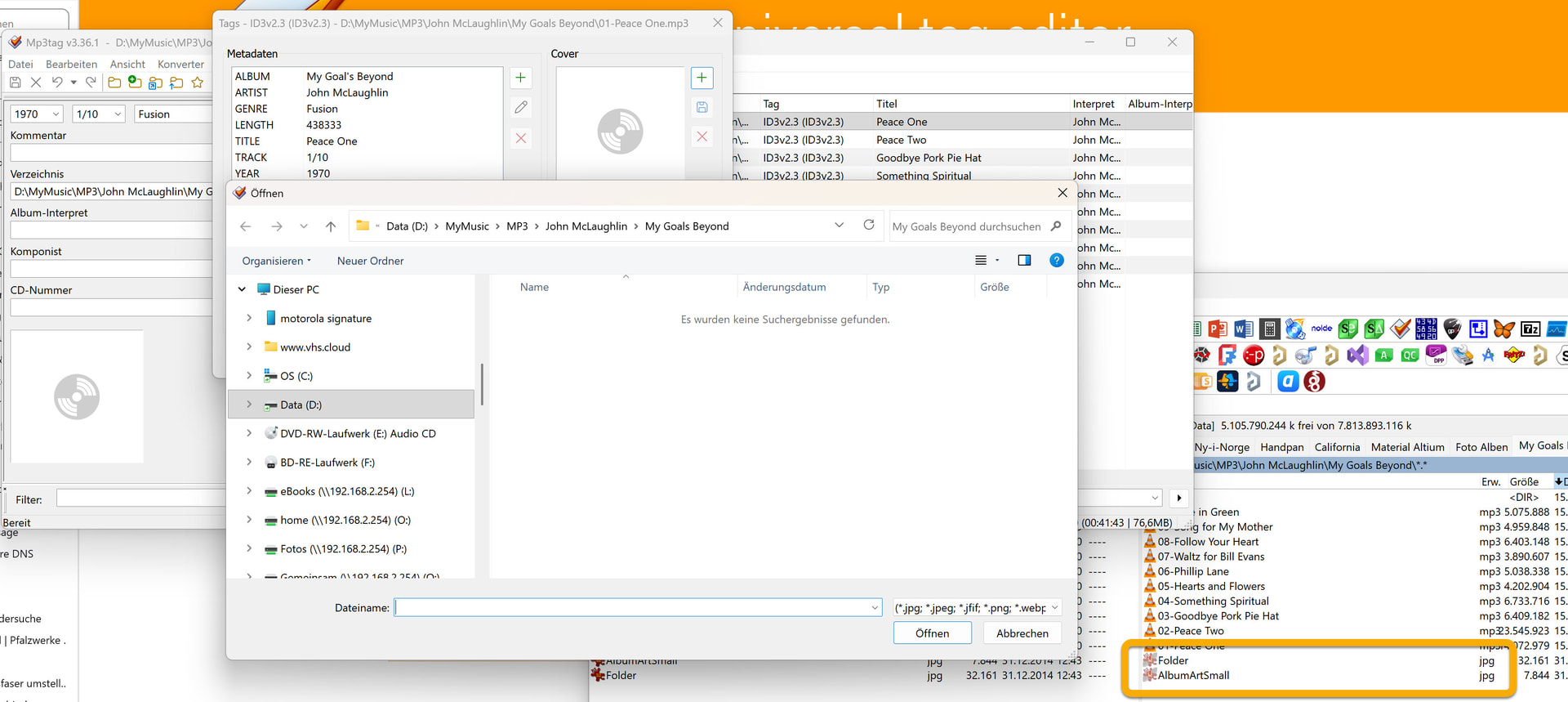
I am using MP3Tag V3.36.1 on Windows 11 and try to add cover art to my MP3 files.
Right click - Erweiterte Tags... - Cover +
The folder with the MP3 file is opened but the jpg files are not shown.
See screen shot. What can I do? This worked in an older version of MP3Tag.
---
### Author:  [@ohrenkino](https://community.mp3tag.de/u/ohrenkino)
#### Post date: [September 15, 2026, 10:13am UTC](https://community.mp3tag.de/t/cover-art-files-are-not-shown-when-searching-new-picture/71838/2 "2026-09-15T10:13:14Z")
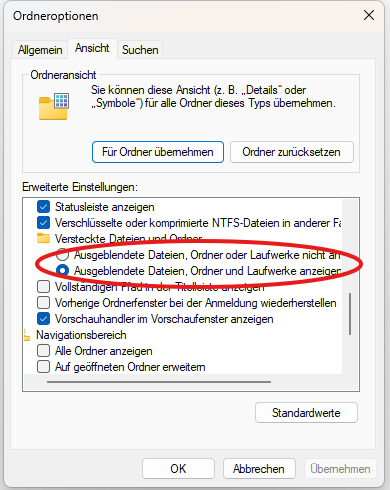
If you have set the explorer not to show hidden files, then you won't see the hidden files folder.jpg and albumartsmall.jpg in the explorer-generated file selection dialogue.
---
### Author:  [@poster](https://community.mp3tag.de/u/poster)
#### Post date: [September 15, 2026, 10:24am UTC](https://community.mp3tag.de/t/cover-art-files-are-not-shown-when-searching-new-picture/71838/3 "2026-09-15T10:24:41Z")
As further information regarding Ohrenkino's answer
---
### Author:  [@LyricsLover](https://community.mp3tag.de/u/LyricsLover)
#### Post date: [September 15, 2026, 10:38am UTC](https://community.mp3tag.de/t/cover-art-files-are-not-shown-when-searching-new-picture/71838/4 "2026-09-15T10:38:13Z")
Or in Windows 11 for a specific directory directly in the Windows File Explorer with
**Anzeigen** -\> **Einblenden** -\> **Ausgeblendete Elemente** :
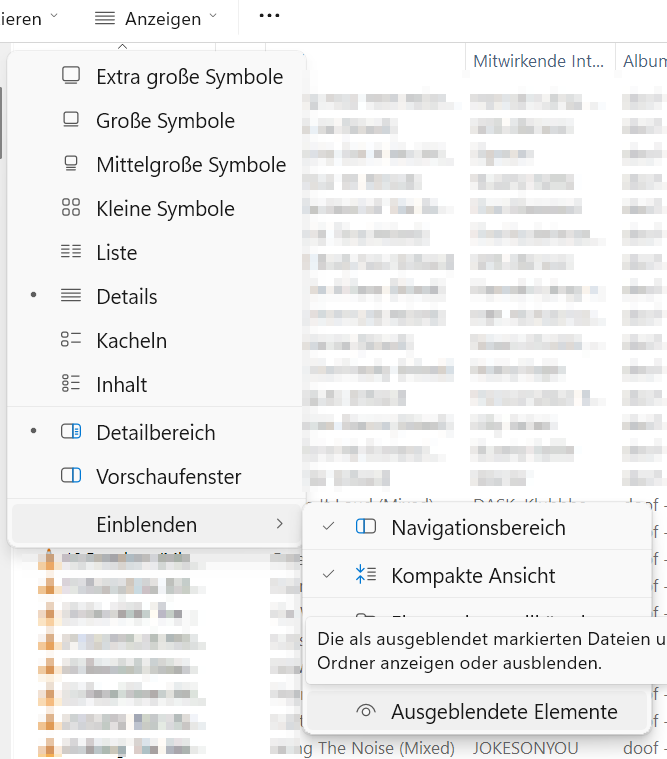
Hidden files are indicated by a slightly dimmed icon in front of the filename:

Same file, not hidden:

---
### Author:  [@LyricsLover](https://community.mp3tag.de/u/LyricsLover)
#### Post date: [September 15, 2026, 10:58am UTC](https://community.mp3tag.de/t/cover-art-files-are-not-shown-when-searching-new-picture/71838/5 "2026-09-15T10:58:17Z")
> [@mim](#):
>
> Right click - Erweiterte Tags... - Cover +
Just a quick note:
You can also drag and drop a picture onto one or more (previously) selected files.
Simply drag the file from your Explorer and drop it into the placeholder for the cover art on the left-hand side in the Tag Panel (the one with the disc symbol).
No need to open Alt + T (Erweiterte Tags) for that case.
Remember to save your changes with Ctrl+S or **Datei** -\> **Tag speichern**
(File -\> Save Tag).
---
### Author:  [@mim](https://community.mp3tag.de/u/mim)
#### Post date: [September 15, 2026, 11:30am UTC](https://community.mp3tag.de/t/cover-art-files-are-not-shown-when-searching-new-picture/71838/6 "2026-09-15T11:30:24Z")
Very strange...
The two jpg files are hidden. Totalcommander shows both files, Windows Explorer does not. In "Ordneroptionen - Ordneransicht" is "Ausgeblendete Dateien, Ordner und Laufwerke anzeigen" active.
Drag and drop of the jpg file works.
Thank you
---
### Author:  [@poster](https://community.mp3tag.de/u/poster)
#### Post date: [September 15, 2026, 11:45am UTC](https://community.mp3tag.de/t/cover-art-files-are-not-shown-when-searching-new-picture/71838/7 "2026-09-15T11:45:03Z")
> [@mim](#):
>
> The two jpg files are hidden. Totalcommander shows both files, Windows Explorer does not. In "Ordneroptionen - Ordneransicht" is "Ausgeblendete Dateien, Ordner und Laufwerke anzeigen" active.
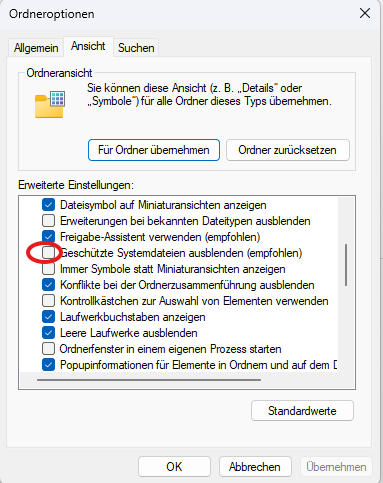
They are probably not only hidden but System-Files too. So deactivate "Geschützte Systemdateien ausblenden".
---
### Author:  [@LyricsLover](https://community.mp3tag.de/u/LyricsLover)
#### Post date: [September 15, 2026, 11:56am UTC](https://community.mp3tag.de/t/cover-art-files-are-not-shown-when-searching-new-picture/71838/8 "2026-09-15T11:56:20Z")
> [@poster](#):
>
> hidden but System-Files too
If both attributes, H and S are set, even the Explorer [own setting](https://community.mp3tag.de/t/cover-art-files-are-not-shown-when-searching-new-picture/71838/4) doesn't help. Such a file remains "hidden".
Only if the H attribut is set without S it becomes visible with
**Anzeigen** -\> **Einblenden** -\> **Ausgeblendete Elemente**
You can show ALL attributes in a CMD window with [ATTRIB](https://learn.microsoft.com/de-de/windows-server/administration/windows-commands/attrib)
```auto
Zeigt Dateiattribute an oder ändert sie.
ATTRIB [+R | -R] [+A | -A] [+S | -S] [+H | -H] [+O | -O] [+I | -I] [+X | -X]
[+P | -P] [+U | -U] [+B | -B]
[Laufwerk:][Pfad][Dateiname] [/S [/D]] [/L]
+ Legt ein Attribut fest.
– Löscht ein Attribut.
R Attribut für "Schreibgeschützte Datei".
A Attribut für "Archivdatei".
S Attribut für "Systemdatei".
H Attribut für "Versteckte Datei".
O Attribut für "Offline".
I Attribut für "Datei ohne indizierten Inhalt".
X Attribut für "Keine Scrubbingdatei".
V Attribut für "Integrität".
P Attribut für "Angeheftet".
U Attribut für "Losgelöst".
B Attribut für "SMR-BLOB".
[Laufwerk:][Pfad][Dateiname]
Gibt die zu verarbeitenden Dateien für das Attribut an.
/S Verarbeitet entsprechende Dateien im aktuellen Ordner
und allen Unterordnern.
/D Verarbeitet auch Ordner.
/L Verarbeitet die Attribute des symbolischen Links anstelle
des Ziels des symbolischen Links.
```
**What I just learned:**
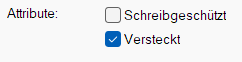
In Windows 11 a set System attribut S will be indicated by a greyed-out "Versteckt" (H for hidden) property:
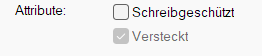
This greyed-out attribute can not be changed in the Windows File Explorer GUI!
A set Hidden attribut H only (without S) is shown as normal activated "Versteckt":
---
### Author:  [@mim](https://community.mp3tag.de/u/mim)
#### Post date: [September 15, 2026, 12:23pm UTC](https://community.mp3tag.de/t/cover-art-files-are-not-shown-when-searching-new-picture/71838/9 "2026-09-15T12:23:30Z")
these two jpg files in the screenshot are marked as system files and hidden. No idea why. Normally jpg files an my computer are not hidden and not marked as system files
---
### Author:  [@ohrenkino](https://community.mp3tag.de/u/ohrenkino)
#### Post date: [September 15, 2026, 12:28pm UTC](https://community.mp3tag.de/t/cover-art-files-are-not-shown-when-searching-new-picture/71838/10 "2026-09-15T12:28:51Z")
So you would have to investigate who created these files and / or changed the attributes.
WMP likes to create especially files with these names and attributes.
You could verify that otherwise "normal" picture files are displayed in the search.
---
### Author:  [@poster](https://community.mp3tag.de/u/poster)
#### Post date: [September 15, 2026, 1:09pm UTC](https://community.mp3tag.de/t/cover-art-files-are-not-shown-when-searching-new-picture/71838/11 "2026-09-15T13:09:21Z")
> [@LyricsLover](#):
>
> If both attributes, H and S are set, even the Explorer [own setting](https://community.mp3tag.de/t/cover-art-files-are-not-shown-when-searching-new-picture/71838/4) doesn't help. Such a file remains "hidden".
Not here.
If I in addition unchheck "Geschützte Systemdateien ausblenden" I can see the file in the windows-explorer with the attributes SH.
---
### Author:  [@poster](https://community.mp3tag.de/u/poster)
#### Post date: [September 15, 2026, 1:12pm UTC](https://community.mp3tag.de/t/cover-art-files-are-not-shown-when-searching-new-picture/71838/12 "2026-09-15T13:12:52Z")
> [@mim](#):
>
> these two jpg files in the screenshot are marked as system files and hidden. No idea why. Normally jpg files an my computer are not hidden and not marked as system files
As far as I remember the windows media player creates these files and always does it with **hidden and system** attrributes.
---
### Author:  [@LyricsLover](https://community.mp3tag.de/u/LyricsLover)
#### Post date: [September 15, 2026, 1:35pm UTC](https://community.mp3tag.de/t/cover-art-files-are-not-shown-when-searching-new-picture/71838/13 "2026-09-15T13:35:33Z")
> [@poster](#):
>
> Not here.
I was talking about my own post with WFE **Anzeigen** -\> **Einblenden** -\> **Ausgeblendete Elemente**
not yours, with WFE **...** -\> **Optionen** -\> 2. Tab **Ansicht**
😉
---
### Author:  [@system](https://community.mp3tag.de/u/system)
#### Post date: [September 17, 2026, 1:36pm UTC](https://community.mp3tag.de/t/cover-art-files-are-not-shown-when-searching-new-picture/71838/14 "2026-09-17T13:36:00Z")
This topic was automatically closed 2 days after the last reply. New replies are no longer allowed.