# Customise Grid Line Background Color and Customise Text Color
**URL:** https://community.mp3tag.de/t/customise-grid-line-background-color-and-customise-text-color/71676
**Category:** Support
**Created:** [August 1, 2026, 12:18am UTC](https://community.mp3tag.de/t/customise-grid-line-background-color-and-customise-text-color/71676 "2026-08-01T00:18:03Z")
**Posts on this page:** 10
**Page:** 1
### Author:  [@wayniesinclair](https://community.mp3tag.de/u/wayniesinclair)
#### Post date: [August 1, 2026, 12:18am UTC](https://community.mp3tag.de/t/customise-grid-line-background-color-and-customise-text-color/71676/1 "2026-08-01T00:18:03Z")
Hi everyone, is there a way to change / customise the "grid line" background and also the text color in the Preference? If so, can you tell me where / how to edit the file, thank you in advance.
---
### Author:  [@ohrenkino](https://community.mp3tag.de/u/ohrenkino)
#### Post date: [August 1, 2026, 6:23am UTC](https://community.mp3tag.de/t/customise-grid-line-background-color-and-customise-text-color/71676/2 "2026-08-01T06:23:56Z")
AFAIK MP3tag uses the system colours.
To change the appearance of grid lines, see the options:
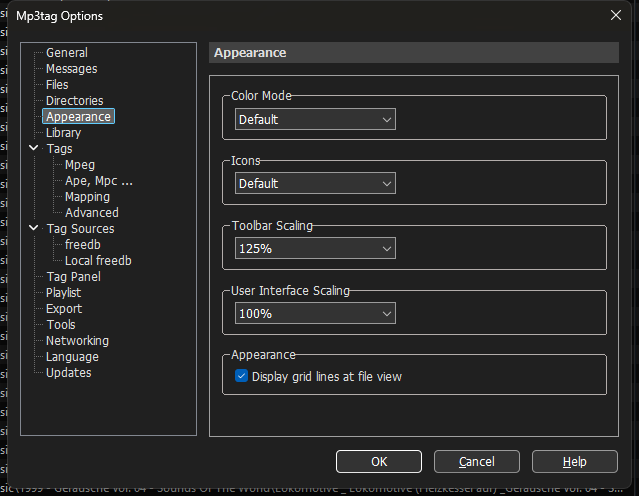
It does not really change the colour, though.
---
### Author:  [@wayniesinclair](https://community.mp3tag.de/u/wayniesinclair)
#### Post date: [August 4, 2026, 7:01am UTC](https://community.mp3tag.de/t/customise-grid-line-background-color-and-customise-text-color/71676/3 "2026-08-04T07:01:18Z")
Not quite what I am looking for. I want to be able to change / customize it to a darker or lighter grey.
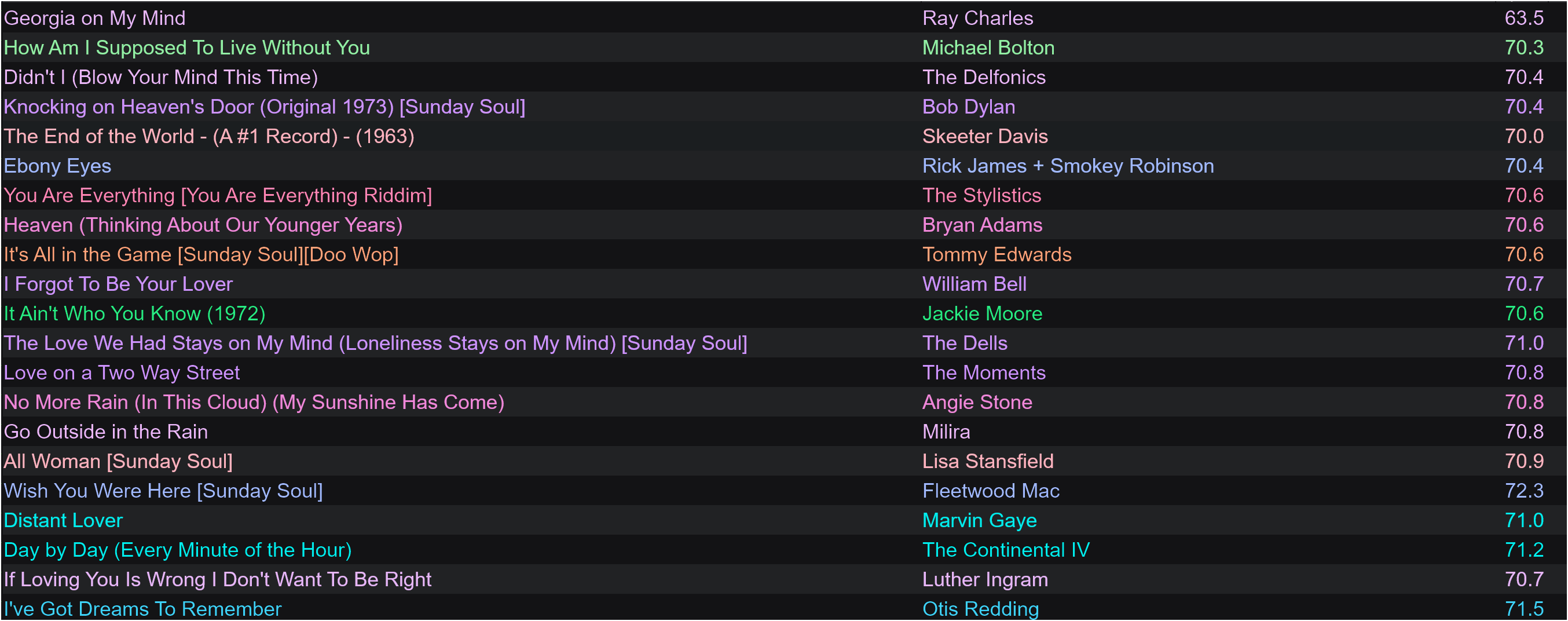
One more question / suggestion. In the Tag Panel, Is there a way to put in ColorRules that will correspond to the BPM? Can I paste them somewhere. I already have the color codes for the various BPMs. @Florian See below.
#70ECD4=Key is 01A, #00EDC9=Key is 01B, #92F0A4=Key is 02A, #27EC82=Key is 02B, #B1EE86=Key is 03A, #85ED4E=Key is 03B, #E6E0A2=Key is 04A, #E0C86E=Key is 04B, #FEC8AC=Key is 05A, #FFA279=Key is 05B, #FFB3BF=Key is 06A, #FF8C93=Key is 06B, #FFB4D2=Key is 07A, #FF85B4=Key is 07B, #EBB7F9=Key is 08A, #F087D9=Key is 08B, #E7B6F8=Key is 09A, #CE93FF=Key is 09B, #C0CEFB=Key is 10A, #A1B9FF=Key is 10B, #94E5F8=Key is 11A, #3ED2F8=Key is 11B, #50EBF0=Key is 12A, #01EDED=Key is 12B
---
### Author:  [@Florian](https://community.mp3tag.de/u/Florian)
#### Post date: [August 4, 2026, 7:06am UTC](https://community.mp3tag.de/t/customise-grid-line-background-color-and-customise-text-color/71676/4 "2026-08-04T07:06:33Z")
> [@wayniesinclair](#):
>
> I want to be able to change / customize it to a darker or lighter grey.
This is not possible from within Mp3tag and currently not planned to be added.
> [@wayniesinclair](#):
>
> In the Tag Panel, Is there a way to put in ColorRules that will correspond to the BPM?
As is this.
---
### Author:  [@LyricsLover](https://community.mp3tag.de/u/LyricsLover)
#### Post date: [August 4, 2026, 7:33am UTC](https://community.mp3tag.de/t/customise-grid-line-background-color-and-customise-text-color/71676/5 "2026-08-04T07:33:50Z")
> [@wayniesinclair](#):
>
> Is there a way to put in ColorRules that will correspond to the BPM?
As Florian already wrote, this is not possible.
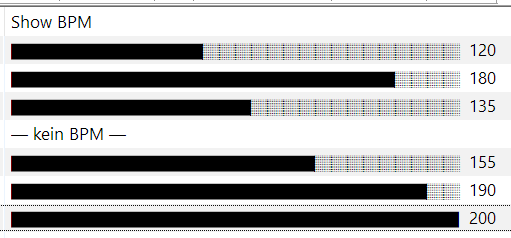
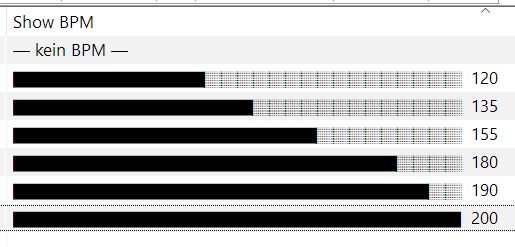
One alternative would be to create a black&white graphical representation of the BPM like this:
_(unsorted and sorted example)_
`$if(%bpm%,$repeat(█,$div($sub(%bpm%,60),5))$repeat(░,$sub(28,$div($sub(%bpm%,60),5))) %bpm%,— kein BPM —)`
The expression uses `$repeat()` to generate a fixed-length progress bar based on the `%bpm%` value. It maps the range 60-200 BPM range to 28 steps\* (5 BPM per step), filling the completed part with `█` and the remainder with `░`.
If `%bpm%` is empty, it outputs `— kein BPM —`.
\* Calculation: 200 - 60 = 140 and then 140 : 5 = 28
Of course, you can customise the range, steps and characters however you like. Just remember that colours are not an option.
---
### Author:  [@wayniesinclair](https://community.mp3tag.de/u/wayniesinclair)
#### Post date: [August 4, 2026, 7:42am UTC](https://community.mp3tag.de/t/customise-grid-line-background-color-and-customise-text-color/71676/6 "2026-08-04T07:42:31Z")
Bummer. Thanks. I hope it gets implemented at some point. This is such an excellent program.
The last update was so appreciated.
---
### Author:  [@wayniesinclair](https://community.mp3tag.de/u/wayniesinclair)
#### Post date: [August 4, 2026, 7:43am UTC](https://community.mp3tag.de/t/customise-grid-line-background-color-and-customise-text-color/71676/7 "2026-08-04T07:43:26Z")
PS: I'm not that good with scripting so, I'll let this go over my head.
---
### Author:  [@LyricsLover](https://community.mp3tag.de/u/LyricsLover)
#### Post date: [August 4, 2026, 7:49am UTC](https://community.mp3tag.de/t/customise-grid-line-background-color-and-customise-text-color/71676/8 "2026-08-04T07:49:46Z")
The above Value is the definition for a new column in your File List.
Right-click on an existing column header, such as **Title** , and select **[Customize](https://docs.mp3tag.de/customization/file-list/)**.
Then click on the New-button and add a Name (=new column header) and the Value:
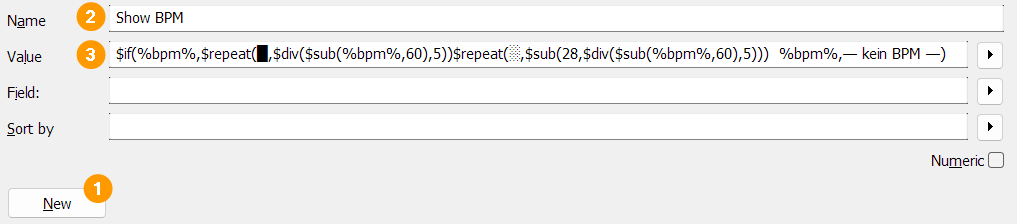
That's all 😉
---
### Author:  [@wayniesinclair](https://community.mp3tag.de/u/wayniesinclair)
#### Post date: [August 8, 2026, 12:13pm UTC](https://community.mp3tag.de/t/customise-grid-line-background-color-and-customise-text-color/71676/9 "2026-08-08T12:13:28Z")
Wow, thanks very much...
---
### Author:  [@system](https://community.mp3tag.de/u/system)
#### Post date: [September 5, 2026, 12:14pm UTC](https://community.mp3tag.de/t/customise-grid-line-background-color-and-customise-text-color/71676/10 "2026-09-05T12:14:11Z")
This topic was automatically closed 28 days after the last reply. New replies are no longer allowed.