# Dark mode: ComboBox / ComboLBox popup list selection shows white (no-color) rectangle instead of proper highlight after 2026-09 Preview (KB5124010) and 2026-10 Security Update (KB5127648 / 26300.9711)
**URL:** https://community.mp3tag.de/t/dark-mode-combobox-combolbox-popup-list-selection-shows-white-no-color-rectangle-instead-of-proper-highlight-after-2026-09-preview-kb5124010-and-2026-10-security-update-kb5127648-26300-9711/71965
**Category:** Bug Reports
**Created:** [October 15, 2026, 4:04am UTC](https://community.mp3tag.de/t/dark-mode-combobox-combolbox-popup-list-selection-shows-white-no-color-rectangle-instead-of-proper-highlight-after-2026-09-preview-kb5124010-and-2026-10-security-update-kb5127648-26300-9711/71965 "2026-10-15T04:04:02Z")
**Posts on this page:** 13
**Page:** 1
### Author:  [@spdking01](https://community.mp3tag.de/u/spdking01)
#### Post date: [October 15, 2026, 4:04am UTC](https://community.mp3tag.de/t/dark-mode-combobox-combolbox-popup-list-selection-shows-white-no-color-rectangle-instead-of-proper-highlight-after-2026-09-preview-kb5124010-and-2026-10-security-update-kb5127648-26300-9711/71965/1 "2026-10-15T04:04:02Z")
**SUMMARY**
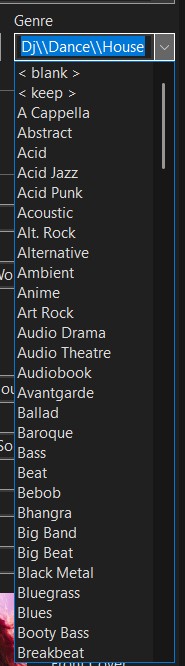
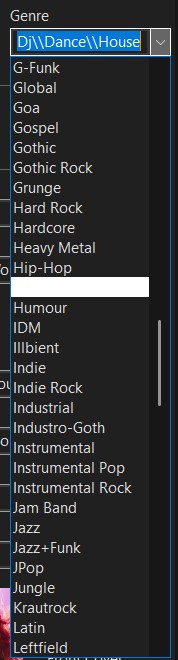
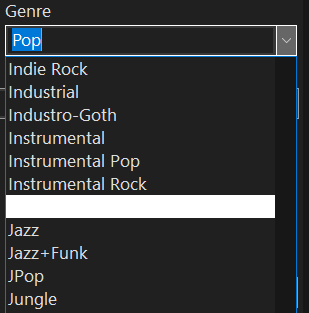
After installing the **2026-09 Preview Update (KB5124010) (build 26200.9550)** on 9/23/2026, all dropdown/combobox lists in MP3tag in Dark mode started showing a white solid rectangle when hovering with the mouse or navigating with the keyboard Up/Down arrows. The proper dark-mode selection highlight is completely missing.
The problem disappeared after I uninstalled the September preview.
It returned immediately after installing the **2026-10 Security Update (KB5127648) (build 26300.9711)** on 10/14/2026.
This only happens in Dark mode (Color Mode = Dark or Default while Windows is dark). Light mode is unaffected.
This affects any dropdown menu, thus being typeable menus, or MP3Tag fixed non-typeable menus. Any listing items accessible through dropdown menus are affected.
Program general menus ("File", "Edit", "View", etc.) are unaffected.
**Affected controls**
All Win32 combobox-style dropdowns: Tag Panel fields, Genre, Custom List Values, Action parameters, Action (Quick), etc.
**Reproduction Steps**
1. Set MP3tag → Options → Appearance → Color Mode = **Dark**.
2. Click any Tag Panel field that shows a dropdown arrow.
3. Hover with the mouse or use ↑ / ↓ keys.
4. Result: highlighted row becomes a solid white rectangle (text is also white/light) → unreadable.
**Expected behavior**
Blue background + light text for the hover/keyboard selection state (as it worked before the September 2026 preview).
**Technical Details**
The affected controls are standard Win32 **COMBOBOX** (with **CBS\_DROPDOWN** / **CBS\_DROPDOWNLIST** ) and the popup **ComboLBox** window that renders the list.
The regression is isolated to the popup list’s selection/hover state. The closed combobox itself still renders its current selection correctly.
MP3tag already applies dark-mode theming (owner-drawing where necessary + **DarkMode\_\*** / **Explorer** themes via **SetWindowTheme** ). The symptom matches known post-2025/2026 dark-mode combobox regressions in other Win32 applications after similar servicing updates, where the selection rect / highlight brush for themed combobox lists stops receiving the correct dark-mode color (or falls back to a white/no-color state).
Relevant indicators:
• Only the list portion ( **ComboLBox** ) is broken.
• Hover + keyboard navigation both affected.
• Closed combobox selection still works.
• Problem appeared with 2026-09 Preview (KB5124010, 26200.9550) and returned with 2026-10 Security Update (05127648, 26300.9711).
• Light mode path is unaffected.
**Workarounds**
• Set MP3tag Color Mode to Light (or Default + switch Windows to Light).
• Uninstalling the September 2026 preview previously restored correct behavior.
**Environment**
• **MP3tag version** : 3.36.1 x64, and previous older MP3Tag versions, as well
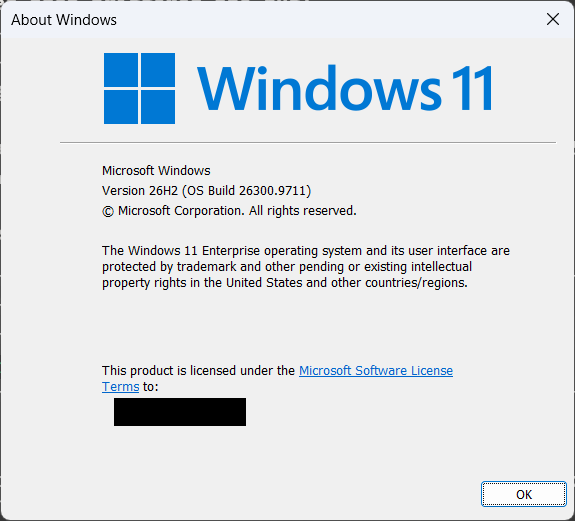
• **Windows:** Windows 11 Enterprise 26H2, build **26300.9711**
• **Updates that triggered the bug** :
◦ 2026-09 Preview Update (KB5124010) – build 26200.9550 – installed 9/23/2026 (symptom appeared)
◦ 2026-10 Security Update (05127648) – build 26300.9711 – installed 10/14/2026 (symptom returned)
• **MP3tag installation** : Portable
• **Color Mode** : Dark (forced), Default (when Windows theme is set this way)
• **Display scaling** : Both 100% at 1920x1080 (with external Samsung screen attached to HDMI port) and 125% at 1920x1080 (laptop lid screen)
• **Windows theme** : Dark
**Attachments**
1. Screenshot of a dropdown in normal (non-hovered) state.
2. Screenshot while hovering or using arrow keys (white rectangle).
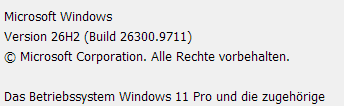
3. "winver" window with exact build string.
**Additional notes**
• This only affects the **list portion** of comboboxes. Fixed menus, main window, and most other controls continue to work in dark mode.
• The issue is 100% reproducible on this machine and followed the exact same pattern with the September 2026 preview.
---
### Author:  [@ohrenkino](https://community.mp3tag.de/u/ohrenkino)
#### Post date: [October 15, 2026, 6:26am UTC](https://community.mp3tag.de/t/dark-mode-combobox-combolbox-popup-list-selection-shows-white-no-color-rectangle-instead-of-proper-highlight-after-2026-09-preview-kb5124010-and-2026-10-security-update-kb5127648-26300-9711/71965/2 "2026-10-15T06:26:10Z")
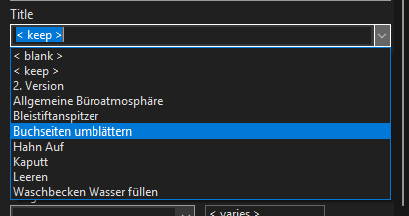
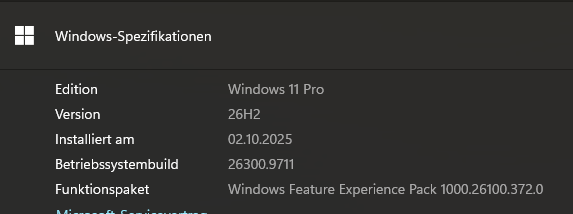
On my PC it looks like this:
---
### Author:  [@LyricsLover](https://community.mp3tag.de/u/LyricsLover)
#### Post date: [October 15, 2026, 6:41am UTC](https://community.mp3tag.de/t/dark-mode-combobox-combolbox-popup-list-selection-shows-white-no-color-rectangle-instead-of-proper-highlight-after-2026-09-preview-kb5124010-and-2026-10-security-update-kb5127648-26300-9711/71965/3 "2026-10-15T06:41:30Z")
I can reproduce the behaviour here with Win11 Pro, 26H2 (Build 26300.9711):
---
### Author:  [@ohrenkino](https://community.mp3tag.de/u/ohrenkino)
#### Post date: [October 15, 2026, 6:45am UTC](https://community.mp3tag.de/t/dark-mode-combobox-combolbox-popup-list-selection-shows-white-no-color-rectangle-instead-of-proper-highlight-after-2026-09-preview-kb5124010-and-2026-10-security-update-kb5127648-26300-9711/71965/4 "2026-10-15T06:45:05Z")
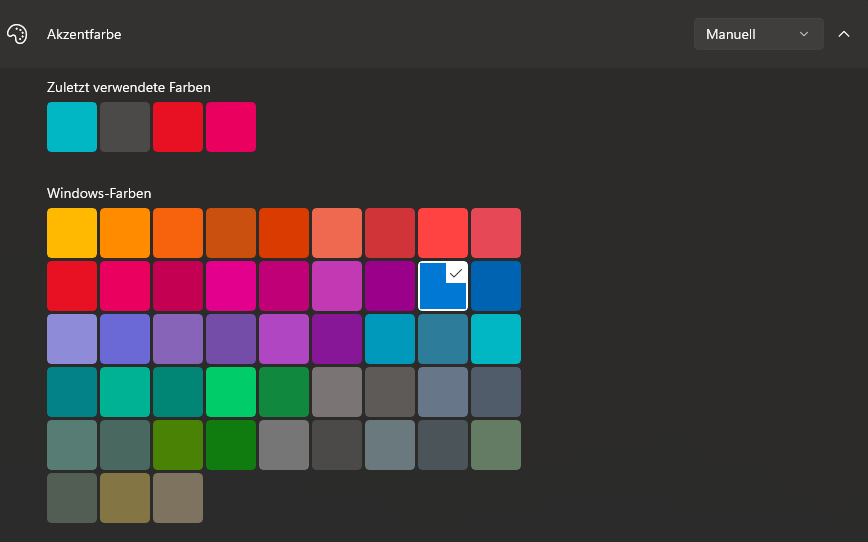
I chose this as colour setting:
---
### Author:  [@LyricsLover](https://community.mp3tag.de/u/LyricsLover)
#### Post date: [October 15, 2026, 6:47am UTC](https://community.mp3tag.de/t/dark-mode-combobox-combolbox-popup-list-selection-shows-white-no-color-rectangle-instead-of-proper-highlight-after-2026-09-preview-kb5124010-and-2026-10-security-update-kb5127648-26300-9711/71965/5 "2026-10-15T06:47:18Z")
+1
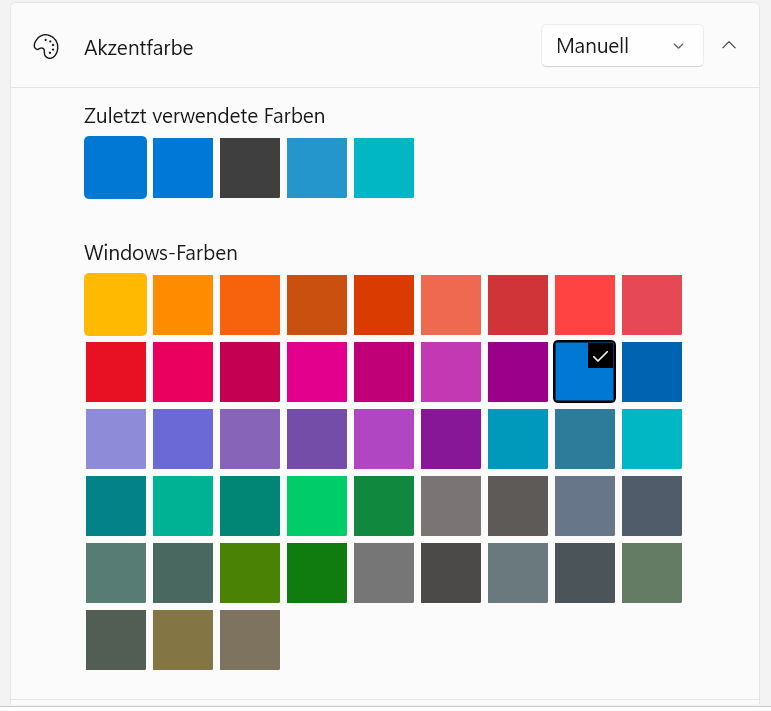
I only switched to Dark Mode in Mp3tag to try it out. I don't usually use Dark Mode.
---
### Author:  [@ohrenkino](https://community.mp3tag.de/u/ohrenkino)
#### Post date: [October 15, 2026, 6:52am UTC](https://community.mp3tag.de/t/dark-mode-combobox-combolbox-popup-list-selection-shows-white-no-color-rectangle-instead-of-proper-highlight-after-2026-09-preview-kb5124010-and-2026-10-security-update-kb5127648-26300-9711/71965/6 "2026-10-15T06:52:39Z")
I checked both:
Windows: bright, MP3tag: dark
Windows: dark, MP3tag: dark
and in both cases I have the blue background.
---
### Author:  [@LyricsLover](https://community.mp3tag.de/u/LyricsLover)
#### Post date: [October 15, 2026, 7:13am UTC](https://community.mp3tag.de/t/dark-mode-combobox-combolbox-popup-list-selection-shows-white-no-color-rectangle-instead-of-proper-highlight-after-2026-09-preview-kb5124010-and-2026-10-security-update-kb5127648-26300-9711/71965/7 "2026-10-15T07:13:18Z")
JFYI:
I have just installed the latest available graphics card driver from Nvidia (version 617.42).
This has not changed anything.
---
### Author:  [@ohrenkino](https://community.mp3tag.de/u/ohrenkino)
#### Post date: [October 15, 2026, 7:15am UTC](https://community.mp3tag.de/t/dark-mode-combobox-combolbox-popup-list-selection-shows-white-no-color-rectangle-instead-of-proper-highlight-after-2026-09-preview-kb5124010-and-2026-10-security-update-kb5127648-26300-9711/71965/8 "2026-10-15T07:15:43Z")
My PC uses Intel HD Graphics.
---
### Author:  [@Florian](https://community.mp3tag.de/u/Florian)
#### Post date: [October 15, 2026, 7:43am UTC](https://community.mp3tag.de/t/dark-mode-combobox-combolbox-popup-list-selection-shows-white-no-color-rectangle-instead-of-proper-highlight-after-2026-09-preview-kb5124010-and-2026-10-security-update-kb5127648-26300-9711/71965/9 "2026-10-15T07:43:24Z")
I already have a local fix for that which will be included with the next beta. Let's hope that this works on all systems. Have I mentioned that dark mode for Win32 apps is one gigantic hack?
---
### Author:  [@spdking01](https://community.mp3tag.de/u/spdking01)
#### Post date: [October 15, 2026, 8:07am UTC](https://community.mp3tag.de/t/dark-mode-combobox-combolbox-popup-list-selection-shows-white-no-color-rectangle-instead-of-proper-highlight-after-2026-09-preview-kb5124010-and-2026-10-security-update-kb5127648-26300-9711/71965/10 "2026-10-15T08:07:03Z")
**UPDATE TIMELINE (from Windows Update history / Get-HotFix)**
2025-11-11 25H2 feature update installed
2026-09-08 KB5124008 (26200.9445), KB5126052 (.NET), .NET 8/9 security updates
2026-09-14 KB5129195 security update (26200.9457)
2026-09-22 KB5124009 (servicing stack)
2026-09-23 KB5124010 preview (26200.9550 on 25H2) **\<- bad**
2026-09-30 26H2 feature update + KB5121794
2026-10-07 KB5124010 uninstalled, reboot -\> build 26300.9457; white highlight gone **\<- fixed**
Multiple earlier reboots did not fix the problem; uninstalling KB5124010 did.
**WHAT WAS TESTED / RULED OUT**
- Clean portable Mp3tag copy, other folder, version 3.35: same bug while KB installed.
- Intel graphics driver 31.0.101.2145 and 31.0.101.2141: bug present with the KB under both;
with the KB removed, normal under 2141 and still normal after reinstalling 2145.
- Forcing the NVIDIA GPU for Mp3tag: no change.
- Windows theme changes: no change. Other apps: not affected.
- A minimal test app with a dark-mode ComboBox on the same PC: normal blue highlight.
- Modules loaded in the Mp3tag process outside the Windows folder: only Mp3tag.exe.
**COMBOLBOX OBSERVATIONS**
- Window class " **ComboLBox**" becomes visible only while a dropdown is open (several hidden instances exist). Styles seen: 0x44808043 and 0x44A08043; ExStyle 0x80 / 0x88.
- Neither **LBS\_OWNERDRAWFIXED (0x10)** nor **LBS\_OWNERDRAWVARIABLE (0x20)** is set, so the selection fill appears to be drawn by the system, not by the app.
- System colors read from a separate PowerShell process looked normal (COLOR\_HIGHLIGHT #0078D4, COLOR\_HIGHLIGHTTEXT #FFFFFF); this does not show what the Mp3tag process received.
**FILE VERSIONS IN THE GOOD STATE (KB5124010 uninstalled, build 26300.9457)**
user32.dll 10.0.26100.8875 (2026-09-08)
uxtheme.dll 10.0.26100.8875
win32u.dll 10.0.26100.9444
dwmapi.dll 10.0.26100.8875
themeui.dll 10.0.26100.8875
d2d1.dll 10.0.26100.8875
dwrite.dll 10.0.26100.8875
dwmcore.dll 10.0.26100.9278
comctl32 v6 (WinSxS):
6.0.26100.9278 created 2026-09-08 (active, loaded by Mp3tag)
6.0.26100.9549 created 2026-09-22 (inactive; probably shipped with KB5124010)
Baselines saved: 3,627 System32 DLLs (version/size/date) and 15 theme files
(Resources\Themes, SHA256). After installing an Intel driver update only 7 Intel DLLs changed;
Theme files and comctl32 versions stayed identical.
The KB release notes do not mention controls or dark mode. A relationship with comctl32
9549 is only a lead. The app may use undocumented dark-mode behavior in uxtheme, so this
could also be a compatibility regression.
Maybe we can gather more information to help you and ease a solution for this problem.
At least for me, this problem only surfaced for the first time to me after the September preview of the October Patch Tuesday pack.
---
### Author:  [@LyricsLover](https://community.mp3tag.de/u/LyricsLover)
#### Post date: [October 15, 2026, 8:10am UTC](https://community.mp3tag.de/t/dark-mode-combobox-combolbox-popup-list-selection-shows-white-no-color-rectangle-instead-of-proper-highlight-after-2026-09-preview-kb5124010-and-2026-10-security-update-kb5127648-26300-9711/71965/11 "2026-10-15T08:10:13Z")
> [@Florian](#):
>
> Have I mentioned that dark mode for Win32 apps is one gigantic hack?
Not yet 😉 😇
---
### Author:  [@Florian](https://community.mp3tag.de/u/Florian)
#### Post date: [October 15, 2026, 3:34pm UTC](https://community.mp3tag.de/t/dark-mode-combobox-combolbox-popup-list-selection-shows-white-no-color-rectangle-instead-of-proper-highlight-after-2026-09-preview-kb5124010-and-2026-10-security-update-kb5127648-26300-9711/71965/12 "2026-10-15T15:34:39Z")
> [@spdking01](#):
>
> all dropdown/combobox lists in MP3tag in Dark mode started showing a white solid rectangle when hovering with the mouse or navigating with the keyboard Up/Down arrows. The proper dark-mode selection highlight is completely missing.
This should be fixed with [Mp3tag v3.37-beta.3](https://community.mp3tag.de/t/455). Please let me know if this fixes the issue for you.
---
### Author:  [@LyricsLover](https://community.mp3tag.de/u/LyricsLover)
#### Post date: [October 15, 2026, 3:48pm UTC](https://community.mp3tag.de/t/dark-mode-combobox-combolbox-popup-list-selection-shows-white-no-color-rectangle-instead-of-proper-highlight-after-2026-09-preview-kb5124010-and-2026-10-security-update-kb5127648-26300-9711/71965/13 "2026-10-15T15:48:12Z")
It works fine here now:
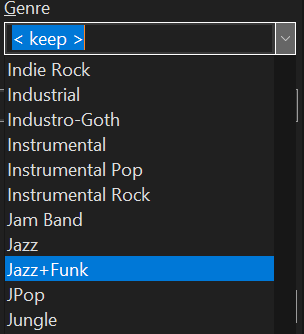
What does it look like to you @spdking01?