# DESCRIPTION vs COMMENT
**URL:** https://community.mp3tag.de/t/description-vs-comment/71155
**Category:** Mac
**Created:** [May 1, 2026, 9:27pm UTC](https://community.mp3tag.de/t/description-vs-comment/71155 "2026-05-01T21:27:03Z")
**Posts on this page:** 16
**Page:** 1
### Author:  [@raymondjiii](https://community.mp3tag.de/u/raymondjiii)
#### Post date: [May 1, 2026, 9:27pm UTC](https://community.mp3tag.de/t/description-vs-comment/71155/1 "2026-05-01T21:27:03Z")
I have a lot of FLAC files that have a DESCRIPTION tag and when loaded into mp3tag I cannot see this value. When I convert the FLAC file to ALAC (using the XLD app) what was the DESCRIPTION tag now becomes the COMMENT tag in the new ALAC file which I can then see in mp3tag. Is the DESCRIPTION tag in the original FLAC file not a valid tag? I am surprised that XLD does add the COMMENT tag correctly and takes the value from DESCRIPTION.
(I opened a ticket on sourceforge to see if they will add the TOTALTRACKS and TOTALDISCS when creating an ALAC file and populate them from the TRACK and DISC substrings from the original FLAC file.)
---
### Author:  [@ohrenkino](https://community.mp3tag.de/u/ohrenkino)
#### Post date: [May 1, 2026, 9:30pm UTC](https://community.mp3tag.de/t/description-vs-comment/71155/2 "2026-05-01T21:30:38Z")
You could create a mapping for VorbisComments (Flac) and the DESCRIPTION like this:
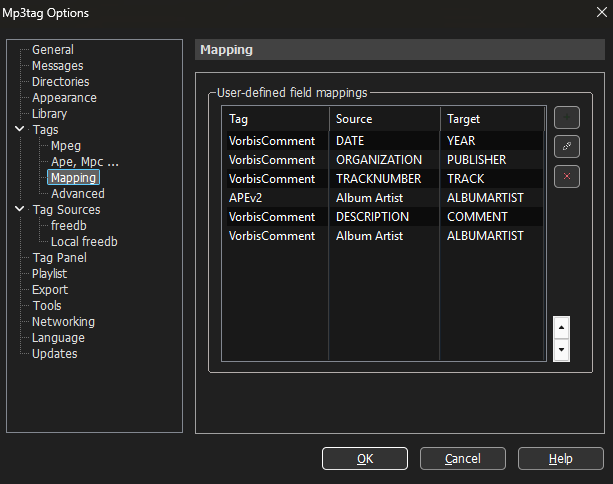
(please look only at the line with "Description")
---
### Author:  [@raymondjiii](https://community.mp3tag.de/u/raymondjiii)
#### Post date: [May 1, 2026, 10:09pm UTC](https://community.mp3tag.de/t/description-vs-comment/71155/3 "2026-05-01T22:09:35Z")
That is awesome. I wish I could do something like that for TOTALTRACKS and TOTALDISCS but use one of those perl like methods to grab what comes after "/"
So something like map: substr(%track%, '/') to TOTALTRACKS (Not claiming that my "substr" is even correct but you get the idea of what I wish I could do.)
---
### Author:  [@ohrenkino](https://community.mp3tag.de/u/ohrenkino)
#### Post date: [May 1, 2026, 10:15pm UTC](https://community.mp3tag.de/t/description-vs-comment/71155/4 "2026-05-01T22:15:00Z")
I am not sure what you want to do or achieve ...
MP3tag takes care of the format "1/2" in TRACK and splits it - if standard compliant - to TRACK =1, TOTALTRACKS = 2. No mapping would be required.
(The same applies to DISC and TOTALDISCS.)
---
### Author:  [@raymondjiii](https://community.mp3tag.de/u/raymondjiii)
#### Post date: [May 1, 2026, 10:33pm UTC](https://community.mp3tag.de/t/description-vs-comment/71155/5 "2026-05-01T22:33:38Z")
So, are you saying that if I convert my FLAC files to ALAC - all I have to do is open the ALAC files in mp3tag and then save the entire fileset in mp3tag? I am trying to figure this out right now....I just converted a set of FLAC files to ALAC and I now load the ALAC files in mp3tag and TOTALTRACKS and TOTALDISCS are not set.
I did see a complex action that someone posted on how to create the TOTALDISCS tag from the "x/y" DISCNUMBER. I don't see how that could be done for TOTALTRACKS though.
---
### Author:  [@ohrenkino](https://community.mp3tag.de/u/ohrenkino)
#### Post date: [May 1, 2026, 10:39pm UTC](https://community.mp3tag.de/t/description-vs-comment/71155/6 "2026-05-01T22:39:39Z")
As I see it, it is the converter that messes up the metadata.
An easy way to transfer the tags from one file to another would be copy&paste (not field by field but file by file - or even: if the source files and the target files are in the same order, then you could select all source files, use Edit\>Copy, select all target files and use Edit\>Paste. The first target file would get all the tag data from the first source file, the second from the second and so on).
Just to set something clear: the track format in m4a files is a purely numeric - it does not allow a `/`.
---
### Author:  [@raymondjiii](https://community.mp3tag.de/u/raymondjiii)
#### Post date: [May 1, 2026, 10:53pm UTC](https://community.mp3tag.de/t/description-vs-comment/71155/7 "2026-05-01T22:53:57Z")
I am looking at a FLAC file right now, before it is converted to ALAC, and there are no extended tags: TOTALTRACKS and TOTALDISCS - just starting mp3tag and viewing extended tags I do not see them. I also added these two fields to appear on the left column.
I do think the following two actions might work to populate these two fields INTO the FLAC file (I did not write these)
`$if2(%TOTALDISCS%,$if($neql(%DISCNUMBER%,$regexp(%DISCNUMBER%,^\d{1','3}/(\d{1','3})$,$1)),$regexp(%DISCNUMBER%,^\d{1','3}/(\d{1','3})$,$1),%TOTALDISCS%))`
`$if2(%totaltracks%,$if($neql(%track%,$regexp(%track%,^\d{1','3}/(\d{1','3})$,$1)),$regexp(%track%,^\d{1','3}/(\d{1','3})$,$1),%totaltracks%))`
Now after applying these two actions to the FLAC file and then convert to ALAC - the two fields TOTALDISCS and TOTALTRACKS do remain in the new ALAC file.
---
### Author:  [@MotleyG](https://community.mp3tag.de/u/MotleyG)
#### Post date: [May 2, 2026, 12:44am UTC](https://community.mp3tag.de/t/description-vs-comment/71155/8 "2026-05-02T00:44:48Z")
> [@raymondjiii](#):
>
> just starting mp3tag and viewing extended tags I do not see them
> [@raymondjiii](#):
>
> Now after applying these two actions to the FLAC file and then convert to ALAC - the two fields TOTALDISCS and TOTALTRACKS do remain in the new ALAC file
This information conflicts. There is nowhere mp3tag can move this information without existing already in the original FLAC file.
Are you sure these don't exist when looking at the Extended Tags window? The fields exist for my FLAC files.
---
### Author:  [@raymondjiii](https://community.mp3tag.de/u/raymondjiii)
#### Post date: [May 2, 2026, 1:05am UTC](https://community.mp3tag.de/t/description-vs-comment/71155/9 "2026-05-02T01:05:46Z")
They do not exist in my FLAC files. But, using the two Actions I posted it creates them from the discs and tracks.
For example, song1 has a track number of 1/12, the action above grabs the 12 and creates the TOTALTRACKS tag for song1. The DISC is listed as 1/1 and using the 2nd action it pulls the second value from DISCS and creates the TOTALDISCS tag for song1. So I just select all of the FLAC files that I am working with and apply these 2 actions. Now when I view Extended Tags on any of these FLAC files - these 2 new tags are now there - they were not when I first started.
DISC creates TOTALDISCS (by extracting the 2nd value)
TRACK creates TOTALTRACKS (by extracting the 2nd value)
---
### Author:  [@ohrenkino](https://community.mp3tag.de/u/ohrenkino)
#### Post date: [May 2, 2026, 7:10am UTC](https://community.mp3tag.de/t/description-vs-comment/71155/10 "2026-05-02T07:10:25Z")
> [@raymondjiii](#):
>
> I do think the following two actions might work to populate these two fields INTO the FLAC file (I did not write these)
You could use "Import tag fields"
Source: `%track%`
Target pattern: `%track%/%totaltracks%`
and
Source: `%discnumber%`
Target pattern: `%discnumber%/%totaldiscs%`
(not as complicated as the longish $IF() comparisons.
---
### Author:  [@MotleyG](https://community.mp3tag.de/u/MotleyG)
#### Post date: [May 2, 2026, 10:15am UTC](https://community.mp3tag.de/t/description-vs-comment/71155/11 "2026-05-02T10:15:52Z")
Perhaps a screenshot of the Extended Tags window for your FLAC file "before" any changes would be helpful here.
Mod - This separate Track and Disc Total topic should be split as it does not apply to the OP request about mapping Description to Comment.
---
### Author:  [@raymondjiii](https://community.mp3tag.de/u/raymondjiii)
#### Post date: [May 2, 2026, 10:52am UTC](https://community.mp3tag.de/t/description-vs-comment/71155/12 "2026-05-02T10:52:44Z")
What's the equivalent on the Mac version ? (I don't see "Import tag fields" - I see "Convert tag - tag") but I'm not sure that is the same because that's not allowing you to change multiple patterns...I think.
---
### Author:  [@ohrenkino](https://community.mp3tag.de/u/ohrenkino)
#### Post date: [May 2, 2026, 10:55am UTC](https://community.mp3tag.de/t/description-vs-comment/71155/13 "2026-05-02T10:55:05Z")
> [@raymondjiii](#):
>
> What's the equivalent on the Mac version ?
Thas IS the Mac version of that action:
> [@Quick Actions and Action Groups](https://community.mp3tag.de/t/quick-actions-and-action-groups/51882):
>
> Mp3tag for Mac provides a variety of Actions, which can be used on filenames and tags. The actions can be applied individually via Actions → Quick Actions ⌥⌘ 6 or be grouped into named and reusable Action Groups via Actions → Actions ⌘ 6. Action Groups serve as repeatable workflows in Mp3tag for Mac. When using Quick Actions you can select one of the different available action types from the list. This action will be applied to the selected files and the changes are saved immediately. Tip 1…
The Windows equivalent would be "Guess values".
"Import tag fields" is an action, no convert function.
---
### Author:  [@raymondjiii](https://community.mp3tag.de/u/raymondjiii)
#### Post date: [May 2, 2026, 11:04am UTC](https://community.mp3tag.de/t/description-vs-comment/71155/14 "2026-05-02T11:04:55Z")
Ah, I see now: Actions --\> Quick Actions --\> Format tag field
I have never used a "Quick Action" before - good to know. I wish I could save that as action that I could just do with a one click...or can I? (not have to type in the field names each time I want to do this operation)
---
### Author:  [@ohrenkino](https://community.mp3tag.de/u/ohrenkino)
#### Post date: [May 2, 2026, 11:07am UTC](https://community.mp3tag.de/t/description-vs-comment/71155/15 "2026-05-02T11:07:41Z")
> [@raymondjiii](#):
>
> Format tag field
No, it is "Import tag fields" . "Format tag field" is a different action.
And yes, you can save an action group (even if it does contain only a single action). Please see the already linked documentation.
---
### Author:  [@system](https://community.mp3tag.de/u/system)
#### Post date: [May 9, 2026, 11:08am UTC](https://community.mp3tag.de/t/description-vs-comment/71155/16 "2026-05-09T11:08:10Z")
This topic was automatically closed 7 days after the last reply. New replies are no longer allowed.