# Display grid lines at file view
**URL:** https://community.mp3tag.de/t/display-grid-lines-at-file-view/8833
**Category:** Support
**Created:** [August 23, 2009, 8:17am UTC](https://community.mp3tag.de/t/display-grid-lines-at-file-view/8833 "2009-08-23T08:17:33Z")
**Posts on this page:** 4
**Page:** 1
### Author:  [@JJ\_Johnson](https://community.mp3tag.de/u/JJ_Johnson)
#### Post date: [August 23, 2009, 8:17am UTC](https://community.mp3tag.de/t/display-grid-lines-at-file-view/8833/1 "2009-08-23T08:17:33Z")
The Help says:
> [@](#):
>
> **Display grid lines at file view**
>
> ```
> This option is a tri-state option. If it's enabled, the lines in the file view are displayed in alternate colors. If it's enabled but grayed out, the file view is drawn with real grid lines.
>
> ```
The grayed out checkbox, "real" grid lines work fine. But I'm not sure what "alternate colors" is supposed to mean. Is it supposed to be alternating background color or text colors or something else? In any case, I see no difference between this and the non-enabled state. If this is a bug then it's not new, because I've always had this checkbox checked and it's always looked like this.
---
### Author:  [@DetlevD](https://community.mp3tag.de/u/DetlevD)
#### Post date: [August 23, 2009, 12:37pm UTC](https://community.mp3tag.de/t/display-grid-lines-at-file-view/8833/2 "2009-08-23T12:37:59Z")
> [@JJ Johnson](#):
>
> The Help says:
> The grayed out checkbox, "real" grid lines work fine. But I'm not sure what "alternate colors" is supposed to mean. Is it supposed to be alternating background color or text colors or something else? In any case, I see no difference between this and the non-enabled state. If this is a bug then it's not new, because I've always had this checkbox checked and it's always looked like this.
The option allows to have lines with alternating background colour, e. g. lightgray and white:
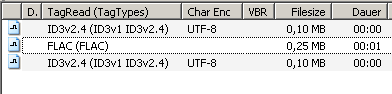
If you have a LCD display it is possible, that you cannot see this "listmode coloring".
You have to change screendriver configuration.
DD.20090823.1637.CEST

---
### Author:  [@JJ\_Johnson](https://community.mp3tag.de/u/JJ_Johnson)
#### Post date: [August 23, 2009, 3:30pm UTC](https://community.mp3tag.de/t/display-grid-lines-at-file-view/8833/3 "2009-08-23T15:30:45Z")
> [@DetlevD](#):
>
> The option allows to have lines with alternating background colour, e. g. lightgray and white:
I don't even see it in the screenshot that you posted.
---
### Author:  [@system](https://community.mp3tag.de/u/system)
#### Post date: [February 9, 2026, 12:21pm UTC](https://community.mp3tag.de/t/display-grid-lines-at-file-view/8833/4 "2026-02-09T12:21:44Z")