# Dynamic Range import from MAAT DROffline report?
**URL:** https://community.mp3tag.de/t/dynamic-range-import-from-maat-droffline-report/71726
**Category:** Mac
**Created:** [August 15, 2026, 9:14am UTC](https://community.mp3tag.de/t/dynamic-range-import-from-maat-droffline-report/71726 "2026-08-15T09:14:16Z")
**Posts on this page:** 15
**Page:** 1
### Author:  [@Ludovic](https://community.mp3tag.de/u/Ludovic)
#### Post date: [August 15, 2026, 9:14am UTC](https://community.mp3tag.de/t/dynamic-range-import-from-maat-droffline-report/71726/1 "2026-08-15T09:14:16Z")
Hello, i'm running MP3tag under macOS since years and very happy with it.
I'm also analyzing all my file with MAAT DROffline mkii under macOS. This software is not tagging any files, just producing a txt file with all the dynamic ranges for the individual titles and for the album.
Wouold like to see, if in a future release, MP3Tag could import the information of the txt from DROffline and tag the "Dynamic Range" for titles and "Album Dynamic Range" for albums in order to be managed through servers like minimserver and Tune ?
Thanks for your support
---
### Author:  [@ohrenkino](https://community.mp3tag.de/u/ohrenkino)
#### Post date: [August 15, 2026, 9:27am UTC](https://community.mp3tag.de/t/dynamic-range-import-from-maat-droffline-report/71726/2 "2026-08-15T09:27:43Z")
I am not sure if this would really be a new feature as there is already the function Convert\>Text file - Tag.
> [@Rename Files and Import Tags from Files](https://community.mp3tag.de/t/rename-files-and-import-tags-from-files/51720#p-153154-import-tags-from-text-files-7):
>
> Mp3tag provides a variety of possibilities to get tag information from parts of the filename or to rename files based on the information stored in the tag of a file. The base concept behind all converters in Mp3tag is the format string, which describes a pattern or template of a filename. A format string consists of any characters and predefined placeholders or scripting functions. Every placeholder begins with the percent sign %, followed by a tag field name and ends with the percent sign. …
You would have to adapt the text file accordingly or create a suitable mask to assign the data to fields.
---
### Author:  [@Ludovic](https://community.mp3tag.de/u/Ludovic)
#### Post date: [August 15, 2026, 9:54am UTC](https://community.mp3tag.de/t/dynamic-range-import-from-maat-droffline-report/71726/3 "2026-08-15T09:54:42Z")
@ohrenkino thanks for your feedbacks. Seems i missed this option. I just tried on few titles and work fine. I would need to find a way to customize the export of DROffline or to have a customized import template into MP3 Tag 😀
---
### Author:  [@ohrenkino](https://community.mp3tag.de/u/ohrenkino)
#### Post date: [August 15, 2026, 9:58am UTC](https://community.mp3tag.de/t/dynamic-range-import-from-maat-droffline-report/71726/4 "2026-08-15T09:58:19Z")
> [@Ludovic](#):
>
> customized import template into MP3 Tag
Or you import the data into a temporary tag field, distibute the individual pieces to dedicated fields and then delete that tag field again. This could probably all be achieved with an action group so that it would require only 2 clicks.
If you require further assistance or suggestions, a sample text file source would be nice.
---
### Author:  [@Ludovic](https://community.mp3tag.de/u/Ludovic)
#### Post date: [August 15, 2026, 10:24am UTC](https://community.mp3tag.de/t/dynamic-range-import-from-maat-droffline-report/71726/5 "2026-08-15T10:24:40Z")
Thanks a lot for your support ! A usual DROffiline output is like this : [Microsoft OneDrive](https://1drv.ms/t/c/4cfe7897b0d5e717/IQCH8x8Q7DOARoSvyi7Lb_n5ASbPwhxUXB5015JCmouPf_s?e=gD9Nvk)
Seems i cannot customize the export. So either i can do everything within MP3 Tag either i would need to go through a bit of IA and automatization to format the txt file in order to ease the import in MP3 Tag
---
### Author:  [@LyricsLover](https://community.mp3tag.de/u/LyricsLover)
#### Post date: [August 15, 2026, 12:01pm UTC](https://community.mp3tag.de/t/dynamic-range-import-from-maat-droffline-report/71726/6 "2026-08-15T12:01:24Z")
> [@Ludovic](#):
>
> to format the txt file in order to ease the import in MP3 Tag
It has been tested under Windows. I don't know if this is true for Mac too.
There are at least 2 big problems to use Convert Textfile -\> Tag:
1. The first character of your file name in your TXT output file must not be a space
(no spaces in front of the tracknumber!)
2. It seems that a file extension is needed
(for the recognition of the matching music track)
This is how the first two example tracks would need to be modified prior to import:

If you can modify your DROffiline output like the above example for the first track, this **Format String** would work:
`%_filename_ext% | %My_Format% | %My_SR% | %My_WL% | %My_Max_TPL% | %My_LUFSi% | %My_DR% | `
This results in the following imported example data for the first track:
Track #1:
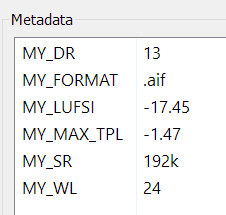 Track #2: 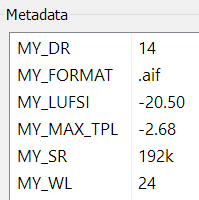
**Note:**
As I don't have any `*.aif` tracks, I used a `.mp3` track for my tests.
That's why my test tracks #1 and #2 have an `.mp3` extension in the above screenshot of the modified TXT file, rather than an `.aif` extension.
---
### Author:  [@ohrenkino](https://community.mp3tag.de/u/ohrenkino)
#### Post date: [August 15, 2026, 6:39pm UTC](https://community.mp3tag.de/t/dynamic-range-import-from-maat-droffline-report/71726/7 "2026-08-15T18:39:51Z")
> [@ohrenkino](#):
>
> Or you import the data into a temporary tag field, distibute the individual pieces to dedicated fields and then delete that tag field again.
This is my suggestion:
Create an action group with the following actions:
1. Import the whole text file with an action of the type "Import text file" into the field with the name e.g. IMPORT.
2. Create an action of the type "Import tag fields"
Source string: `$regexp($regexp(%import%,.+$replace(%_filename_ext%,'(','\(',')','\)')(.+?)\n.*,$1),\s+\|\s+,==)`
> [@Florian](#):
>
> For the Mac version use
>
> ```auto
> $regexp($regexp(%import%,.+|\n$replace(%_filename_ext%,'(','\(',')','\)')(.+?)\n.*|\n
>
> ```
Target format string: `==%dummy%==%format%==%word_length%==%max_tpl%==%lufsi%==%dr_pmf%==`
3. Create an action of the type "Remove fields": IMPORT
The source format string should create an output like
`==.aif==192k==24==-2.68==-20.50==14==`
The parts between the `==` then get assigned to the fields named in the target format string.
I have no clue which fields the players use to display or use the values - so that would have to be investigated by users of these players and adapted accordingly.
---
### Author:  [@Ludovic](https://community.mp3tag.de/u/Ludovic)
#### Post date: [August 16, 2026, 6:46am UTC](https://community.mp3tag.de/t/dynamic-range-import-from-maat-droffline-report/71726/8 "2026-08-16T06:46:40Z")
Thanks @LyricsLover and @ohrenkino will have a look today
---
### Author:  [@LyricsLover](https://community.mp3tag.de/u/LyricsLover)
#### Post date: [August 16, 2026, 7:34am UTC](https://community.mp3tag.de/t/dynamic-range-import-from-maat-droffline-report/71726/9 "2026-08-16T07:34:27Z")
Just a quick note for future readers:
The mentioned tool **MAAT DROffline** does not measure dynamic range in MP3 or AAC and other lossy-encoded music formats. Original statement:
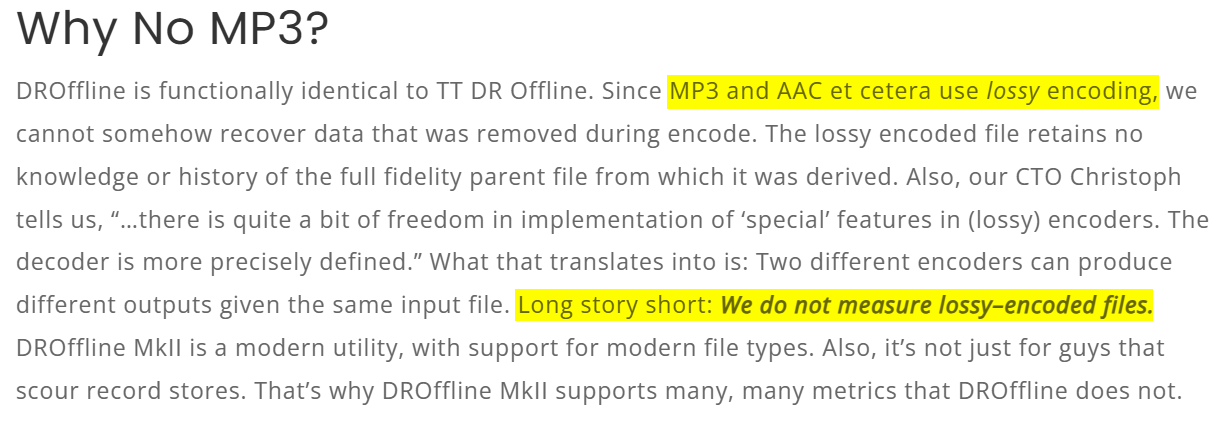
The pre-defined file selection only offers these 5 types:

---
### Author:  [@Florian](https://community.mp3tag.de/u/Florian)
#### Post date: [August 16, 2026, 9:10am UTC](https://community.mp3tag.de/t/dynamic-range-import-from-maat-droffline-report/71726/10 "2026-08-16T09:10:31Z")
> [@ohrenkino](#):
>
> 1. Create an action of the type "Import tag fields"
> Source string: `$regexp($regexp(%import%,.+$replace(%_filename_ext%,'(','\(',')','\)')(.+?)\n.*,$1),\s+\|\s+,==)`
For the Mac version use
```auto
$regexp($regexp(%import%,.+|\n$replace(%_filename_ext%,'(','\(',')','\)')(.+?)\n.*|\n,$1),\s+\|\s+,==)
```
---
### Author:  [@ohrenkino](https://community.mp3tag.de/u/ohrenkino)
#### Post date: [August 23, 2026, 10:40am UTC](https://community.mp3tag.de/t/dynamic-range-import-from-maat-droffline-report/71726/11 "2026-08-23T10:40:07Z")
What did you find out, when you had a look (more than 7 days ago)?
---
### Author:  [@Ludovic](https://community.mp3tag.de/u/Ludovic)
#### Post date: [August 23, 2026, 2:59pm UTC](https://community.mp3tag.de/t/dynamic-range-import-from-maat-droffline-report/71726/12 "2026-08-23T14:59:14Z")
Thanks for chasing me. What i have done right now is to format the DROffline txt file with the support of copilot to produce a new txt file that i can easily input inside MP3 Tag with only the track numbers and the DR of the track (Dynamic Range) and the overall DR of the Album (ALBUM DYNAMIC RANGE). Now i need to automatize with the support of the AI.
---
### Author:  [@ohrenkino](https://community.mp3tag.de/u/ohrenkino)
#### Post date: [August 23, 2026, 4:00pm UTC](https://community.mp3tag.de/t/dynamic-range-import-from-maat-droffline-report/71726/13 "2026-08-23T16:00:22Z")
> [@Ludovic](#):
>
> What i have done right now is to format the DROffline txt file with the support of copilot to produce a nex txt file that i can easily input inside MP3 Tag
I would like to add that my suggested workflow and @Florian 's suggested expression would take the original text file and extract the data for each file. No further re-formatting or AI queries required.
---
### Author:  [@Ludovic](https://community.mp3tag.de/u/Ludovic)
#### Post date: [August 23, 2026, 4:43pm UTC](https://community.mp3tag.de/t/dynamic-range-import-from-maat-droffline-report/71726/14 "2026-08-23T16:43:50Z")
Thanks. Will try to spend time on this this week as i would travel for business the weeks after
---
### Author:  [@system](https://community.mp3tag.de/u/system)
#### Post date: [September 2, 2026, 6:19am UTC](https://community.mp3tag.de/t/dynamic-range-import-from-maat-droffline-report/71726/15 "2026-09-02T06:19:40Z")
This topic was automatically closed 2 days after the last reply. New replies are no longer allowed.