# Entry Fields blank ...
**URL:** https://community.mp3tag.de/t/entry-fields-blank/4435
**Category:** Support
**Created:** [February 6, 2007, 6:37pm UTC](https://community.mp3tag.de/t/entry-fields-blank/4435 "2007-02-06T18:37:23Z")
**Posts on this page:** 8
**Page:** 1
### Author:  [@Mavis](https://community.mp3tag.de/u/Mavis)
#### Post date: [February 6, 2007, 6:37pm UTC](https://community.mp3tag.de/t/entry-fields-blank/4435/1 "2007-02-06T18:37:23Z")
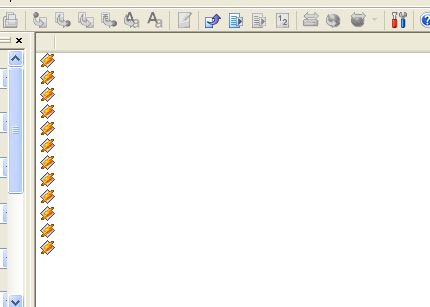
Hi ... I'm using V 2.37a, suddenly, I can't see anything in the left hand pane, apart from the winamp icon for each file. All the columns have disappeared, and I can't seem to get them back. I've tried re-installing without success. Any help / suggestions would be gratefully recieved ... Thanks.
---
### Author:  [@Sebastian\_Mares](https://community.mp3tag.de/u/Sebastian_Mares)
#### Post date: [February 6, 2007, 8:28pm UTC](https://community.mp3tag.de/t/entry-fields-blank/4435/2 "2007-02-06T20:28:26Z")
Delete %APPDATA%\Mp3tag\data\columns.ini. Mp3tag should create a new one when you launch it again, but all custom columns will be lost.
---
### Author:  [@Mavis](https://community.mp3tag.de/u/Mavis)
#### Post date: [February 7, 2007, 8:24am UTC](https://community.mp3tag.de/t/entry-fields-blank/4435/3 "2007-02-07T08:24:48Z")
Hi ...Thanks for reply.
I deleted this from the registry, but it didn't make any difference. I then tried re installing again ... Still no difference. Then I did a registry search and removed all traces of Mp3tag before re-installing, and that has worked. 🙂 Thank you for your help.
---
### Author:  [@Sebastian\_Mares](https://community.mp3tag.de/u/Sebastian_Mares)
#### Post date: [February 7, 2007, 10:05am UTC](https://community.mp3tag.de/t/entry-fields-blank/4435/4 "2007-02-07T10:05:58Z")
I didn't say anything about the registry. 😳
---
### Author:  [@Mavis](https://community.mp3tag.de/u/Mavis)
#### Post date: [February 7, 2007, 3:43pm UTC](https://community.mp3tag.de/t/entry-fields-blank/4435/5 "2007-02-07T15:43:53Z")
I searched in the installation folder, but there wasn't a file with the name you mentioned (Delete %APPDATA%\Mp3tag\data\columns.ini) I looked at everything. Then a search found one in the registry, so I guessed that had to be it!
Anyway, the programme (and everything else on the computer) appear to be working well, so all's well that ends well ... Thanks again. 🙂
---
### Author:  [@Sebastian\_Mares](https://community.mp3tag.de/u/Sebastian_Mares)
#### Post date: [February 7, 2007, 4:06pm UTC](https://community.mp3tag.de/t/entry-fields-blank/4435/6 "2007-02-07T16:06:18Z")
%APPDATA% is a system variable that stands for Documents and Settings\User\Application Data. It's like %WINDIR% or %TEMP% - you can enter that as-is in Windows Explorer or the command prompt.
---
### Author:  [@Mavis](https://community.mp3tag.de/u/Mavis)
#### Post date: [February 7, 2007, 5:27pm UTC](https://community.mp3tag.de/t/entry-fields-blank/4435/7 "2007-02-07T17:27:50Z")
Yes ... but as a non techie, I didn't know that, and you didn't say it ... unfortunately not everyone is that computer literate. I still appreciate your help though, as it's working well.
---
### Author:  [@system](https://community.mp3tag.de/u/system)
#### Post date: [February 9, 2026, 12:20pm UTC](https://community.mp3tag.de/t/entry-fields-blank/4435/8 "2026-02-09T12:20:08Z")