# Export configuration template with the ability to sort, filter, display cover art, and play local songs in your browser
**URL:** https://community.mp3tag.de/t/export-configuration-template-with-the-ability-to-sort-filter-display-cover-art-and-play-local-songs-in-your-browser/71662
**Category:** Export
**Tags:** javascript, export, html
**Created:** [July 27, 2026, 3:50pm UTC](https://community.mp3tag.de/t/export-configuration-template-with-the-ability-to-sort-filter-display-cover-art-and-play-local-songs-in-your-browser/71662 "2026-07-27T15:50:24Z")
**Posts on this page:** 7
**Page:** 1
### Author:  [@LyricsLover](https://community.mp3tag.de/u/LyricsLover)
#### Post date: [July 27, 2026, 3:50pm UTC](https://community.mp3tag.de/t/export-configuration-template-with-the-ability-to-sort-filter-display-cover-art-and-play-local-songs-in-your-browser/71662/1 "2026-07-27T15:50:24Z")
Based on this [idea here](https://community.mp3tag.de/t/export-configuration-archive-problem/65666/7), I enhanced my example Export configuration script.
[MyColumnsExport (with Filter, Sort, Player, Cover) v1.2.mte](https://community.mp3tag.de/uploads/short-url/89pFGsxlOZlNKke1C4qfR3Keays.mte) (37,9 KB)
(download it and place it in `%appdata%\Mp3tag\export`)
Speed-optimized v2.0:
> [@Export configuration template with the ability to sort, filter, display cover art, and play local songs in your browser](https://community.mp3tag.de/t/export-configuration-template-with-the-ability-to-sort-filter-display-cover-art-and-play-local-songs-in-your-browser/71662/5):
>
> The script version 1.2 works fine for a typical album with 10-20 tracks. It also holds up reasonably well for something like the "UK Top 40" or "UK Top 100" lists. But it becomes too slow once you export thousands of rows. This is a speed-optimized version v2.0 of the script: [MyColumnsExport (with Filter, Sort, Player, Cover, speed checked) v2.0.mte](https://community.mp3tag.de/uploads/short-url/5CRJHPTINLoGnfcnCAwn9NWgCsS.mte) (43,6 KB) Changelog: Performance overhaul The old version re-searched for cover images and re-scanned all table cells on every sort, filter key…
This Mp3tag export script creates a HTML-page for all selected tracks.
# Features:
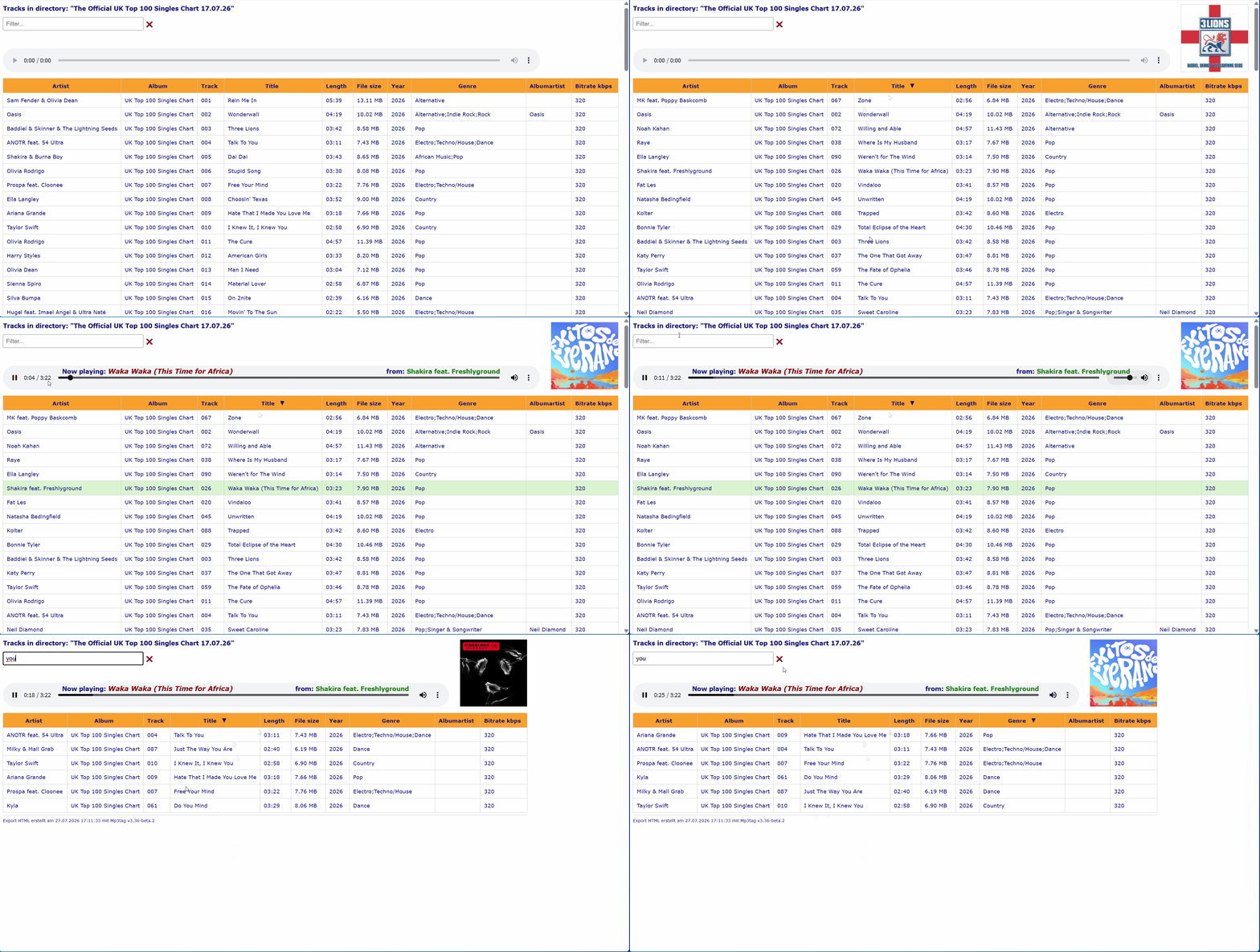
**a) Sort** your tracks by any column (by clicking on the column header) in ascending or descending order, by size in MB/KB, or alphabetically or numerical
**b) Filter** your tracks by entering any character that your filtered track `TITLE` has to include
**c) Play your local track** by clicking anywhere on the row. The embedded HTML5 browser-player controls include Play/Pause, Volume, Mute and Position, which you can access via the large slider.
**d) Display the track cover**. If you export the covers for your selected tracks with an Action "Export Cover to file" and the Format string `.\Covers\$num(%track%,2) - %title%` hovering over the `TITLE` column displays such covers. When you click on a song to play it, an existing cover art will remain in the top right-hand corner.
**Important:**
Such a HTML page is not a replacement for Foobar, VLC, or any Jukebox or Media Manager!
This template only demonstrates the potential of an HTML page enriched with JavaScript code.
Those interested can take a look inside the `.mte`. I have documented all its functions and styles. You might get an idea of what is possible with **File** -\> **Export** and some JavaScript skills.
**Final hint:** This script has been tested in Google Chrome, Microsoft Edge, Opera (Blink), Mullvad Browser, and Firefox (Gecko).
All core features work consistently across these browsers. However, due to limitations of the Gecko rendering engine, the HTML5 player supports fewer design and styling options in Firefox and Mullvad Browser than in Blink-based browsers.
---
### Author:  [@astrohip](https://community.mp3tag.de/u/astrohip)
#### Post date: [July 28, 2026, 3:28pm UTC](https://community.mp3tag.de/t/export-configuration-template-with-the-ability-to-sort-filter-display-cover-art-and-play-local-songs-in-your-browser/71662/2 "2026-07-28T15:28:54Z")
Holy Moley, this is amazing. All sorts of possibilities to explore. Thanks for sharing this.
One question: Sort time. I'm experimenting with a 4,000 row export, and it takes about 5 seconds to sort. Is this normal for Chrome? Very fast computer (i9, 64GB RAM), very fast HD (SSD). W11, Chrome. The HTML file is about 5MB.
---
### Author:  [@LyricsLover](https://community.mp3tag.de/u/LyricsLover)
#### Post date: [July 28, 2026, 3:53pm UTC](https://community.mp3tag.de/t/export-configuration-template-with-the-ability-to-sort-filter-display-cover-art-and-play-local-songs-in-your-browser/71662/3 "2026-07-28T15:53:06Z")
> [@astrohip](#):
>
> Holy Moley, this is amazing. All sorts of possibilities to explore. Thanks for sharing this.
You're welcome! I'm glad to hear it.
> [@astrohip](#):
>
> ...4,000 row export, and it takes about 5 seconds to sort. Is this normal for Chrome?
To be honest: I haven't tried to optimise the sort function for speed yet.
It was fast enough for my "UK Top 100" example. 😉
On second glance, I don't think the sort itself has a speed issue.
I think it has more to do with the way the DOM is handled.
Every click on a column header performs the following operations for _every single comparison_:
• 2 x `querySelectorAll`
• 2 x `textContent.trim()`
• Optional conversions (time, bytes, numbers)
• And finally 4'000 x `appendChild`
With 4'000 rows, that results in roughly:
4'000 log(4'000) ≈ 48'000 comparisons
→ 48'000 DOM accesses
→ 48'000 text extractions
→ 48'000 trim operations
All of that is expensive.
This could perhaps be optimised, but as mentioned, "speed" was not the main focus. 😇
Maybe I'll find some time later to look into it more closely, but please don't expect it to happen in the next few days.
---
### Author:  [@astrohip](https://community.mp3tag.de/u/astrohip)
#### Post date: [July 28, 2026, 4:05pm UTC](https://community.mp3tag.de/t/export-configuration-template-with-the-ability-to-sort-filter-display-cover-art-and-play-local-songs-in-your-browser/71662/4 "2026-07-28T16:05:44Z")
It's fine the way it is, don't spend any effort on the sort. It was more curiosity than complaining.
It is interesting what it goes thru to do a sort!
---
### Author:  [@LyricsLover](https://community.mp3tag.de/u/LyricsLover)
#### Post date: [August 2, 2026, 8:44am UTC](https://community.mp3tag.de/t/export-configuration-template-with-the-ability-to-sort-filter-display-cover-art-and-play-local-songs-in-your-browser/71662/5 "2026-08-02T08:44:47Z")
The script version 1.2 works fine for a typical album with 10-20 tracks. It also holds up reasonably well for something like the "UK Top 40" or "UK Top 100" lists. But it becomes too slow once you export thousands of rows.
This is a speed-optimized version **v2.0** of the script:
[MyColumnsExport (with Filter, Sort, Player, Cover, speed checked) v2.0.mte](https://community.mp3tag.de/uploads/short-url/5CRJHPTINLoGnfcnCAwn9NWgCsS.mte) (43,6 KB)
**Changelog:**
**Performance overhaul**
The old version re-searched for cover images and re-scanned all table cells on every sort, filter keystroke, and click - fine for small amount of tracks, but slow at scale. v2.0 caches everything once on page load (row search text, cover paths, sort keys) and reuses that cache everywhere. Sorting now uses a "decorate-sort-undecorate" approach instead of recalculating sort keys during every comparison, and DOM updates are batched via a document fragment instead of moving rows one-by-one. Filtering also got a "debounce" (150ms) so it doesn't re-run on every single keystroke.
**Cover detection: guesswork → exact match**
v1.2 guessed at cover filenames by brute-force testing 16 filename/extension combinations per track (with/without album folder, raw/cleaned title, four extensions) - slow and unreliable. **v2.0** drops the guessing entirely: it now reads the exact cover path and MIME type that Mp3tag already exported per track, so each track needs exactly one lookup instead of up to sixteen.
**Hint:**
You should export your covers - if you want to see them - with the new Format string in **Export Cover to file** :
`.\Covers\$num(%track%,2) - $trim($regexp($validate(%title%,' '), +,' '))`
This should solve some problems with special invalid characters for filenames like `*` or `?` or `<` `>` or `:` and some more.
**New: track/filter counters**
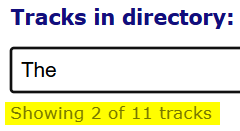
**v2.0** adds a live "Showing X of Y tracks" indicator and cleans up the "missing covers" counter placement, giving better feedback when filtering large libraries.
**Minor layout/UX polish**
Column header text no longer wraps awkwardly around the sort arrow (reserved space added), some spacing/margins around the filter row were tightened, and sorting now also handles the Year column numerically.
This v2.0 is built to comfortably handle ~20'000 tracks, whereas v1.2 was really only comfortable with much smaller amount of exported rows.
Still, I'd like to remind you:
> [@](#):
>
> **Important:**
> Such a HTML page is not a replacement for Foobar, VLC, or any Jukebox or Media Manager!
> This template only demonstrates the potential of an HTML page enriched with JavaScript code.
---
### Author:  [@astrohip](https://community.mp3tag.de/u/astrohip)
#### Post date: [August 2, 2026, 12:30pm UTC](https://community.mp3tag.de/t/export-configuration-template-with-the-ability-to-sort-filter-display-cover-art-and-play-local-songs-in-your-browser/71662/6 "2026-08-02T12:30:41Z")
Wow, amazing work. Thanks!!
---
### Author:  [@system](https://community.mp3tag.de/u/system)
#### Post date: [August 30, 2026, 12:31pm UTC](https://community.mp3tag.de/t/export-configuration-template-with-the-ability-to-sort-filter-display-cover-art-and-play-local-songs-in-your-browser/71662/7 "2026-08-30T12:31:37Z")
This topic was automatically closed 28 days after the last reply. New replies are no longer allowed.