# Export Configurations
**URL:** https://community.mp3tag.de/t/export-configurations/1867
**Category:** Support
**Created:** [April 9, 2005, 9:54pm UTC](https://community.mp3tag.de/t/export-configurations/1867 "2005-04-09T21:54:57Z")
**Posts on this page:** 6
**Page:** 1
### Author:  [@liah00](https://community.mp3tag.de/u/liah00)
#### Post date: [April 9, 2005, 9:54pm UTC](https://community.mp3tag.de/t/export-configurations/1867/1 "2005-04-09T21:54:57Z")
Hey everyone. I'm new here. I've been using this program for a day now and it's already one of the best things that ever happened to me!!!
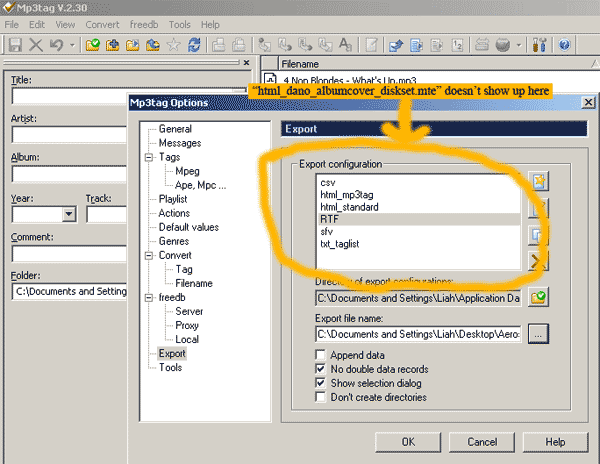
Anyhow, I downloaded an export configuration, stuck it in my "export" folder like I assumed should be done. But...I can't access the file through the export menu within the program (all it displays are the default configurations). Is there some way I can import that to the program's export config list? That sounds confusing..I hope I made my point. 😳
I searched everywhere and could find anything about how to do this.
Mel
---
### Author:  [@nickless](https://community.mp3tag.de/u/nickless)
#### Post date: [April 9, 2005, 10:52pm UTC](https://community.mp3tag.de/t/export-configurations/1867/2 "2005-04-09T22:52:29Z")
> [@](#):
>
> Anyhow, I downloaded an export configuration, stuck it in my "export" folder like I assumed should be done.
Hi!
Export configurations should be extracted from Zip-Archives into "%appdata%\Mp3Tag\export" folder (for support of multi-user environments).
Regards
nickless
---
### Author:  [@liah00](https://community.mp3tag.de/u/liah00)
#### Post date: [April 9, 2005, 11:34pm UTC](https://community.mp3tag.de/t/export-configurations/1867/3 "2005-04-09T23:34:46Z")
That's what I did the first time. I did it a second time after your post just in case I messed something up the first time. I even closed the program and re-opened it a couple times.
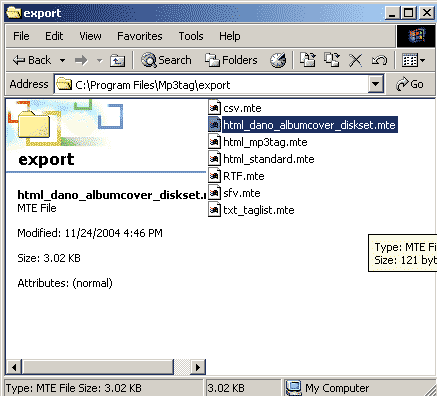
In this picture, you'll see that I extracted the file "html\_dano\_albumcover\_diskset.mte" to the proper folder.
And in this one, you'll see that it doesn't show up on the list (and I don't know how to get it to do that).
(I hope those pictures show up)
Mel


---
### Author:  [@Sebastian\_Mares](https://community.mp3tag.de/u/Sebastian_Mares)
#### Post date: [April 10, 2005, 6:31am UTC](https://community.mp3tag.de/t/export-configurations/1867/4 "2005-04-10T06:31:35Z")
> [@](#):
>
> In this picture, you'll see that I extracted the file "html\_dano\_albumcover\_diskset.mte" to the proper folder.
>
> \<{POST\_SNAPBACK}\>
No, you extracted it in the program files folder, not the application data directory. "%appdata%" (you can simply type that as-is in Windows Explorer) is usually mapped to "Documents and Settings\User". 😉
---
### Author:  [@liah00](https://community.mp3tag.de/u/liah00)
#### Post date: [April 10, 2005, 6:48am UTC](https://community.mp3tag.de/t/export-configurations/1867/5 "2005-04-10T06:48:37Z")
Oh....how stupid can I be??? Haha. I'm so sorry. I've got it now. Thanks for the patience. 
---
### Author:  [@system](https://community.mp3tag.de/u/system)
#### Post date: [February 9, 2026, 12:19pm UTC](https://community.mp3tag.de/t/export-configurations/1867/6 "2026-02-09T12:19:21Z")