# Extract Cover Working Dir
**URL:** https://community.mp3tag.de/t/extract-cover-working-dir/8929
**Category:** Support
**Created:** [September 12, 2009, 2:41am UTC](https://community.mp3tag.de/t/extract-cover-working-dir/8929 "2009-09-12T02:41:30Z")
**Posts on this page:** 6
**Page:** 1
### Author:  [@mjcm](https://community.mp3tag.de/u/mjcm)
#### Post date: [September 12, 2009, 2:41am UTC](https://community.mp3tag.de/t/extract-cover-working-dir/8929/1 "2009-09-12T02:41:30Z")
Hi I have a small problem with extract cover.
Steps to reproduce:
1.
Open a folder with Audio files
Extract Cover
Notice directory and file name and click save
Same thing but Audio files located on a different drive
1.
Everything is the same except that the export Directory is the
same directory as in Nr 1. and not the current working directory.
A screenshot of the Orignal Directory
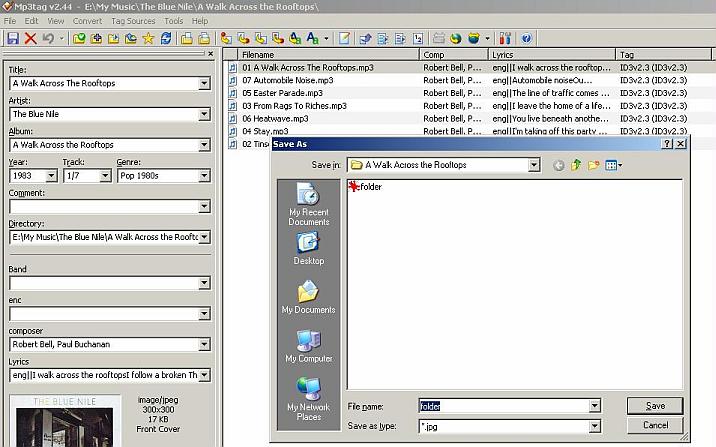
and a Screenshot of the temporary directory
(Notice the difference in directory in the Main Page and the save dialog)



---
### Author:  [@DetlevD](https://community.mp3tag.de/u/DetlevD)
#### Post date: [September 12, 2009, 6:54am UTC](https://community.mp3tag.de/t/extract-cover-working-dir/8929/2 "2009-09-12T06:54:36Z")
> [@Mike\_nl](#):
>
> Hi I have a small problem with extract cover. ...
What is the Formatstring used by Mp3tag Action "Export cover image to file" in both cases?
From what application does the SaveAs Dialog come from?
DD.20090912.1054.CEST
---
### Author:  [@mjcm](https://community.mp3tag.de/u/mjcm)
#### Post date: [September 12, 2009, 7:03am UTC](https://community.mp3tag.de/t/extract-cover-working-dir/8929/3 "2009-09-12T07:03:59Z")
Sorry for the confusion.
No Action, just Right Click on the Image and select [Extract Cover]. And the Save Dialog comes from Mp3tag itself
---
### Author:  [@DetlevD](https://community.mp3tag.de/u/DetlevD)
#### Post date: [September 12, 2009, 9:10am UTC](https://community.mp3tag.de/t/extract-cover-working-dir/8929/4 "2009-09-12T09:10:24Z")
Ah, yes I understand, right clicking on the cover image in the Panel Dialog ... but I cannot confirm the error condition, you've described. The right click SaveAs Dialog presents the home folder of the current selected track as expected.
DD.20090912.1310.CEST
---
### Author:  [@mjcm](https://community.mp3tag.de/u/mjcm)
#### Post date: [September 12, 2009, 9:21am UTC](https://community.mp3tag.de/t/extract-cover-working-dir/8929/5 "2009-09-12T09:21:46Z")
When extracting on the same drive, the working dir follows me around 😉
But starting to work on a different drive, the working dir then points to the last SaveDir
---
### Author:  [@system](https://community.mp3tag.de/u/system)
#### Post date: [February 9, 2026, 12:21pm UTC](https://community.mp3tag.de/t/extract-cover-working-dir/8929/6 "2026-02-09T12:21:47Z")