# Extract Date part of RELEASETIME field
**URL:** https://community.mp3tag.de/t/extract-date-part-of-releasetime-field/9035
**Category:** Support
**Created:** [September 26, 2009, 10:59am UTC](https://community.mp3tag.de/t/extract-date-part-of-releasetime-field/9035 "2009-09-26T10:59:16Z")
**Posts on this page:** 7
**Page:** 1
### Author:  [@bugmenot](https://community.mp3tag.de/u/bugmenot)
#### Post date: [September 26, 2009, 10:59am UTC](https://community.mp3tag.de/t/extract-date-part-of-releasetime-field/9035/1 "2009-09-26T10:59:16Z")
Hello all. I'm hoping someone could help me out - hopefully a quick and easy one. 🙂
iTunes sets the RELEASETIME field as Date+Time with a couple of characters thrown in (e.g. "2009-09-14T05:29:04Z").
I would like to trim the ReleaseTime field so it just has the date. Can anyone help out? 
```
Original = 2009-09-14T05:29:04Z
Required = 2009-09-14
```
Many regards
🙂
---
### Author:  [@Florian](https://community.mp3tag.de/u/Florian)
#### Post date: [September 26, 2009, 11:14am UTC](https://community.mp3tag.de/t/extract-date-part-of-releasetime-field/9035/2 "2009-09-26T11:14:04Z")
This can be done using an Action Format value for the field RELEASETIME where you use $left(%RELEASETIME%,10) as format string.
---
### Author:  [@DetlevD](https://community.mp3tag.de/u/DetlevD)
#### Post date: [April 10, 2010, 8:44am UTC](https://community.mp3tag.de/t/extract-date-part-of-releasetime-field/9035/3 "2010-04-10T08:44:48Z")
QUOTE (another @ Sep 26 2009, 14:59) \<{POST\_SNAPBACK}\>
... iTunes sets the RELEASETIME field as Date+Time with a couple of characters thrown in (e.g. "2009-09-14T05:29:04Z").
I would like to trim the ReleaseTime field so it just has the date. ...
```
Original = 2009-09-14T05:29:04Z
Required = 2009-09-14 ...
```
Mp3tag supports different ways to solve this task.
Action "Guess values"
Source format: %RELEASETIME%
Guessing pattern: %RELEASETIME%T%DUMMY%
DD.20100410.1244.CEST
---
### Author:  [@Trac](https://community.mp3tag.de/u/Trac)
#### Post date: [April 23, 2011, 3:55pm UTC](https://community.mp3tag.de/t/extract-date-part-of-releasetime-field/9035/4 "2011-04-23T15:55:16Z")
Hi All, Thanks for a great prog.
I would also like to crop the time, but was unsuccessful with the suggestions.
Should I apply a code in the column data? All of the RELEASETIMEs have T&Z after the date:
-2010-08-01T00:00:00Z
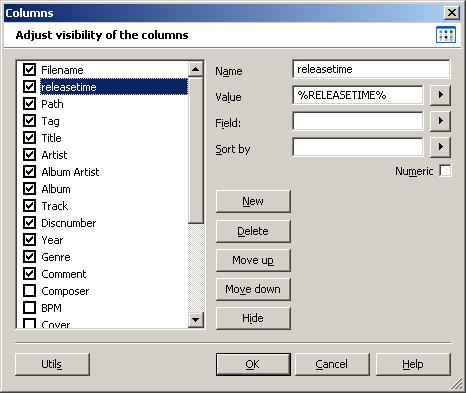
Thanks

---
### Author:  [@DetlevD](https://community.mp3tag.de/u/DetlevD)
#### Post date: [April 23, 2011, 4:07pm UTC](https://community.mp3tag.de/t/extract-date-part-of-releasetime-field/9035/5 "2011-04-23T16:07:00Z")
> [@Trac](#):
>
> ... I would also like to crop the date, but was unsuccessful with the suggestions.
> Should I apply a code in the column data? All of the RELEASETIMEs have T&Z after the date:
> -2010-08-01T00:00:00Z ...
This is a one year old thread now re-opened, why?
Hi Trac, see post #2 or #3 and try to use an action as described.
The list view's purpose is mainly to display tag-field content.
To change tag-field content use the converters or the actions.
DD.20110423.2009.CEST
---
### Author:  [@Trac](https://community.mp3tag.de/u/Trac)
#### Post date: [April 23, 2011, 4:25pm UTC](https://community.mp3tag.de/t/extract-date-part-of-releasetime-field/9035/6 "2011-04-23T16:25:49Z")
> [@DetlevD](#):
>
> This is a one year old thread now re-opened, why?
>
> Hi Trac, see post #3 and try to use an action as described.
>
> The list view's purpose is mainly to display tag-field content.
> To change tag-field content use the converters or the actions.
>
> DD.20110423.2009.CEST
My Bad, new to this software and was using the convert tab instead of the Actions tab.
Post #3 fixed it.
Thanks
---
### Author:  [@system](https://community.mp3tag.de/u/system)
#### Post date: [February 9, 2026, 12:21pm UTC](https://community.mp3tag.de/t/extract-date-part-of-releasetime-field/9035/7 "2026-02-09T12:21:49Z")