# Feature Request: Disable "DOS Box" while running a "Tool"?
**URL:** https://community.mp3tag.de/t/feature-request-disable-dos-box-while-running-a-tool/7313
**Category:** Support
**Created:** [October 10, 2008, 12:46pm UTC](https://community.mp3tag.de/t/feature-request-disable-dos-box-while-running-a-tool/7313 "2008-10-10T12:46:34Z")
**Posts on this page:** 5
**Page:** 1
### Author:  [@Moonbase](https://community.mp3tag.de/u/Moonbase)
#### Post date: [October 10, 2008, 12:46pm UTC](https://community.mp3tag.de/t/feature-request-disable-dos-box-while-running-a-tool/7313/1 "2008-10-10T12:46:34Z")
I just had to update MusicIP Mixer's database with BPM values and used a command-line exe as "tool" inside MP3Tag for this. I ran it on a sample 4,255 files and have the following feature requests:
1. Is it somehow possible to introduce an option _not_ to show the DOS Box popping up for each and every file? This looks a bit crazy:
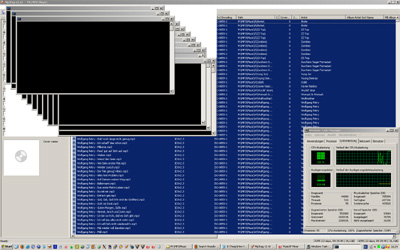
1. It seems MP3Tag spawns a new process for each selected song file, resulting in lots of processes running at the same time (and thus probably clobbering weaker machinery). In updating info for 4,255 files, I lost the info on 21 (which could be re-done).
Would it be possible _not_ to run _all_ processes at the same time but instead proceed to the next file in the list only _after the current one has finished execution,_ i.e. handle all files _sequentially?_ I guess this would make to "Tools" function much more versatile (if selectable), it could then also be used to spawn processes that can handle only _one_ instance running.
Since most tools used would be small command-line tools anyway (I think), there'd be not many problems with having to keep a DOS window open and maybe wait for user input or the like.
What do you think?
---
### Author:  [@Stevest](https://community.mp3tag.de/u/Stevest)
#### Post date: [October 10, 2008, 1:46pm UTC](https://community.mp3tag.de/t/feature-request-disable-dos-box-while-running-a-tool/7313/2 "2008-10-10T13:46:42Z")
Just a quick idea, quasi a workaround:
maybe you could use export function instead of Tools to create .bat files. In that file you could use the start command with the /wait switch. In this case your .exe will be called sequentially.
---
### Author:  [@Moonbase](https://community.mp3tag.de/u/Moonbase)
#### Post date: [October 10, 2008, 4:17pm UTC](https://community.mp3tag.de/t/feature-request-disable-dos-box-while-running-a-tool/7313/3 "2008-10-10T16:17:17Z")
> [@Stevest](#):
>
> […]quasi a workaround[…]
Hee hee, a workaround for the workaround! (Thanks for the creative idea, Stevest!)
I came up with the following »Export« which will actually create a BATCH file to tag _all three_ (BPM, ORIGYEAR and LANGUAGE) into the Music Mixer Database:
**Export: Batch file for Music IP Mixer Database Update**
```
$filename("C:\Program Files\MusicIP\MusicIP Mixer\mmm.bat")$loop(%_path%)start "MMMExec updating BPM" /wait /B "C:\Program Files\MusicIP\MusicIP Mixer\mmmexec.exe" -set BPM=%bpm% "%_path%"
start "MMMExec updating ORIGYEAR" /wait /B "C:\Program Files\MusicIP\MusicIP Mixer\mmmexec.exe" -set ORIGYEAR=%origyear% "%_path%"
start "MMMExec updating LANGUAGE" /wait /B "C:\Program Files\MusicIP\MusicIP Mixer\mmmexec.exe" -set LANGUAGE=%language% "%_path%"
$loopend()
```
As you can see, I preferred directly pointing to both the location of _mmmexec.exe_ and the newly created _mmm.bat_ so that everything has a »defined location" and isn’t dependent on PATH variables or the like. The resulting _mmm.bat_ file can be executed either manually or by selecting »Yes« when MP3Tag Export asks you whether the file should be »displayed«. (Most systems have .bat associated with the command processor.)
_Important note:_ _Always_ specify the »window title« parameter with the _START_ command—otherwise Windows will mess up the parameters given to the executed program!
Still, I very much hope for the above requested feature …
EDIT: Please use with care! I just found out that this will presently _not_ function with file paths containing non-ASCII characters. I have written a [feature request](https://community.mp3tag.de/t/7321/1) asking Florian to implement an export file encoding that is compatible with Batch Files.
The _good_ thing is: You can still use the scheme—in a way: Answer »No« when asked for displaying the export file, use an editor that can convert _ANSI_ to _OEM_ codepage to edit the generated _mmm.bat_ file, and then execute it manually. — A workaround for the workaround for a workaround … 😃
---
### Author:  [@Stevest](https://community.mp3tag.de/u/Stevest)
#### Post date: [October 10, 2008, 5:15pm UTC](https://community.mp3tag.de/t/feature-request-disable-dos-box-while-running-a-tool/7313/4 "2008-10-10T17:15:39Z")
To say the truth, I myself use some batch-file-based workarounds (for example to create multiple files with only one export, to move complete folders - including audio files, pictures, pdfs etc.).
Well, I am an engineer, and the engineers' most important attribute is laziness. I always rack my brains how to make things easier. So I create action and export scripts. And if there is no way to do things, I try to find workarounds. Me sluggard. 😳😃
I'm pleased to help you in some way.
---
### Author:  [@system](https://community.mp3tag.de/u/system)
#### Post date: [February 9, 2026, 12:21pm UTC](https://community.mp3tag.de/t/feature-request-disable-dos-box-while-running-a-tool/7313/5 "2026-02-09T12:21:09Z")