# Feature Request - Frequency Spectrum
**URL:** https://community.mp3tag.de/t/feature-request-frequency-spectrum/71784
**Category:** Mac
**Created:** [August 28, 2026, 8:05pm UTC](https://community.mp3tag.de/t/feature-request-frequency-spectrum/71784 "2026-08-28T20:05:58Z")
**Posts on this page:** 5
**Page:** 1
### Author:  [@lalox](https://community.mp3tag.de/u/lalox)
#### Post date: [August 28, 2026, 8:05pm UTC](https://community.mp3tag.de/t/feature-request-frequency-spectrum/71784/1 "2026-08-28T20:05:58Z")
If I may request, it would be beautiful to have a frequency spectrum as an optional addition in the tag panel.
Currently I drop the song file into Spek but Apple Silicon will stop supporting Spek in 2027 since Spek was made ages ago for the Intel chips. Surco and FakinTheFunk have options to view a frequency spectrum of a song but it takes me multiple steps instead of the quick drag and drop into Spek. Spectro allows for the quick drag and drop so that would be the natural replacement. However, it would be just incredibly awesome to have that all in one place within mp3tag. Particularly because mp3tag is the best. I require a frequency spectrum because I frequently come across songs that have a labeled bitrate that is not the true bitrate or have to compare the same song from different sources to choose the better quality one to keep.
Thank you kindly
---
### Author:  [@Casual\_Tea](https://community.mp3tag.de/u/Casual_Tea)
#### Post date: [August 30, 2026, 9:07am UTC](https://community.mp3tag.de/t/feature-request-frequency-spectrum/71784/2 "2026-08-30T09:07:00Z")
While I find spectrograms useful for similar reasons as you, I don't know if they belong in a tag editor like Mp3tag.
After a quick online search I found [spek-X](https://github.com/MikeWang000000/spek-X), which supposedly works on Apple Silicon (I've never owned a mac so I cannot test this claim).
Personally I'd try adding this (or a similar alternative to spek that is usable on the command line) in a custom Tool within Mp3tag to quickly create/display spectrograms for selected songs.
---
### Author:  [@lalox](https://community.mp3tag.de/u/lalox)
#### Post date: [September 6, 2026, 6:34am UTC](https://community.mp3tag.de/t/feature-request-frequency-spectrum/71784/3 "2026-09-06T06:34:41Z")
Thank you for the spek-X link. That's helpful for free. However like I said, Spectro does the same.
Using the command line tool would really slow down my workflow. As a DJ I do this for hundreds-thousands of individual songs every week.
I understand how you might see this as unrelated to tag editing but it's actually really relevant if you have different copies of the same song in varying qualities. Because then you can quickly choose the ideal one to edit and keep and discard the rest.
As far as a custom Tool within Mp3tag, that sounds great, but I frankly have no idea where to start with that or if that's even a possibility. Do you?
---
### Author:  [@poster](https://community.mp3tag.de/u/poster)
#### Post date: [September 6, 2026, 7:38am UTC](https://community.mp3tag.de/t/feature-request-frequency-spectrum/71784/5 "2026-09-06T07:38:55Z")
> [@lalox](#):
>
> As far as a custom Tool within Mp3tag, that sounds great, but I frankly have no idea where to start with that or if that's even a possibility. Do you?
As far as I know, this feature currently exists only in the Windows version of Mp3tag.
> [@MAC New User findings and suggestion](https://community.mp3tag.de/t/mac-new-user-findings-and-suggestion/69554/5):
>
> Yes, running external tools is on my internal wish list. I just counted your vote for it. Do you need any specific tool? Some are already available via Open with... from the File List's context menu. The export function of the Windows version is a constant source of time-consuming support requests for me. While it might work for many users (I don’t collect telemetry, so I don't know any numbers), most of the people I hear from struggle with the technicalities of adjusting export configurations…
---
### Author:  [@Casual\_Tea](https://community.mp3tag.de/u/Casual_Tea)
#### Post date: [September 6, 2026, 9:18am UTC](https://community.mp3tag.de/t/feature-request-frequency-spectrum/71784/6 "2026-09-06T09:18:12Z")
> [@poster](#):
>
> this feature currently exists only in the Windows version of Mp3tag
I didn't know that.
> [@lalox](#):
>
> As far as a custom Tool within Mp3tag, that sounds great, but I frankly have no idea where to start with that or if that's even a possibility. Do you?
In case the Tools functionality gets added to the Mac version in a similar fashion, this is how you'd do it:
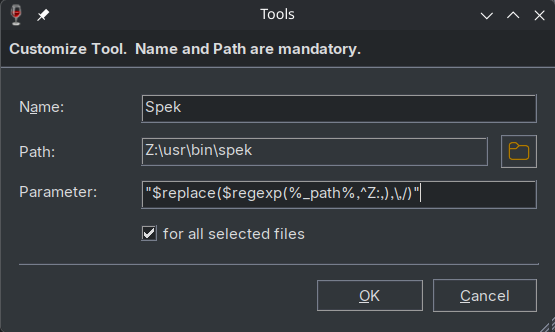
But more likely a simple version like this:
Name: `Spek`
Path: `/usr/bin/spek`
Parameter: `%_path%`
Since I use Mp3tag on CachyOS and Fedora 44 KDE via Wine, I have to transform the mounted Windows path that Mp3tag returns to a Unix path, hence the added complexity. My workaround also likely breaks when the filename contains a `"`.
Here's the tool in action (I call it via `CTRL+2` hotkey):
And in case there are other Linux KDE users wondering how to open spek maximized from an Mp3tag Tool, here's how:
