# FINALLY SOLVED: Acquire the "Day of the Week" of "%\_file\_mod\_datetime%" AND "%\_file\_create\_datetime%" using their respective Epoch-Unix values (i.e., "%\_file\_mod\_datetime\_raw%" and "%\_file\_create\_datetime\_raw%") (2024-2025) | Great for Columns Sorting
**URL:** https://community.mp3tag.de/t/finally-solved-acquire-the-day-of-the-week-of-file-mod-datetime-and-file-create-datetime-using-their-respective-epoch-unix-values-i-e-file-mod-datetime-raw-and-file-create-datetime-raw-2024-2025-great-for-columns-sorting/71276
**Category:** Support
**Created:** [May 15, 2026, 5:45am UTC](https://community.mp3tag.de/t/finally-solved-acquire-the-day-of-the-week-of-file-mod-datetime-and-file-create-datetime-using-their-respective-epoch-unix-values-i-e-file-mod-datetime-raw-and-file-create-datetime-raw-2024-2025-great-for-columns-sorting/71276 "2026-05-15T05:45:59Z")
**Posts on this page:** 7
**Page:** 1
### Author:  [@wneclass2018](https://community.mp3tag.de/u/wneclass2018)
#### Post date: [May 15, 2026, 5:45am UTC](https://community.mp3tag.de/t/finally-solved-acquire-the-day-of-the-week-of-file-mod-datetime-and-file-create-datetime-using-their-respective-epoch-unix-values-i-e-file-mod-datetime-raw-and-file-create-datetime-raw-2024-2025-great-for-columns-sorting/71276/1 "2026-05-15T05:45:59Z")
**Day of the Week** String for " **%\_file\_mod\_datetime%**":
> $replace($mod($div($add(%\_file\_mod\_datetime\_raw%,$mul($ifgreater(86400,%\_file\_mod\_datetime\_raw%,'+1','0'),'+63113904000'),$mul($regexp($regexp($regexp($regexp(%\__file\_mod\_datetime%,'^.\*(?\ $replace($mod($div($add(%\_file\_create\_datetime\_raw%,$mul($ifgreater(86400,%\_file\_create\_datetime\_raw%,'+1','0'),'+63113904000'),$mul($regexp($regexp($regexp($regexp(%\__file\_create\_datetime%,'^.\*(?\
### Author:  [@Florian](https://community.mp3tag.de/u/Florian)
#### Post date: [May 15, 2026, 6:08am UTC](https://community.mp3tag.de/t/finally-solved-acquire-the-day-of-the-week-of-file-mod-datetime-and-file-create-datetime-using-their-respective-epoch-unix-values-i-e-file-mod-datetime-raw-and-file-create-datetime-raw-2024-2025-great-for-columns-sorting/71276/2 "2026-05-15T06:08:07Z")
If your topic involves a format string, please enclose the format string in backticks ```, e.g., ``my format string`` so that spaces and other special characters like backslashes `\` and stars `*` are preserved by the forum software.
You can also use Ctrl + E to mark the selected text as preformatted or use the corresponding symbol from the format palette.

---
### Author:  [@wneclass2018](https://community.mp3tag.de/u/wneclass2018)
#### Post date: [May 16, 2026, 12:21am UTC](https://community.mp3tag.de/t/finally-solved-acquire-the-day-of-the-week-of-file-mod-datetime-and-file-create-datetime-using-their-respective-epoch-unix-values-i-e-file-mod-datetime-raw-and-file-create-datetime-raw-2024-2025-great-for-columns-sorting/71276/3 "2026-05-16T00:21:51Z")
Thank you, sir. Prior to receiving your response, I filled in the "\_" & "\*", manually. Nonetheless, the script is good to go for providing the Day of the Week, which I use for column sorting.
---
### Author:  [@ohrenkino](https://community.mp3tag.de/u/ohrenkino)
#### Post date: [May 16, 2026, 6:01am UTC](https://community.mp3tag.de/t/finally-solved-acquire-the-day-of-the-week-of-file-mod-datetime-and-file-create-datetime-using-their-respective-epoch-unix-values-i-e-file-mod-datetime-raw-and-file-create-datetime-raw-2024-2025-great-for-columns-sorting/71276/4 "2026-05-16T06:01:22Z")
> [@wneclass2018](#):
>
> I filled in the "\_" & "\*"
As I see it, some of the expression is now in italic typeface which suggests that some characters are interpreted as formatting tags.
I copied the result and now present it as code - please check if the expression is still correct:
```auto
$replace($mod($div($add(%_file_mod_datetime_raw%,$mul($ifgreater(86400,%_file_mod_datetime_raw%,'+1','0'),'+63113904000'),$mul($regexp($regexp($regexp($regexp(%_file_mod_datetime%,'^.*(?
### Author:  [@wneclass2018](https://community.mp3tag.de/u/wneclass2018)
#### Post date: [May 16, 2026, 10:10am UTC](https://community.mp3tag.de/t/finally-solved-acquire-the-day-of-the-week-of-file-mod-datetime-and-file-create-datetime-using-their-respective-epoch-unix-values-i-e-file-mod-datetime-raw-and-file-create-datetime-raw-2024-2025-great-for-columns-sorting/71276/5 "2026-05-16T10:10:54Z")
Thanks. And, yes, they are both correct. Moreover, both strings, respectively, are for "Day of the Week" for %\_file\_create\_datetime% and %\_file\_mod\_datetime%.
---
### Author:  [@wneclass2018](https://community.mp3tag.de/u/wneclass2018)
#### Post date: [May 18, 2026, 2:12am UTC](https://community.mp3tag.de/t/finally-solved-acquire-the-day-of-the-week-of-file-mod-datetime-and-file-create-datetime-using-their-respective-epoch-unix-values-i-e-file-mod-datetime-raw-and-file-create-datetime-raw-2024-2025-great-for-columns-sorting/71276/6 "2026-05-18T02:12:00Z")
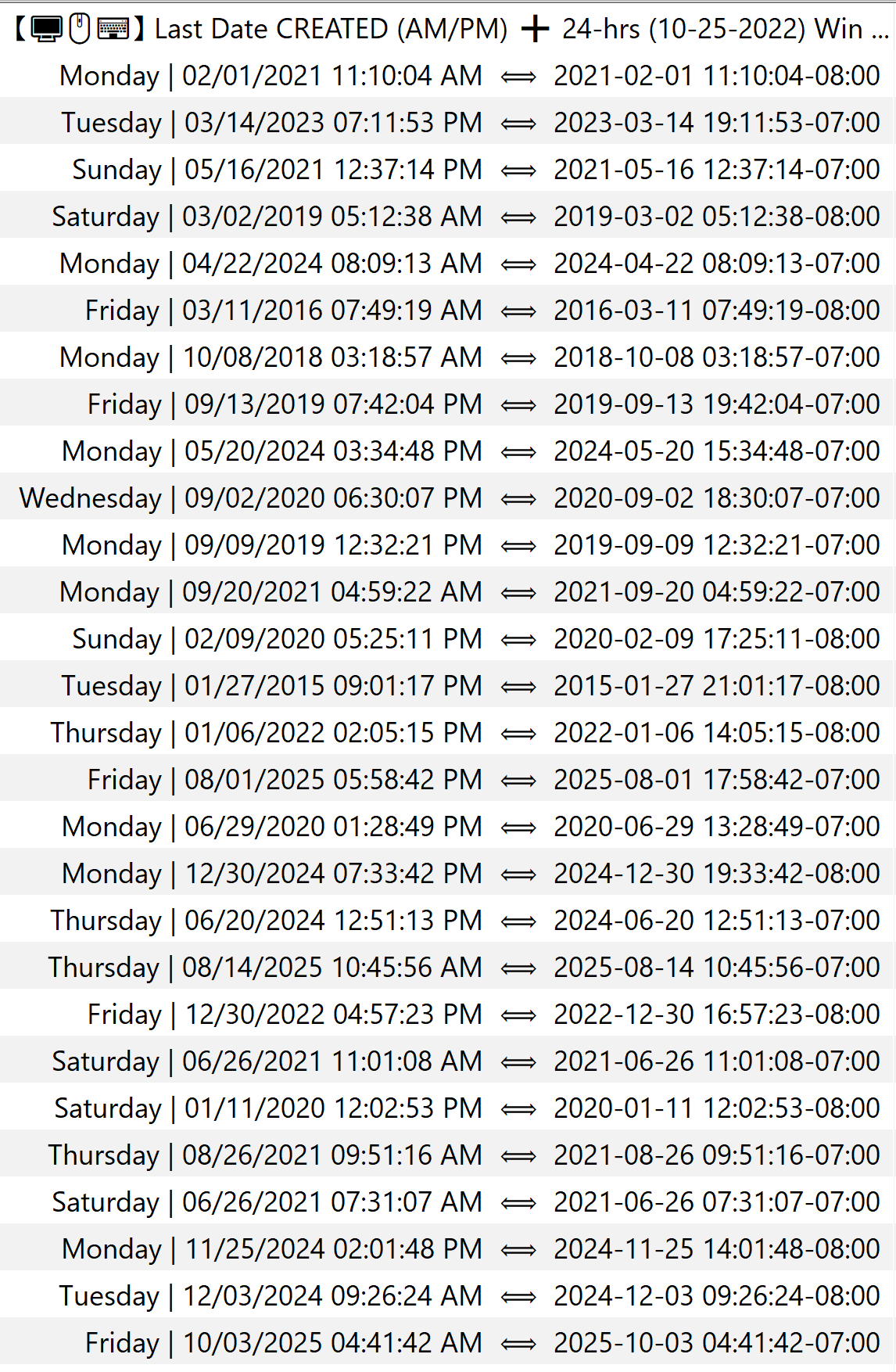
I forgot to post an image of the results. Nonetheless, the image below shows the **Day of the Week** (i.e., from either of the two strings provided above), before the pipe, where it directly coincides with the date of **%\_file\_create\_datetime%** or **%\_file\_mod\_datetime%**.
---
### Author:  [@system](https://community.mp3tag.de/u/system)
#### Post date: [June 7, 2026, 7:05am UTC](https://community.mp3tag.de/t/finally-solved-acquire-the-day-of-the-week-of-file-mod-datetime-and-file-create-datetime-using-their-respective-epoch-unix-values-i-e-file-mod-datetime-raw-and-file-create-datetime-raw-2024-2025-great-for-columns-sorting/71276/7 "2026-06-07T07:05:52Z")
This topic was automatically closed 7 days after the last reply. New replies are no longer allowed.