# Format %\_date% to YYYY-MM-DD with leading zeros?
**URL:** https://community.mp3tag.de/t/format-date-to-yyyy-mm-dd-with-leading-zeros/65014
**Category:** Support
**Created:** [June 10, 2024, 11:54am UTC](https://community.mp3tag.de/t/format-date-to-yyyy-mm-dd-with-leading-zeros/65014 "2024-06-10T11:54:47Z")
**Posts on this page:** 20
**Page:** 1
### Author:  [@ShatteredGlass](https://community.mp3tag.de/u/ShatteredGlass)
#### Post date: [June 10, 2024, 11:54am UTC](https://community.mp3tag.de/t/format-date-to-yyyy-mm-dd-with-leading-zeros/65014/1 "2024-06-10T11:54:47Z")
I'm wanting to use the %\_date% placeholder for one of my tags, but I want to convert it to ISO date format YYYY-MM-DD. Two issues though are that %\_date% doesn't use leading zeros for single-digit months, and there are no field separators between the three fields. So currently, %\_date% = 692024 where I would like 2024-06-09. I'm familiar with RegEx, but I've not come across one like this before. Ideas?
---
### Author:  [@ohrenkino](https://community.mp3tag.de/u/ohrenkino)
#### Post date: [June 10, 2024, 11:57am UTC](https://community.mp3tag.de/t/format-date-to-yyyy-mm-dd-with-leading-zeros/65014/2 "2024-06-10T11:57:32Z")
> [@ShatteredGlass](#):
>
> %\_date% = 692024
So you would never know for 1122024 whether it should be 11-02-2024 or 01-12-2024?
---
### Author:  [@LyricsLover](https://community.mp3tag.de/u/LyricsLover)
#### Post date: [June 10, 2024, 12:10pm UTC](https://community.mp3tag.de/t/format-date-to-yyyy-mm-dd-with-leading-zeros/65014/3 "2024-06-10T12:10:33Z")
According to the ID3 standard, there are these 4 tags for DATE and YEAR.
None of them includes a format like MDYYYY or DMYYYY.
**TYER**
The 'Year' frame is a numeric string with a year of the recording. This frames is always four characters long (until the year 10000).
**TORY**
The 'Original release year' frame is intended for the year when the original recording, if for example the music in the file should be a cover of a previously released song, was released. The field is formatted as in the "TYER" frame.
**TDAT**
The 'Date' frame is a numeric string in the DDMM format containing the date for the recording. This field is always four characters long.
**TRDA**
The 'Recording dates' frame is a intended to be used as complement to the "TYER", "TDAT" and "TIME" frames. E.g. "4th-7th June, 12th June" in combination with the "TYER" frame.
In which case your `%_date%` placeholder contains MDYYYY or DMYYYY?
---
### Author:  [@ohrenkino](https://community.mp3tag.de/u/ohrenkino)
#### Post date: [June 10, 2024, 12:12pm UTC](https://community.mp3tag.de/t/format-date-to-yyyy-mm-dd-with-leading-zeros/65014/4 "2024-06-10T12:12:46Z")
And even the use of the dynamic variable %\_date% returns a fully formatted date on my machine:

could it be that this depends on your OS date settings?
---
### Author:  [@LyricsLover](https://community.mp3tag.de/u/LyricsLover)
#### Post date: [June 10, 2024, 12:22pm UTC](https://community.mp3tag.de/t/format-date-to-yyyy-mm-dd-with-leading-zeros/65014/5 "2024-06-10T12:22:01Z")
> [@ohrenkino](#):
>
> could it be that this depends on your OS date settings?
Yes it seems to depend on what you have set here in your regional Windows DATE format settings:

If you reduce the short date format to `T.M.JJJJ` you get a `%_date%` like 6.9.2024
With a format like `TT.MM.JJJJ` you get a `%_date%` like 06.09.2024
---
### Author:  [@LyricsLover](https://community.mp3tag.de/u/LyricsLover)
#### Post date: [June 10, 2024, 12:34pm UTC](https://community.mp3tag.de/t/format-date-to-yyyy-mm-dd-with-leading-zeros/65014/6 "2024-06-10T12:34:06Z")
Could it be that the OP is using a short date format like
`MDYYYY`
or
`DMYYYY`
in his (english) Windows regional date time format settings?
In this case we could explain how a `%_date%` could be shown as `692024`
---
### Author:  [@ohrenkino](https://community.mp3tag.de/u/ohrenkino)
#### Post date: [June 10, 2024, 3:33pm UTC](https://community.mp3tag.de/t/format-date-to-yyyy-mm-dd-with-leading-zeros/65014/7 "2024-06-10T15:33:45Z")
> [@ShatteredGlass](#):
>
> So currently, %\_date% = 692024 where I would like 2024-06-09. I'm familiar with RegEx, but I've not come across one like this before. Ideas?
Try `$regexp(692024,(\d)(\d)(\d\d\d\d),$3-0$2-0$1)`
to get
2024-09-06
---
### Author:  [@Sergius](https://community.mp3tag.de/u/Sergius)
#### Post date: [June 10, 2024, 5:08pm UTC](https://community.mp3tag.de/t/format-date-to-yyyy-mm-dd-with-leading-zeros/65014/8 "2024-06-10T17:08:56Z")

Hello [ShatteredGlass](https://community.mp3tag.de/u/ShatteredGlass)
I recently worked on a draft calendar for my project in Mp3tag which I placed in a Tools:
You can choose the date from the calendar and convert it to the format you want:
YYYY/MM/DD
YYYY-MM-DD
YYYY.MM.DD
etc...
If you are interested, I can send you the file...
---
### Author:  [@ShatteredGlass](https://community.mp3tag.de/u/ShatteredGlass)
#### Post date: [June 10, 2024, 7:42pm UTC](https://community.mp3tag.de/t/format-date-to-yyyy-mm-dd-with-leading-zeros/65014/9 "2024-06-10T19:42:39Z")
@LyricsLover
@ohrenkino
YES! Indeed the %\_date% placeholder is using the "Short date" format from the Windows Region settings. I've changed it to ISO format and now the %\_date% placeholder is working as I want....

However, this now means that the date showing in the bottom right corner of my screen is now using this format also. This doesn't really bother me, but now I'll have to see what else changing this setting might impact in other areas of the OS. I'm not really a fan of having to workaround the issue like this. Would be nice if there was still a way to get YYYY-MM-DD in Mp3tag, without having to change the Region settings in Windows.
> [@ohrenkino](#):
>
> Try `$regexp(692024,(\d)(\d)(\d\d\d\d),$3-0$2-0$1)`
> to get
> 2024-09-06
This works great if you're going to be manually specifying the date, unfortunately, it doesn't actually work when used with the %\_date% placeholder....
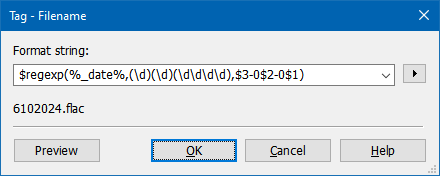
I wonder if there is another way to wrap that regex with another regex to get that to work with %\_date%?
---
### Author:  [@ohrenkino](https://community.mp3tag.de/u/ohrenkino)
#### Post date: [June 10, 2024, 7:48pm UTC](https://community.mp3tag.de/t/format-date-to-yyyy-mm-dd-with-leading-zeros/65014/10 "2024-06-10T19:48:55Z")
Works over here:

You would have to cater for your new format and add the separators as well.
---
### Author:  [@ShatteredGlass](https://community.mp3tag.de/u/ShatteredGlass)
#### Post date: [June 10, 2024, 7:51pm UTC](https://community.mp3tag.de/t/format-date-to-yyyy-mm-dd-with-leading-zeros/65014/11 "2024-06-10T19:51:48Z")
Works over there because you have your Region settings set to something other than the default. Well the default for a US/English installation of Windows anyways...

---
### Author:  [@ohrenkino](https://community.mp3tag.de/u/ohrenkino)
#### Post date: [June 10, 2024, 7:53pm UTC](https://community.mp3tag.de/t/format-date-to-yyyy-mm-dd-with-leading-zeros/65014/12 "2024-06-10T19:53:09Z")
What do you get if you enter %\_date% in Convert\>Tag-Tag?
---
### Author:  [@ShatteredGlass](https://community.mp3tag.de/u/ShatteredGlass)
#### Post date: [June 10, 2024, 7:58pm UTC](https://community.mp3tag.de/t/format-date-to-yyyy-mm-dd-with-leading-zeros/65014/13 "2024-06-10T19:58:16Z")
**Default "Short Date"**

**Modified Short Date**

---
### Author:  [@ohrenkino](https://community.mp3tag.de/u/ohrenkino)
#### Post date: [June 10, 2024, 7:59pm UTC](https://community.mp3tag.de/t/format-date-to-yyyy-mm-dd-with-leading-zeros/65014/14 "2024-06-10T19:59:42Z")
If you use the slash in Convert\>Tag-Filename then it gets removed as the slash is no valid character for a file name.
That is why I asked for Convert\>Tag-Tag.
---
### Author:  [@ShatteredGlass](https://community.mp3tag.de/u/ShatteredGlass)
#### Post date: [June 10, 2024, 8:05pm UTC](https://community.mp3tag.de/t/format-date-to-yyyy-mm-dd-with-leading-zeros/65014/15 "2024-06-10T20:05:26Z")
My bad...


---
### Author:  [@ohrenkino](https://community.mp3tag.de/u/ohrenkino)
#### Post date: [June 10, 2024, 8:11pm UTC](https://community.mp3tag.de/t/format-date-to-yyyy-mm-dd-with-leading-zeros/65014/16 "2024-06-10T20:11:08Z")
So if you keep your standard date format looking like
6/10/2024
then try:
`$regexp(%_date%,(\d+)/(\d+)/(\d\d\d\d),$3)-$num($regexp(%_date%,(\d+)/(\d+)/(\d\d\d\d),$1),2)-$num($regexp(%_date%,(\d+)/(\d+)/(\d\d\d\d),$2),2)`
(where you replace the fixed date with %\_date%.
You have to cut out every part of the date and then set the padding.
---
### Author:  [@ShatteredGlass](https://community.mp3tag.de/u/ShatteredGlass)
#### Post date: [June 10, 2024, 8:20pm UTC](https://community.mp3tag.de/t/format-date-to-yyyy-mm-dd-with-leading-zeros/65014/17 "2024-06-10T20:20:30Z")

---
### Author:  [@ohrenkino](https://community.mp3tag.de/u/ohrenkino)
#### Post date: [June 10, 2024, 8:22pm UTC](https://community.mp3tag.de/t/format-date-to-yyyy-mm-dd-with-leading-zeros/65014/18 "2024-06-10T20:22:22Z")
Please remove the apostrophes in front of and behind %\_date%
---
### Author:  [@ShatteredGlass](https://community.mp3tag.de/u/ShatteredGlass)
#### Post date: [June 10, 2024, 8:29pm UTC](https://community.mp3tag.de/t/format-date-to-yyyy-mm-dd-with-leading-zeros/65014/19 "2024-06-10T20:29:13Z")
You did it! It works!
```auto
$regexp(%_date%,(\d+)/(\d+)/(\d\d\d\d),$3)-$num($regexp(%_date%,(\d+)/(\d+)/(\d\d\d\d),$1),2)-$num($regexp(%_date%,(\d+)/(\d+)/(\d\d\d\d),$2),2)
```

---
### Author:  [@ShatteredGlass](https://community.mp3tag.de/u/ShatteredGlass)
#### Post date: [June 10, 2024, 8:31pm UTC](https://community.mp3tag.de/t/format-date-to-yyyy-mm-dd-with-leading-zeros/65014/20 "2024-06-10T20:31:31Z")
Of course my excitement was short lived as I just now realized that placeholders don't work with Tag Panel entries... SMH

[Next page](https://community.mp3tag.de/t/format-date-to-yyyy-mm-dd-with-leading-zeros/65014.md?page=2)