# Format Value query
**URL:** https://community.mp3tag.de/t/format-value-query/12703
**Category:** Support
**Created:** [November 17, 2011, 1:11am UTC](https://community.mp3tag.de/t/format-value-query/12703 "2011-11-17T01:11:40Z")
**Posts on this page:** 20
**Page:** 1
### Author:  [@slov92](https://community.mp3tag.de/u/slov92)
#### Post date: [November 17, 2011, 1:11am UTC](https://community.mp3tag.de/t/format-value-query/12703/1 "2011-11-17T01:11:40Z")
I am tagging TV shows in mp4.
The files I have are tagged for iTunes and I want them tagged for use with WinAmp.
The TV Season field is just a number to tag the season:
E.G - TV SHOW: 3 (for Season 3)
I would like to create an action to change the album field (required by winamp) to Season 3.
So any ideas on how I move the 3 over (which I have done with other tags as a format value) but also to add the word "season" to each tag.
I hope this is clear.
---
### Author:  [@stevehero](https://community.mp3tag.de/u/stevehero)
#### Post date: [November 17, 2011, 1:44am UTC](https://community.mp3tag.de/t/format-value-query/12703/2 "2011-11-17T01:44:17Z")
Use the following.
_Action type:_ **Format value**
_Field:_ **ALBUM**
_Formatstring:_ **Season %tvseason%**
%tvseason% is whichever field you are storing the '3' as in your example.
---
### Author:  [@slov92](https://community.mp3tag.de/u/slov92)
#### Post date: [November 18, 2011, 1:04am UTC](https://community.mp3tag.de/t/format-value-query/12703/3 "2011-11-18T01:04:07Z")
> [@stevehero](#):
>
> Use the following.
> _Action type:_ **Format value**
> _Field:_ **ALBUM**
> _Formatstring:_ **Season %tvseason%**
>
> %tvseason% is whichever field you are storing the '3' as in your example.
Yes! That worked perfectly. Many thanks.
How about this?
Filename for TV shows is: Modern.Family.S03E08.After.The.Fire
Title is: After the Fire
I want to convert tag to filename and
I want the outcome to be (in the filename field):
038 - After The Fire
iTunes season is 3, iTunes episode is 8.
Too much to ask?
---
### Author:  [@stevehero](https://community.mp3tag.de/u/stevehero)
#### Post date: [November 18, 2011, 3:00am UTC](https://community.mp3tag.de/t/format-value-query/12703/4 "2011-11-18T03:00:11Z")
> [@slov92](#):
>
> Filename for TV shows is: Modern.Family.S03E08.After.The.Fire
> Title is: After the Fire
>
> I want the outcome to be (in the filename field):
> 038 - After The Fire
use this:
_Name of action group:_ **&Script Test**
Action #1:
_Action type:_ **Replace with regular expression**
_Field:_ **\_FILENAME**
_Regular expression:_ **^([^\d]+)(\d+)(\w)(\d+)(.+)(.\w{3,4})$**
_Replace matches with:_ **$2x$4 -$5$6**
[] case-sensitive comparison
Action #2:
_Action type:_ **Replace with regular expression**
_Field:_ **\_FILENAME**
_Regular expression:_ **([^.])(.)([^.])**
_Replace matches with:_ **$1 $3**
[] case-sensitive comparison
Action #3:
_Action type:_ **Replace with regular expression**
_Field:_ **\_FILENAME**
_Regular expression:_ **(\s+)(\w+)$**
_Replace matches with:_ **.$2**
[] case-sensitive comparison
1st action places all the things you want in the right order.
2nd action replaces 'words.like.this.mp4' to 'words like this mp4'
3rd action fixes the ' mp4' back to '.mp4'
script is uploaded for you. place in %appdata%\mp3tag\data\actions folder.
[\_Script\_Test.mta](https://community.mp3tag.de/uploads/default/original/2X/d/d6d2718e01eef081ba0138c2321547a98ab49122.mta) (214 Bytes)
---
### Author:  [@slov92](https://community.mp3tag.de/u/slov92)
#### Post date: [November 18, 2011, 3:17am UTC](https://community.mp3tag.de/t/format-value-query/12703/5 "2011-11-18T03:17:40Z")
> [@stevehero](#):
>
> use this:
> _Name of action group:_ **&Script Test**
>
> Action #1:
> _Action type:_ **Replace with regular expression**
> _Field:_ **\_FILENAME**
> _Regular expression:_ **^([^\d]+)(\d+)(\w)(\d+)(.+)(.\w{3,4})$**
> _Replace matches with:_ **$2x$4 -$5$6**
>
> [] case-sensitive comparison
>
> Action #2:
> _Action type:_ **Replace with regular expression**
> _Field:_ **\_FILENAME**
> _Regular expression:_ **([^.])(.)([^.])**
> _Replace matches with:_ **$1 $3**
>
> [] case-sensitive comparison
>
> Action #3:
> _Action type:_ **Replace with regular expression**
> _Field:_ **\_FILENAME**
> _Regular expression:_ **(\s+)(\w+)$**
> _Replace matches with:_ **.$2**
>
> [] case-sensitive comparison
>
> 1st action places all the things you want in the right order.
> 2nd action replaces 'words.like.this.mp4' to 'words like this mp4'
> 3rd action fixes the ' mp4' back to '.mp4'
>
> script is uploaded for you. place in %appdata%\mp3tag\data\actions folder.
Woooah! That is so cool.
I was doubtful that it could be done but that works perfectly.
Great support and great software.
Many, many thanks.
---
### Author:  [@slov92](https://community.mp3tag.de/u/slov92)
#### Post date: [November 21, 2011, 6:02am UTC](https://community.mp3tag.de/t/format-value-query/12703/6 "2011-11-21T06:02:46Z")
... and sorry one more thing. if the tag says:
Modern.Family.S03E08.768kbps.After.The.Fire.[[videoseed.com](http://videoseed.com)]
and I want to change it to:
038 - After The Fire
How would I do that?
---
### Author:  [@DetlevD](https://community.mp3tag.de/u/DetlevD)
#### Post date: [November 21, 2011, 7:02am UTC](https://community.mp3tag.de/t/format-value-query/12703/7 "2011-11-21T07:02:38Z")
> [@slov92](#):
>
> ... and sorry one more thing. if the tag says:
> Modern.Family.S03E08.768kbps.After.The.Fire.[[videoseed.com](http://videoseed.com)]
> and I want to change it to:
> 038 - After The Fire
> How would I do that?
From:
Modern.Family.S03E08.768kbps.After.The.Fire.[[videoseed.com](http://videoseed.com)]
To:
038 - After The Fire
Filter:
**"$replace(%\_filename%,'.',' ')" MATCHES "^.+?\sS(\d+)E(\d+)\s\d+kbps\s(.+)\s\[.+\]$"**
Action: Format value
Field: \_FILENAME
Formatstring:
**$regexp($replace(%\_filename%,'.',' '),'^.+?\sS(\d+)E(\d+)\s\d+kbps\s(.+)\s\[.+\]$','$1x$2 - $3')**
From:
Modern.Family.S03E08.After.The.Fire
To:
038 - After The Fire
Filter:
**"$replace(%\_filename%,'.',' ')" MATCHES "^.+?\sS(\d+)E(\d+)\s(.+)$"**
Action: Format value
Field: \_FILENAME
Formatstring:
**$regexp($replace(%\_filename%,'.',' '),'^.+?\sS(\d+)E(\d+)\s(.+)$','$1x$2 - $3')**
DD.20111121.0920.CET
---
### Author:  [@slov92](https://community.mp3tag.de/u/slov92)
#### Post date: [November 21, 2011, 7:08am UTC](https://community.mp3tag.de/t/format-value-query/12703/8 "2011-11-21T07:08:04Z")
> [@DetlevD](#):
>
> Filter:
>
> **"$replace(%\_filename%,'.',' ')" MATCHES "^.+?\sS(\d+)E(\d+)\s\d+kbps\s(.+)\s\[.+\]$"**
>
> Action: Format value
> Field: \_FILENAME
> Formatstring:
>
> **$regexp($replace(%\_filename%,'.',' '),'^.+?\sS(\d+)E(\d+)\s\d+kbps\s(.+)\s\[.+\]$','$1x$2 - $3')**
>
> From:
> Modern.Family.S03E08.768kbps.After.The.Fire.[[videoseed.com](http://videoseed.com)]
> To:
> 038 - After The Fire
>
> DD.20111121.0908CET
Yes sir - that worked perfectly.
Many thanks.
---
### Author:  [@slov92](https://community.mp3tag.de/u/slov92)
#### Post date: [November 25, 2011, 7:08am UTC](https://community.mp3tag.de/t/format-value-query/12703/9 "2011-11-25T07:08:52Z")
> [@slov92](#):
>
> Yes sir - that worked perfectly.
>
> Many thanks.
Actually, I am afraid to report that it didn't after all.
Only around half of the conversions work it seems.
---
### Author:  [@DetlevD](https://community.mp3tag.de/u/DetlevD)
#### Post date: [November 25, 2011, 12:07pm UTC](https://community.mp3tag.de/t/format-value-query/12703/10 "2011-11-25T12:07:28Z")
> [@slov92](#):
>
> Actually, I am afraid to report that it didn't after all. Only around half of the conversions work it seems.
Hmm ... it seems that you have to adapt the filter string and the format string to match the other remaining cases.
Do have a closer look to the structure of the filenames, which were not touched by the last run.
Where are the differences in structure or used characters?
Also ... when the filter is set, the status line tells you how many files from the entire loaded list of files are currently displayed.
DD.20111125.1408.CET
---
### Author:  [@stevehero](https://community.mp3tag.de/u/stevehero)
#### Post date: [November 25, 2011, 1:55pm UTC](https://community.mp3tag.de/t/format-value-query/12703/11 "2011-11-25T13:55:22Z")
> [@slov92](#):
>
> Actually, I am afraid to report that it didn't after all.
>
> Only around half of the conversions work it seems.
try this for 'Modern.Family.S03E08.768kbps.After.The.Fire.[[videoseed.com](http://videoseed.com)]'
_Name of action group:_ **&Script Test**
Action #1:
_Action type:_ **Replace with regular expression**
_Field:_ **\_FILENAME**
_Regular expression:_ **\d+kbps**
_Replace matches with:_
[] case-sensitive comparison
Action #2:
_Action type:_ **Replace with regular expression**
_Field:_ **\_FILENAME**
_Regular expression:_ **[.+.com]**
_Replace matches with:_
[] case-sensitive comparison
Action #3:
_Action type:_ **Format value**
_Field:_ **\_FILENAME**
_Formatstring:_ **$regexp($replace(%\_filename%,'.',' '),'^.+?\sS(\d+)E(\d+)\s(.+)$','$1x$2 - $3')**
'' represents BLANK
1. replaces '768kbps' to '' (this could be '444kbps' and it would still replace it with nothing).
2. replaces '[[videoseed.com](http://videoseed.com)]' to '' (this actually replaces anything in this format '[[this.com](http://this.com)]' to ''.
3. same as 'DetlevD' posted.
between stage 2 and 3 you can add more regexp or even the simple replace action to get rid of anything which doesn't match the format you wish to have. e.g.
Modern.Family.S03E08.768kbps.After.The.Fire.[[videoseed.com](http://videoseed.com)]
**TO**
Modern.Family.S03E08.After.The.Fire
[\_Script\_Test.mta](https://community.mp3tag.de/uploads/default/original/2X/6/638d28144ad5c90d4f7600c8cb5ff7dffbd66b14.mta) (216 Bytes)
[\_Script\_Test.mta](https://community.mp3tag.de/uploads/default/original/2X/6/638d28144ad5c90d4f7600c8cb5ff7dffbd66b14.mta) (216 Bytes)
---
### Author:  [@slov92](https://community.mp3tag.de/u/slov92)
#### Post date: [November 25, 2011, 11:32pm UTC](https://community.mp3tag.de/t/format-value-query/12703/12 "2011-11-25T23:32:11Z")
Thank you.
I will try this out for a while and let you know how things work out.
---
### Author:  [@slov92](https://community.mp3tag.de/u/slov92)
#### Post date: [November 26, 2011, 12:15pm UTC](https://community.mp3tag.de/t/format-value-query/12703/13 "2011-11-26T12:15:11Z")
> [@stevehero](#):
>
> try this for 'Modern.Family.S03E08.768kbps.After.The.Fire.[[videoseed.com](http://videoseed.com)]'
>
> _Name of action group:_ **&Script Test**
>
> Action #1:
> _Action type:_ **Replace with regular expression**
> _Field:_ **\_FILENAME**
> _Regular expression:_ **\d+kbps**
> _Replace matches with:_
>
> [] case-sensitive comparison
>
> Action #2:
> _Action type:_ **Replace with regular expression**
> _Field:_ **\_FILENAME**
> _Regular expression:_ **[.+.com]**
> _Replace matches with:_
>
> [] case-sensitive comparison
>
> Action #3:
> _Action type:_ **Format value**
> _Field:_ **\_FILENAME**
> _Formatstring:_ **$regexp($replace(%\_filename%,'.',' '),'^.+?\sS(\d+)E(\d+)\s(.+)$','$1x$2 - $3')**
>
> '' represents BLANK
>
> 1. replaces '768kbps' to '' (this could be '444kbps' and it would still replace it with nothing).
> 2. replaces '[[videoseed.com](http://videoseed.com)]' to '' (this actually replaces anything in this format '[[this.com](http://this.com)]' to ''.
> 3. same as 'DetlevD' posted.
>
> between stage 2 and 3 you can add more regexp or even the simple replace action to get rid of anything which doesn't match the format you wish to have. e.g.
>
> Modern.Family.S03E08.768kbps.After.The.Fire.[[videoseed.com](http://videoseed.com)]
> **TO**
> Modern.Family.S03E08.After.The.Fire
>
> [\_Script\_Test.mta](https://community.mp3tag.de/uploads/default/original/2X/6/638d28144ad5c90d4f7600c8cb5ff7dffbd66b14.mta) (216 Bytes)
So I've just seen 1 small issue.
The filename appears with 2 spaces the '-' and 'After...'
I can't seem to show it on this post but it should read 038 - After the Fire
rather than 038 - \_\_ After the Fire (with the underscores meaning spaces)
---
### Author:  [@DetlevD](https://community.mp3tag.de/u/DetlevD)
#### Post date: [November 26, 2011, 4:27pm UTC](https://community.mp3tag.de/t/format-value-query/12703/14 "2011-11-26T16:27:46Z")
> [@slov92](#):
>
> So I've just seen 1 small issue.
> The filename appears with 2 spaces the '-' and 'After...' ...
Yes, the two spaces might have been left over from 'replace dot with space' in the first step.
You can add an action, which can replace two space characters with one space character.
DD.20111126.1828.CET
---
### Author:  [@stevehero](https://community.mp3tag.de/u/stevehero)
#### Post date: [November 26, 2011, 5:08pm UTC](https://community.mp3tag.de/t/format-value-query/12703/15 "2011-11-26T17:08:18Z")
> [@slov92](#):
>
> So I've just seen 1 small issue.
>
> The filename appears with 2 spaces the '-' and 'After...'
>
> I can't seem to show it on this post but it should read 038 - After the Fire
> rather than 038 - \_\_ After the Fire (with the underscores meaning spaces)
To get rid of unwanted spaces add this as action no. 4 (just make sure its the last action in the action group)
Action #4:
_Action type:_ **Replace with regular expression**
_Field:_ **_FILENAME_**
_Regular expression: **\s{2,}**
Replace matches with:_ (\_ represents one whitespace)
[] case-sensitive comparison
**\s** Represents whitespace
**{2,}** Is a quantifier for the whitespace. (this means greater than 2 whitespaces until infinity).
---
### Author:  [@slov92](https://community.mp3tag.de/u/slov92)
#### Post date: [November 27, 2011, 12:02am UTC](https://community.mp3tag.de/t/format-value-query/12703/16 "2011-11-27T00:02:09Z")
> [@stevehero](#):
>
> To get rid of unwanted spaces add this as action no. 4 (just make sure its the last action in the action group)
>
> Action #4:
> _Action type:_ **Replace with regular expression**
> _Field:_ **_FILENAME_**
> _Regular expression: **\s{2,}**
> Replace matches with:_ (\_ represents one whitespace)
>
> [] case-sensitive comparison
>
> **\s** Represents whitespace
> **{2,}** Is a quantifier for the whitespace. (this means greater than 2 whitespaces until infinity).
I have rather unsuccessfully tried this. I now still have 2 spaces at the beginning and another space has appeared at the end of the the last word (of the filename) and .mp4
I tried to save the .mtg file and then upload it to show you but it it is saying I don't have authority to upload this type of file.
Any chance you could upload the .mta file as before?
EDIT: Just so you know I did have a go here is what I added -
Replace with regular expression
Field: \_FILENAME
Regular Expression: \s{2,}
Replace Matches With: (tabbed one space and then clicked OK)
Case-sensitive comparison (blank)
---
### Author:  [@stevehero](https://community.mp3tag.de/u/stevehero)
#### Post date: [November 27, 2011, 11:51pm UTC](https://community.mp3tag.de/t/format-value-query/12703/17 "2011-11-27T23:51:48Z")
> [@slov92](#):
>
> Any chance you could upload the .mta file as before?
[\_Script\_Test.mta](https://community.mp3tag.de/uploads/default/original/2X/6/696b7662c07df34f86b4e8abca63351a445fff23.mta) (218 Bytes)
This one is same as before.
[_Script\_Test\_\_1_.mta](https://community.mp3tag.de/uploads/default/original/2X/3/3cc452fc2c5cb9f1605546a3a75c0921d78656a6.mta) (100 Bytes)
This one removes leading, trailing and unneeded whitespaces in the filename and tag information, just run this once your done with the files.
**A LITTLE TIP**
Just name it '&Clean-Up#Necessary Leading, Trailing, White space' so it looks like the attched jpeg
The '&' symbol beside the C makes it that you can hit alt\>A\>C to get to that 'Clean-Up' section. The # is the important one, it groups them under the one section.
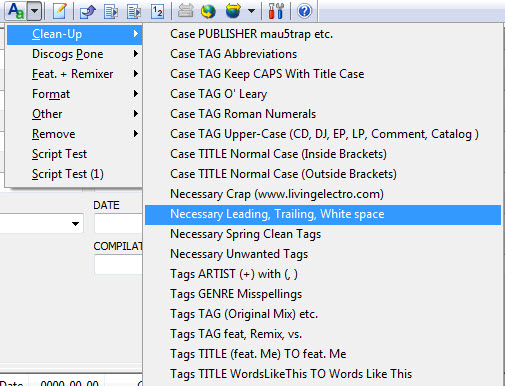
[_Script\_Test\_\_1_.mta](https://community.mp3tag.de/uploads/default/original/2X/3/3cc452fc2c5cb9f1605546a3a75c0921d78656a6.mta) (100 Bytes)
[\_Script\_Test.mta](https://community.mp3tag.de/uploads/default/original/2X/6/696b7662c07df34f86b4e8abca63351a445fff23.mta) (218 Bytes)
---
### Author:  [@slov92](https://community.mp3tag.de/u/slov92)
#### Post date: [November 29, 2011, 7:11am UTC](https://community.mp3tag.de/t/format-value-query/12703/18 "2011-11-29T07:11:28Z")
> [@stevehero](#):
>
> [\_Script\_Test.mta](https://community.mp3tag.de/uploads/default/original/2X/6/696b7662c07df34f86b4e8abca63351a445fff23.mta) (218 Bytes)
> This one is same as before.
>
> [_Script\_Test\_\_1_.mta](https://community.mp3tag.de/uploads/default/original/2X/3/3cc452fc2c5cb9f1605546a3a75c0921d78656a6.mta) (100 Bytes)
> This one removes leading, trailing and unneeded whitespaces in the filename and tag information, just run this once your done with the files.
Just one thing now although not a biggie.
There is still a gap between the last letter of the word in the filename and the .mp4.
The second script doesn't seem to change anything.
> [@stevehero](#):
>
> **A LITTLE TIP**
> Just name it '&Clean-Up#Necessary Leading, Trailing, White space' so it looks like the attched jpeg
>
> The '&' symbol beside the C makes it that you can hit alt\>A\>C to get to that 'Clean-Up' section. The # is the important one, it groups them under the one section.
I am afraid I didn't quite get this.
---
### Author:  [@stevehero](https://community.mp3tag.de/u/stevehero)
#### Post date: [November 29, 2011, 10:47am UTC](https://community.mp3tag.de/t/format-value-query/12703/19 "2011-11-29T10:47:57Z")
> [@slov92](#):
>
> Just one thing now although not a biggie.
>
> There is still a gap between the last letter of the word in the filename and the .mp4.
>
> The second script doesn't seem to change anything.
>
> I am afraid I didn't quite get this.
[actions.zip](https://community.mp3tag.de/uploads/default/original/2X/0/0182a9b95e9eaadfb7ce8b561ab62a736eba94c9.zip) (655 Bytes)
See how this works, unzip and place them in your folder. You will notice how the file is named affects the way it appears in the program.
I've also fixed the problem with the 'trailing space .mp4'
So you only need to run the action ' **_Script Test#slov92 Problem.mta_**' once to do the job.
[actions.zip](https://community.mp3tag.de/uploads/default/original/2X/0/0182a9b95e9eaadfb7ce8b561ab62a736eba94c9.zip) (655 Bytes)
---
### Author:  [@slov92](https://community.mp3tag.de/u/slov92)
#### Post date: [November 29, 2011, 11:41am UTC](https://community.mp3tag.de/t/format-value-query/12703/20 "2011-11-29T11:41:58Z")
> [@stevehero](#):
>
> [actions.zip](https://community.mp3tag.de/uploads/default/original/2X/0/0182a9b95e9eaadfb7ce8b561ab62a736eba94c9.zip) (655 Bytes)
> See how this works, unzip and place them in your folder. You will notice how the file is named affects the way it appears in the program.
>
> I've also fixed the problem with the 'trailing space .mp4'
>
> So you only need to run the action ' **_Script Test#slov92 Problem.mta_**' once to do the job.
I've tried that with one file and it seems to work perfectly.
Will test some more tomorrow.
Once again all your work is much appreciated. 🙂
[Next page](https://community.mp3tag.de/t/format-value-query/12703.md?page=2)