# Getting all Songs in an "ALBUM"
**URL:** https://community.mp3tag.de/t/getting-all-songs-in-an-album/13432
**Category:** Support
**Created:** [May 15, 2012, 10:29pm UTC](https://community.mp3tag.de/t/getting-all-songs-in-an-album/13432 "2012-05-15T22:29:10Z")
**Posts on this page:** 13
**Page:** 2
### Author:  [@BOSSTAGGER930](https://community.mp3tag.de/u/BOSSTAGGER930)
#### Post date: [May 25, 2012, 2:13pm UTC](https://community.mp3tag.de/t/getting-all-songs-in-an-album/13432/21 "2012-05-25T14:13:27Z")
> [@DetlevD](#):
>
> What does it mean: "NO AP"?
> What files did you or did the LG RT added "as individual albums"?
>
> Why do you complain missing artwork?
> The given test files have no embedded artwork because they have only the ID3v1 tag-type.
> Therefore and because of the generic values in the given tag-fields, the SPRINT service, if you did not switch it off, cannot find any artwork because of the generic values in the given tag-fields.
>
> The test bed is still on the step where artwork is not the theme.
> First of all we need to understand the working of the LG RT, how this device work internally with the given music files.
>
> If the LG RT for itself is able to organize files by their tag-field content, then the given test files should be result into:
>
> - Artist List with four Artist names: AAA, BBB, CCC, DDD.
> - Album List with four Album names: Album 1, Album 2, Album 3, Album 4.
> - Genre List with three Genre names: Blues, Jazz, Soul.
>
> If you can confirm this result, we could trust the LG RT to work as one might expect it, and we would know for sure, that the LG RT is able to work with ID3v1 tag-type.
>
> The next step would be to use test files having only the ID3v2.3 tag-type to proove the ablitiy of the LG RT working with this tag-type.
>
> Your feedback statements are not satisfying enough to go to a next step.
> There is missing a Mp3tag screenshot of the "BT" test files, after transfering them to the LG RT disk drive.
> There is missing a detailed description how these files have been treated by the LG RT in terms of organizing into lists of artists, albums, genres.
> You give me no chance to help you out of the jungle, if you do not follow a systematic analytical way.
>
> It might be useful for you to search for and contact a LG RT user group.
>
> DD.20120515.0720.CEST
HERE are the results of my FINAL stab at this, for now:
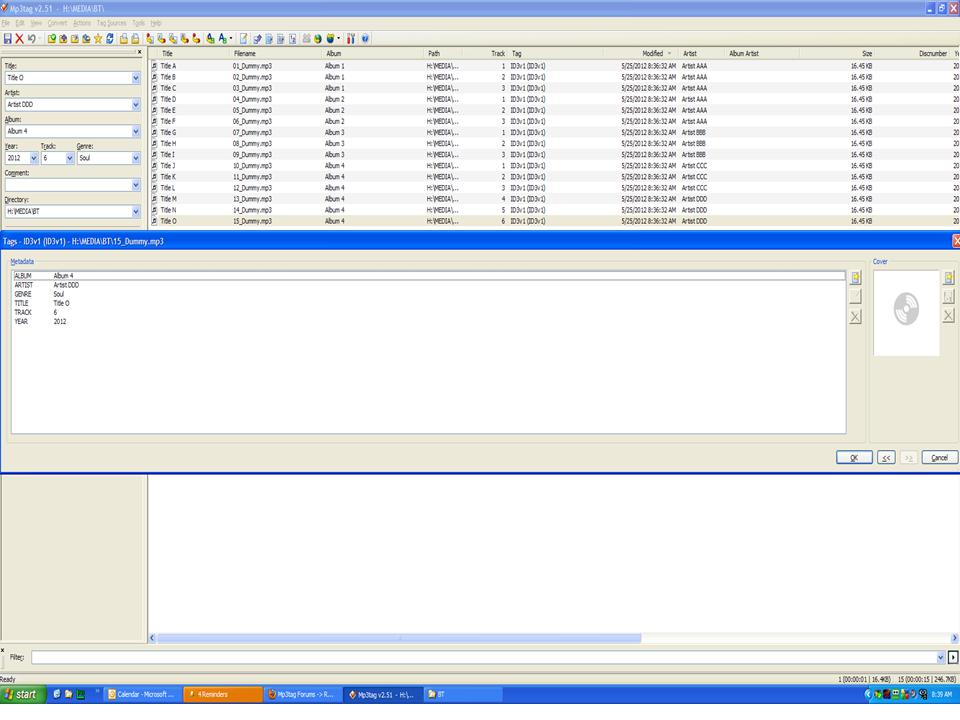
1. I took YOUR BT test files ONLY, which were set with V1 tags only, set the options to read only V1 and not to read V2 or APE (that what AP is) and REMOVE V2 and APE with YOUR settings.
As expected, I got NO artwork, but I also got no ALBUM.
Then, I changed the settings to include V2, added artwork and it showed the artwork, but made no ALBUM.
Then I added back in APEV2 and still got NO ALBUM.
Here is my FINAL take on this:
There is NOTHING wrong with the PHONE as demonstrated by the Zeppelin albums, which have V1, V2 and APEV2 tags - and their songs show up as one ALBUM with ARTWORK.
When I take two to four files that are streams from radio shows with segments lasting 10-15 minutes a piece, that works as ALBUMS.
When I try and take individual songs and make albums, with the SAME SETTINGS and INPUT as the ones that worked (Zeppelin, Springsteen, etc.) I get multiple albums with one song in each ALBUM.
I'm wondering if it is a conflict from streaming them from YOU TUBE or SPOTIFY, etc. which encodes certain information from the start. BUT, if I'm removing their tags and adding my own, why doesn't it work?
For the time being, I'll make ALBUMS out of the radio stuff and PLAYLISTS out of the individual songs, until I figure it out.
Thank you AGAIN for all your assistance, but I'll try and get a friend to show up in person and figure it out, OR, as you suggested, try and find an LG RT group.
Thanks again and happy holidays to all those celebrating MEMORIAL DAY!
NORM
---
### Author:  [@DetlevD](https://community.mp3tag.de/u/DetlevD)
#### Post date: [May 25, 2012, 5:19pm UTC](https://community.mp3tag.de/t/getting-all-songs-in-an-album/13432/22 "2012-05-25T17:19:46Z")
> [@BOSS TAGGER](#):
>
> ... I took YOUR BT test files ONLY, which were set with V1 tags only, set the options to read only V1 and not to read V2 or APE (that what AP is) and REMOVE V2 and APE with YOUR settings.
You was not advised to do anything with Mp3tag, but only to copy the already prepared test files to the LG RT drive and let the LG RT do the organizing of the files into its special lists per ARTIST, ALBUM, GENRE.
> [@BOSS TAGGER](#):
>
> ... Here is my FINAL take on this:
> There is NOTHING wrong with the PHONE ...
> [@BOSS TAGGER](#):
>
> ... if I'm removing their tags and adding my own, why doesn't it work? ...
Probably because you do not know how the LG RT works.
Finally thank you for your feedback.
I extract from your response, that the given ID3v1 test files were entirely not recognized by the LG RT.
That is mysterious or quite right, who knows it for sure?
I think you came to a good solution, let it be as is, let the time heal the wounds, search and find someone who has enough experience about the LG RT and the SPRINT service and about ID3 tagging and eventually about APE tagging and so on.
Good luck and feel free to come back and report about your odyssey.
DD.20120515.2118.CEST
---
### Author:  [@BOSSTAGGER930](https://community.mp3tag.de/u/BOSSTAGGER930)
#### Post date: [May 26, 2012, 12:04am UTC](https://community.mp3tag.de/t/getting-all-songs-in-an-album/13432/23 "2012-05-26T00:04:07Z")
[quote name='DetlevD' post='64291']
You was not advised to do anything with Mp3tag, but only to copy the already prepared test files to the LG RT drive and let the LG RT do the organizing of the files into its special lists per ARTIST, ALBUM, GENRE.
I didn't do a THING with the Mp3Tag. I just copied the files to the phone (after turning off the options for V2 and APE). You said to turn them off, didn't you?
If you want to send me the files again, I'll try it a 2nd time, but I don't think it matters.
I'm wondering if when I record the streams VIA REPLAY MUSIC, I should LOOK for a way to turn off their indexing/song info and if that would make a difference and they would be clean(er).
NORM
---
### Author:  [@DetlevD](https://community.mp3tag.de/u/DetlevD)
#### Post date: [May 26, 2012, 3:58am UTC](https://community.mp3tag.de/t/getting-all-songs-in-an-album/13432/24 "2012-05-26T03:58:54Z")
> [@BOSS TAGGER](#):
>
> ... I didn't do a THING with the Mp3Tag. I just copied the files to the phone (after turning off the options for V2 and APE). You said to turn them off, didn't you? If you want to send me the files again, I'll try it a 2nd time, but I don't think it matters. ...
Above in post #16 I have described a way to prepare test files using Mp3tag for the first test step to make clear whether the LG RT can successfully handle mp3 files with only the ID3v1 tag-type set.
Additionally I have appended a zip file containing a ready made set of test files for instantly use.
As long the zip file will be not removed from the forum post, you can download the zip file as often as you will and use the embedded mp3 test files for tests.
You do not need Mp3tag for copying the test files to the LG RT device, you can do it using the unzipping dialog or the Windows explorer.
> [@BOSS TAGGER](#):
>
> ... I'm wondering if when I record the streams VIA REPLAY MUSIC, I should LOOK for a way to turn off their indexing/song info and if that would make a difference and they would be clean(er). NORM
You are the owner of the LG RT player and you are the expert for this device, not me.
DD.20120526.0759.CEST
---
### Author:  [@BOSSTAGGER930](https://community.mp3tag.de/u/BOSSTAGGER930)
#### Post date: [May 27, 2012, 1:51am UTC](https://community.mp3tag.de/t/getting-all-songs-in-an-album/13432/25 "2012-05-27T01:51:00Z")
**SUCCESS! SUCCESS! SUCCESS! SUCCESS! SUCCESS! SUCCESS! SUCCESS! SUCCESS!**
(Opps, She-dooby, I'm tattered! Don't you know the crime rates going UP UP UP UP (Sorry, couldn't resist! Seen the STONES at least twice!))
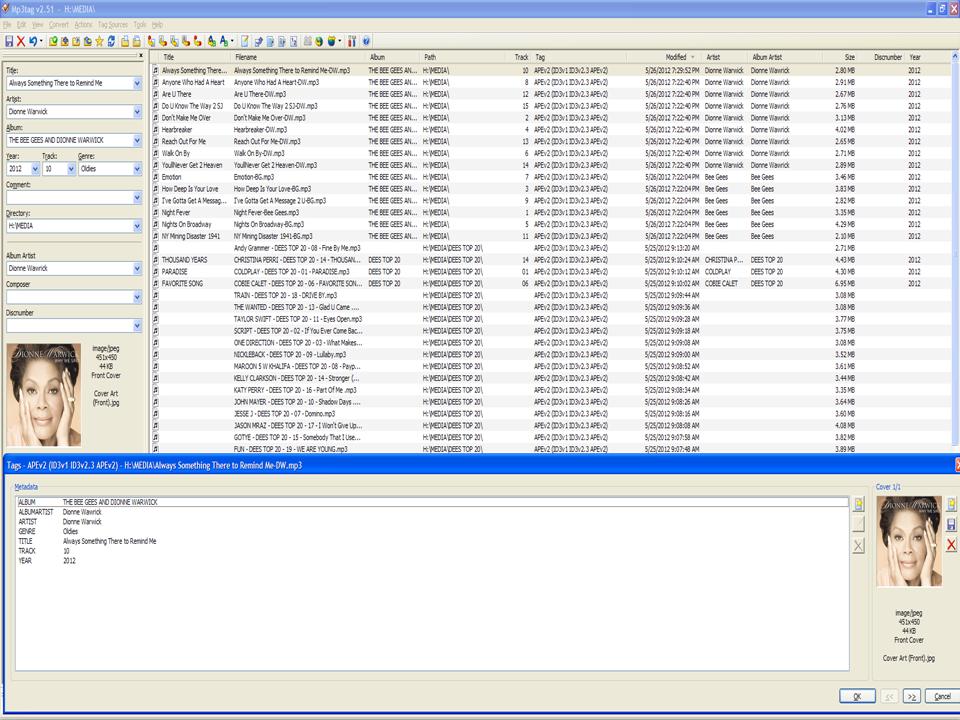
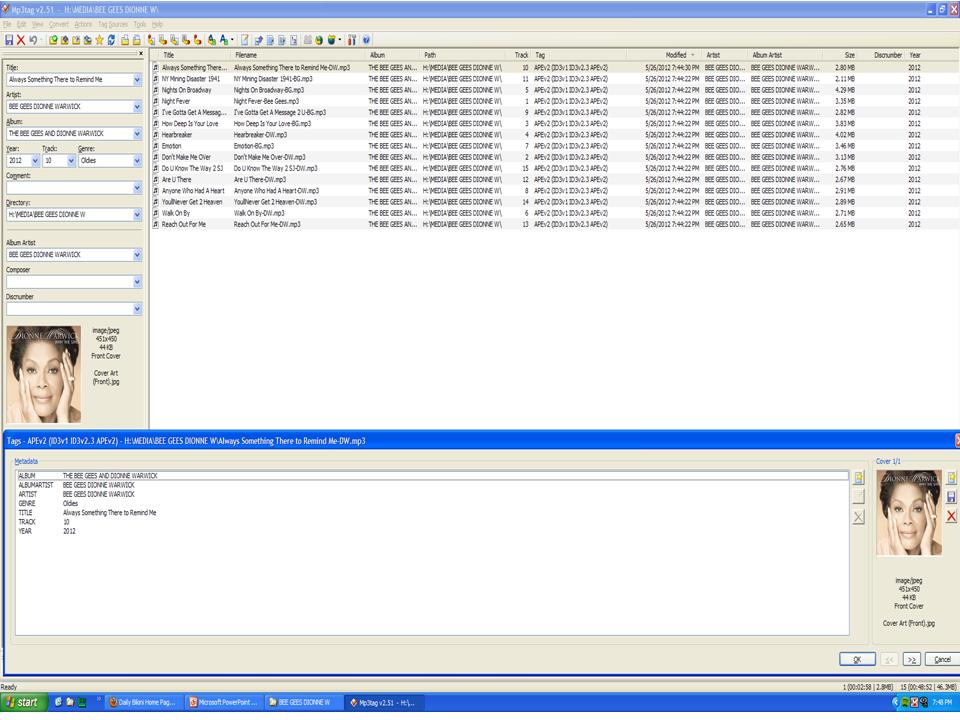
OK, Ladies and Gentlemen: I streamed 15 songs (in this case, 6 Bee Gees/9 Dionne Warwick).
I TURNED OFF the auto-tagging in REPLAY MUSIC. I then entered all my information.
The FIRST TIME I tried it with the fields ALBUMARTIST and ARTIST stating either BG or DW, I got one ALBUM for each artist and their respective songs w/artwork contained therein for a total of two ALBUMS. (BGDW.jpg)
The SECOND TIME I tried it with ALBUMARTIST and ARTIST being the same, I got ONE ALBUM with all 15 songs with artwork! (BGDW2.jpg)
For the moment, I'm leaving it be since I'm familiar enough with these artist not to care; however, I will play around with it some other time to see if I can get it to work. I should be able to put multiple artists into one ALBUM.
Do you think using ALBUM ARTIST versus ALBUMARTIST would make a difference?
I THOUGHT having just the same ALBUM name would do it, but may be not? Maybe I need the COMPILATION field?
Right now, whatever is identical in fields ARTIST AND ALBUMARTIST are what are lumped together.
Thanks again, let me know any thoughts and will keep you posted.
NORM
---
### Author:  [@DetlevD](https://community.mp3tag.de/u/DetlevD)
#### Post date: [May 27, 2012, 4:07am UTC](https://community.mp3tag.de/t/getting-all-songs-in-an-album/13432/26 "2012-05-27T04:07:32Z")
> [@BOSS TAGGER](#):
>
> **SUCCESS!**... The FIRST TIME I tried it with the fields ALBUMARTIST and ARTIST ... The SECOND TIME I tried it with ALBUMARTIST and ARTIST being the same, I got ONE ALBUM with all 15 songs with artwork! (BGDW2.jpg) ... Do you think using ALBUM ARTIST versus ALBUMARTIST would make a difference? ... Right now, whatever is identical in fields ARTIST AND ALBUMARTIST are what are lumped together. ...
Your screenshot shows that the new donwloaded (streamed) files are tagged with three different tag-types ID3v1, ID3v2.3, APE.
Note:
Mp3tag has a priority system for tag-types (APE \> ID3v2 \> ID3v1).
Reading the APE tag-type dominates before reading the ID3v2 tag-type, which dominates before reading the ID3v1 tag-type.
I assume that the SPRINT download service wants to go the safe way and does tag the files with three different tag-types, in order to offer at least one suitable tag-type, which hopefully will work together with any unknown receiving device.
When Mp3tag is set to display the APE tag-type, you cannot see what data is stored in the other tag-types.
If you manipulate tag-field data using Mp3tag while the view and writing is put on to the APE tag-type, this could not have any effect to the LG RT, when the LG RT does not know to handle the APE tag-type, probably because it can handle only the ID3 tag-type, v1 or v2.3 or both.
How the LG RT really works, we do not know, because the lack of provider documentation, and because of of the inability to carry out systematic tests.
It would be of interest, using Mp3tag with one fresh downloaded file, if you can investigate each of the three tag-types separately with their each own set of tag-fields and their stored data per tag-field, and tell us the detailed result.
_Please provide three screenshots of the Mp3tag Dialog "Extended Tags" for each tag-type ID3v1, ID3v2, APE_ from one file of one album set, which is accepted by the LG RT as an album in its album list.
It would be helpfull to find out, what tag-type is supported by the LG RT.
DD.20120527.0806.CEST
Edit.DD.20120530.0710.CEST
---
### Author:  [@BOSSTAGGER930](https://community.mp3tag.de/u/BOSSTAGGER930)
#### Post date: [May 27, 2012, 12:40pm UTC](https://community.mp3tag.de/t/getting-all-songs-in-an-album/13432/27 "2012-05-27T12:40:43Z")
> [@DetlevD](#):
>
> Your screenshot shows that the new donwloaded (streamed) files are tagged with three different tag-types ID3v1, ID3v2.3, APE.
>
> Note:
> Mp3tag has a priority system for tag-types (APE \> ID3v2 \> ID3v1).
> Reading the APE tag-type dominates before reading the ID3v2 tag-type, which dominates before reading the ID3v1 tag-type.
>
> I assume that the SPRINT download service wants to go the safe way and does tag the files with three different tag-types, in order to offer at least one suitable tag-type, which hopefully will work together with any unknown receiving device.
>
> When Mp3tag is set to display the APE tag-type, you cannot see what data is stored in the other tag-types.
>
> If you manipulate tag-field data using Mp3tag while the view and writing is put on to the APE tag-type, this could not have any effect to the LG RT, when the LG RT does not know to handle the APE tag-type, probably because it can handle only the ID3 tag-type, v1 or v2.3 or both.
>
> How the LG RT really works, we do not know, because the lack of provider documentation, and because of of the inability to carry out systematic tests.
>
> It would be of interest, using Mp3tag with one fresh downloaded file, if you can investigate each of the three tag-types separately with their each own set of tag-fields and their stored data per tag-field, and tell us the detailed result.
>
> It would be helpfull to find out, what tag-type is supported by the LG RT.
>
> DD.20120527.0806.CEST
Good Morning from LA:
I'll be brief as I'm going in a million directions.
1. SPRINT DOWNLOAD SERVICE is a non-entity is this whole process. I have never used the service and don't plan to.
The songs are either streamed (from SPOTIFY or YOU TUBE) or transferred from CD's. The radio shows are streamed from the appropriate website (BBC, a radio station, etc.).
1. I will try and find some time to try your suggested experiment and will report back. I will also try the variations with ALBUM ARTIST versus ALBUMARTIST, etc. and let you know what happens.
It is kind of maddening it took this long to figure out what works at the moment, but that is how life is when you are new to something.
Thanks.
NORM
---
### Author:  [@BOSSTAGGER930](https://community.mp3tag.de/u/BOSSTAGGER930)
#### Post date: [May 29, 2012, 1:24am UTC](https://community.mp3tag.de/t/getting-all-songs-in-an-album/13432/28 "2012-05-29T01:24:11Z")
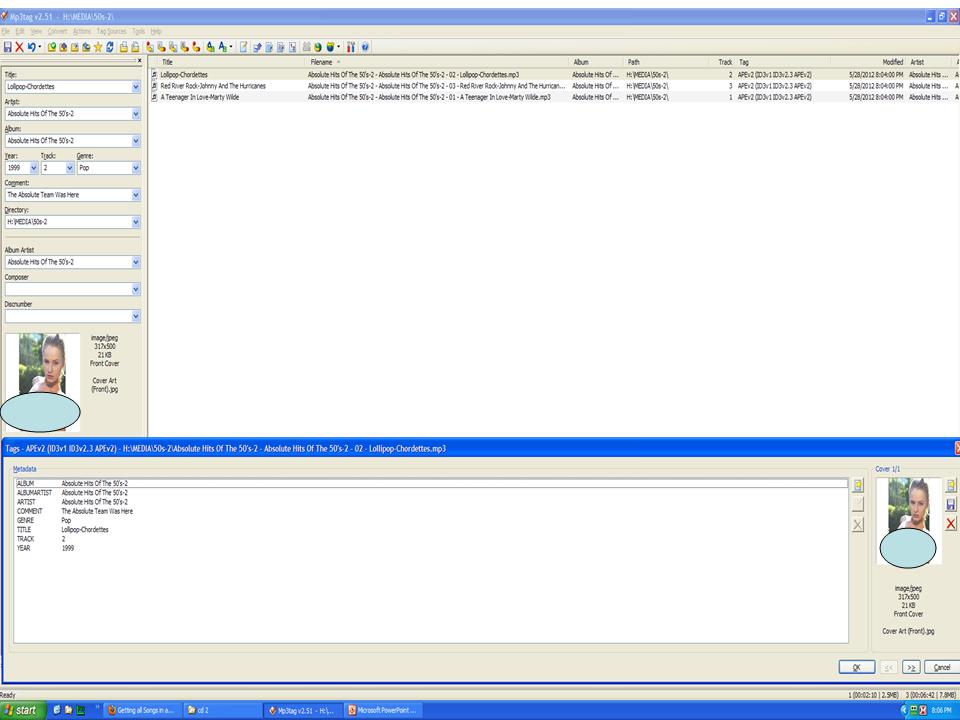
After continuing to experiment (and I've run out of time and PATIENCE), I have found the ONLY way to get all selections into an ALBUM is to ensure that ARTIST and ALBUMARTIST have the identical information. WHATEVER!
The attached slide shows how I get around it all by "simply" pasting the artist's name into the TITLE field. Since I have to manually add the track numbers, so what! Then, I highlight all the selections, make the ARTIST and ALBUMARTIST the same and add my artwork.
WAH-LAH.
Some day (month, year, decade) when I get new energy, I'll try the other experiments requested above.
Again, thanks for all the help, but this is what works on my phone.
I got to 100; who cares whether it is 50-50 or 32-68!
NORM
---
### Author:  [@ohrenkino](https://community.mp3tag.de/u/ohrenkino)
#### Post date: [May 29, 2012, 3:33am UTC](https://community.mp3tag.de/t/getting-all-songs-in-an-album/13432/29 "2012-05-29T03:33:05Z")
> [@BOSS TAGGER](#):
>
> ...ensure that ARTIST and ALBUMARTIST have the identical information...
This looks an awful lot like the advice from post #4, now 24 posts later.
---
### Author:  [@DetlevD](https://community.mp3tag.de/u/DetlevD)
#### Post date: [May 29, 2012, 3:47am UTC](https://community.mp3tag.de/t/getting-all-songs-in-an-album/13432/30 "2012-05-29T03:47:50Z")
> [@BOSS TAGGER](#):
>
> ... The attached slide shows how I get around it all by "simply" pasting the artist's name into the TITLE field. Since I have to manually add the track numbers, so what! Then, I highlight all the selections, make the ARTIST and ALBUMARTIST the same and add my artwork. ...
Did you do this processing using Mp3tag or using the LG RT?
Hm...
- _artist's name into the TITLE field_
- _ARTIST and ALBUMARTIST the same_
... sounds to me, as if there are now three tag-fields with the same value.
DD.20120529.0747.CEST
---
### Author:  [@BOSSTAGGER930](https://community.mp3tag.de/u/BOSSTAGGER930)
#### Post date: [May 29, 2012, 2:11pm UTC](https://community.mp3tag.de/t/getting-all-songs-in-an-album/13432/31 "2012-05-29T14:11:56Z")
I use ONLY the MP3tag software for creating all my ALBUMS.
When I made a playlist, then I used the phone.
NDG
---
### Author:  [@BOSSTAGGER930](https://community.mp3tag.de/u/BOSSTAGGER930)
#### Post date: [May 30, 2012, 4:08pm UTC](https://community.mp3tag.de/t/getting-all-songs-in-an-album/13432/32 "2012-05-30T16:08:42Z")
_Because I have no life_
SO, friends, yesterday, I streamed from MOG (it's free and legal!) a Steely Dan LP.
I left the tags "on" in REPLAY MUSIC so the information was embedded with each MP3.
When I went to transfer the songs to my LG RT, ALL the songs were in one ALBUM.
What makes it interesting is that there were no ALBUMARTIST or ALBUM ARTIST fields; only TITLE, ARTIST GENRE YEAR and TRACK. The tags were only V1 V2, no APV.......
For the fun of it, I took three songs, entered only that info, but it didn't work. So I'm sticking with the earlier-referenced MO and putting the title and artist in the TITLE field.
Tah-Tah from California!
---
### Author:  [@system](https://community.mp3tag.de/u/system)
#### Post date: [February 9, 2026, 12:23pm UTC](https://community.mp3tag.de/t/getting-all-songs-in-an-album/13432/33 "2026-02-09T12:23:50Z")
[Previous page](https://community.mp3tag.de/t/getting-all-songs-in-an-album/13432.md?page=1)