# Getting rid of the invisible Album text
**URL:** https://community.mp3tag.de/t/getting-rid-of-the-invisible-album-text/64412
**Category:** Support
**Tags:** player
**Created:** [April 14, 2024, 2:33pm UTC](https://community.mp3tag.de/t/getting-rid-of-the-invisible-album-text/64412 "2024-04-14T14:33:54Z")
**Posts on this page:** 6
**Page:** 1
### Author:  [@Peter\_Hoste](https://community.mp3tag.de/u/Peter_Hoste)
#### Post date: [April 14, 2024, 2:33pm UTC](https://community.mp3tag.de/t/getting-rid-of-the-invisible-album-text/64412/1 "2024-04-14T14:33:54Z")
"Q-music de 500 Beste of het foute uur", "Hitzone 66 Best of 1991 (CD1)" are a few examples of my album titles.
My car radio show these, but they are too long for also showing the artist & number.
and that is what I want tp see.
In MP3Tag I removed ALL ALBUM info.
But my radio keeps showing these long Album names.
I want to get rid of the Album Info. HOW????
---
### Author:  [@ohrenkino](https://community.mp3tag.de/u/ohrenkino)
#### Post date: [April 14, 2024, 2:37pm UTC](https://community.mp3tag.de/t/getting-rid-of-the-invisible-album-text/64412/2 "2024-04-14T14:37:44Z")
Could you show us the extended tags dialogue Alt-Tof a single file that still shows more info than expected?
And perhaps also the settings in Ctrl-O\>Tags\>Mpeg?
---
### Author:  [@Peter\_Hoste](https://community.mp3tag.de/u/Peter_Hoste)
#### Post date: [April 14, 2024, 2:56pm UTC](https://community.mp3tag.de/t/getting-rid-of-the-invisible-album-text/64412/3 "2024-04-14T14:56:22Z")

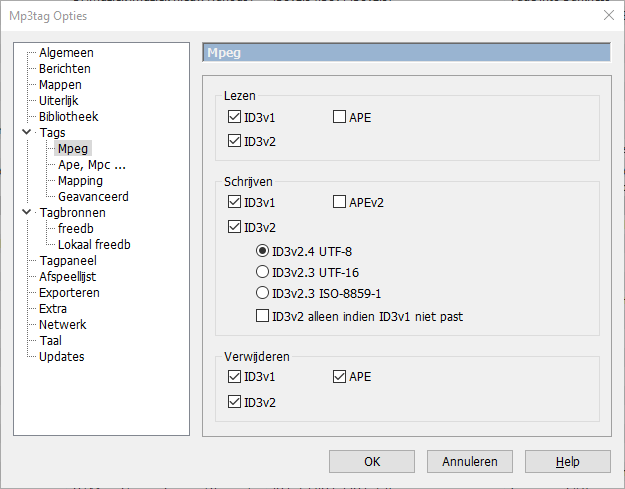
Like this?
---
### Author:  [@ohrenkino](https://community.mp3tag.de/u/ohrenkino)
#### Post date: [April 14, 2024, 3:14pm UTC](https://community.mp3tag.de/t/getting-rid-of-the-invisible-album-text/64412/4 "2024-04-14T15:14:33Z")
Perfect. Thank you.It shows that there are no APE tags in the file - something that causes confusion sometimes.
So it could be the player that either has a cache somewhere or it consults the internet to add further data.
That could be investigated further.
You chould check the cache if you rename the file so that it looks like a new file and the player has to re-read the tags.
---
### Author:  [@Peter\_Hoste](https://community.mp3tag.de/u/Peter_Hoste)
#### Post date: [April 14, 2024, 5:13pm UTC](https://community.mp3tag.de/t/getting-rid-of-the-invisible-album-text/64412/5 "2024-04-14T17:13:56Z")
Yep, that worked.
I put all the files in the root of the USB stick, instead of different folders. And now he shows the short names of the albums.
Thanks for the help.
---
### Author:  [@system](https://community.mp3tag.de/u/system)
#### Post date: [May 14, 2024, 5:14pm UTC](https://community.mp3tag.de/t/getting-rid-of-the-invisible-album-text/64412/6 "2024-05-14T17:14:26Z")
This topic was automatically closed 30 days after the last reply. New replies are no longer allowed.