# Handle "file already exists" error: move to folder or recycle bin
**URL:** https://community.mp3tag.de/t/handle-file-already-exists-error-move-to-folder-or-recycle-bin/71422
**Category:** General Discussion
**Created:** [June 10, 2026, 8:33am UTC](https://community.mp3tag.de/t/handle-file-already-exists-error-move-to-folder-or-recycle-bin/71422 "2026-06-10T08:33:26Z")
**Posts on this page:** 5
**Page:** 1
### Author:  [@nima](https://community.mp3tag.de/u/nima)
#### Post date: [June 10, 2026, 8:33am UTC](https://community.mp3tag.de/t/handle-file-already-exists-error-move-to-folder-or-recycle-bin/71422/1 "2026-06-10T08:33:26Z")
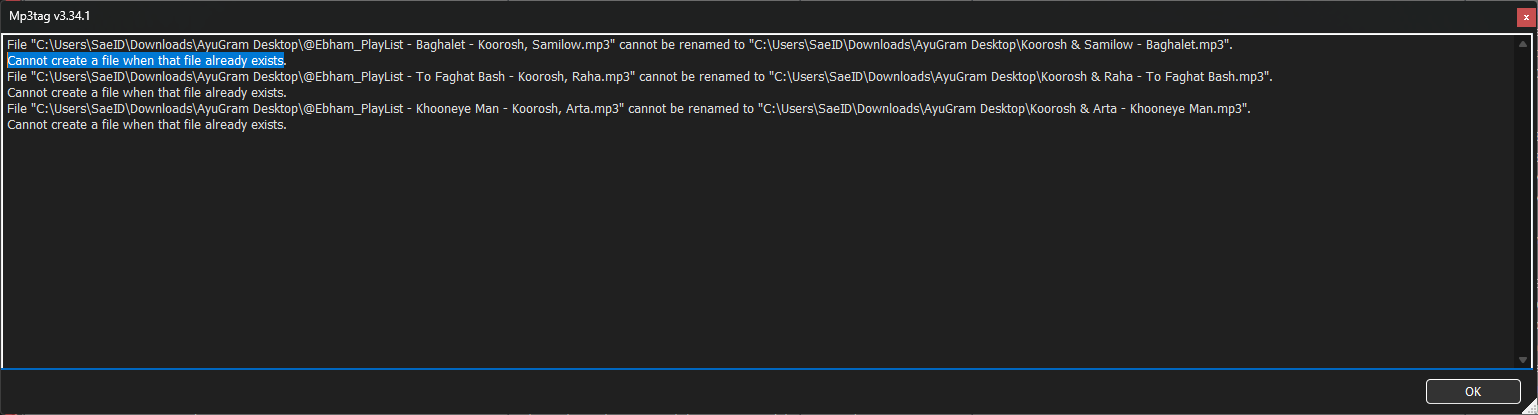
When renaming multiple files in Mp3tag, if a destination filename already exists, I get this error:
"Cannot create a file when that file already exists."
Currently the process stops or shows the error without giving any action options. I request two features for such conflict situations:
1. A button to **move the conflicting files to a specific folder** (e.g., a "Duplicates" or "Conflicts" folder) so renaming can continue.
2. A button to **move the conflicting files to Windows Recycle Bin** automatically, so they don't block the renaming process and can be restored later if needed.
This would help users cleaning up large music collections with duplicate filenames.
Thank you for considering.
---
### Author:  [@ohrenkino](https://community.mp3tag.de/u/ohrenkino)
#### Post date: [June 10, 2026, 10:02am UTC](https://community.mp3tag.de/t/handle-file-already-exists-error-move-to-folder-or-recycle-bin/71422/2 "2026-06-10T10:02:15Z")
> [@nima](#):
>
> A button to **move the conflicting files to a specific folder** (
This will only work if there is just one duplicate - as soon as the naming pattern would lead to several files with the same name, it would move the problem only 1 file further.
IMHO, it is always a question of how accurate the tag data is. A name conflict would always lead to further investigations, as far as I am concerned:
Is it a real duplicate or do only the tags lead to the same name?
Is my naming pattern OK or should I add further information so that the names become unique?
Esp. if in a
> [@nima](#):
>
> large music collection
it would be a pity if suddenly numerous files would be moved away from the original location and the restauration would lead to added effort.
see also here:
> [@Feature request: Add "Move to folder" and "Delete to Recycle Bin" buttons in the "file already exists" dialog when renaming](https://community.mp3tag.de/t/feature-request-add-move-to-folder-and-delete-to-recycle-bin-buttons-in-the-file-already-exists-dialog-when-renaming/70279):
>
> Hi everyone, When using the "Tag - Filename" feature (or actions that rename files based on tags), Mp3tag shows this dialog when multiple files would end up with the same name: ight now the only option is to click OK and then manually deal with all the duplicates afterward, which is very time-consuming with large libraries. Suggestion: It would be extremely helpful if this dialog had two additional buttons for the conflicting files: Move to Duplicates folder Moves the current conflicting …
---
### Author:  [@nima](https://community.mp3tag.de/u/nima)
#### Post date: [June 11, 2026, 4:58am UTC](https://community.mp3tag.de/t/handle-file-already-exists-error-move-to-folder-or-recycle-bin/71422/3 "2026-06-11T04:58:10Z")
Thank you for your feedback, but I think there might be a misunderstanding about my request.
**1. I am not asking for a manual one-by-one solution**
I am dealing with a **large music collection** where I am renaming files based on tags using the format `%artist% - %title%`. When Mp3tag encounters a file with the same tag data, it creates a file name that already exists. In that case, the file is **truly a duplicate** in terms of content (because the tags are identical).
**2. I am asking for an automatic batch solution**
When there are 20 duplicate files (with identical tags), I don't want Mp3tag to stop or ask me one by one. I want it to **automatically move all conflicting files** to a "Duplicates" folder or the Recycle Bin **in one operation** , so the renaming process can continue for the remaining files.
**3. "Moving files is bad" does not apply here**
You mentioned that moving files away from their original location would cause trouble. But I don't want to delete them permanently. My request is to **move them to the Recycle Bin** so they can be restored later. This is a **safe automatic cleanup** , not a permanent loss.
**4. Real-world scenario**
For a user with 5000+ music files, manually checking every single conflict is impossible. An automated "move to folder" or "move to recycle bin" feature during the naming process would be a huge time saver and a logical, efficient solution.
So I respectfully believe my request is **valid, practical, and well-suited** for Mp3tag. It would help many users clean up their music libraries without any manual intervention
---
### Author:  [@ohrenkino](https://community.mp3tag.de/u/ohrenkino)
#### Post date: [June 11, 2026, 6:21am UTC](https://community.mp3tag.de/t/handle-file-already-exists-error-move-to-folder-or-recycle-bin/71422/4 "2026-06-11T06:21:01Z")
Your suggestion has been noted, no doubt. But so has the linked one with almost the same title and description of the function.
There have also been numerous discussions about the treatment of alleged duplicates, see e.g. here (seriously)
> [@Feature Request: search folder search master library find duplicate](https://community.mp3tag.de/t/feature-request-search-folder-search-master-library-find-duplicate/53282):
>
> I inherited a lot of music lately, and am trying to import into my library. I would like to see the the file compare feature allow two kinds of of search 1st. type search - Compare songs in a base folder. for example: D:\music\new rock flac this would be the base folder, has say 100 songs. or Compare all songs in following folders: D:\music; D:\new mp3; D:\mp3 working; E:\music 1990s; E\music 2000s F:\Allmusic 1st type search - The second parameter is where to search. example: F…
In general: AFAI get the summary, the same data in the tag fields does not qualify to identify a real duplicate.
So for serious collectors it would be mandatory to investigate for each file if it is a real duplicate or just the tag data is insufficient.
As you see that the feature has been asked some time ago (and there are other threads that suggest other functions to work around the problem of duplicate file names) I suggest for the meantime the following:
Rename all new files with Convert\>Tag-Filename
Format string: `%artist% - %title% (%_counter%)`
Then move them to the new location with the method that you have used before and now all files that cannot be renamed stay with a number in parenthesis.
You can now filter for these files with
`%_filename% MATCHES "\(\d+\)"`
and check if they are real duplicates.
---
### Author:  [@ohrenkino](https://community.mp3tag.de/u/ohrenkino)
#### Post date: [June 12, 2026, 10:49am UTC](https://community.mp3tag.de/t/handle-file-already-exists-error-move-to-folder-or-recycle-bin/71422/6 "2026-06-12T10:49:41Z")
I just tried to show you a workaround until the feature gets implemented.
But looking at threads that date back to 2010 that also ask for a different treatment of duplicate filenames, e.g. here:
> [@Auto rename FILENAME in case of duplicated songs](https://community.mp3tag.de/t/auto-rename-filename-in-case-of-duplicated-songs/9646):
>
> Hi ! How do I make Mp3 tag to add a number at the end of the FILENAME in the case of duplicated filenames? Example: ABBA-Mamma Mia.mp3 - first copy of the song ABBA-Mamma Mia(2).mp3 - second copy of the song ABBA-Mamma Mia(3).mp3 - third copy of the song
I cannot say when the feature will be available. So until then ...