# Having trouble with tags not being applied
**URL:** https://community.mp3tag.de/t/having-trouble-with-tags-not-being-applied/71392
**Category:** Support
**Tags:** player
**Created:** [June 3, 2026, 2:26pm UTC](https://community.mp3tag.de/t/having-trouble-with-tags-not-being-applied/71392 "2026-06-03T14:26:17Z")
**Posts on this page:** 5
**Page:** 1
### Author:  [@karr](https://community.mp3tag.de/u/karr)
#### Post date: [June 3, 2026, 2:26pm UTC](https://community.mp3tag.de/t/having-trouble-with-tags-not-being-applied/71392/1 "2026-06-03T14:26:18Z")
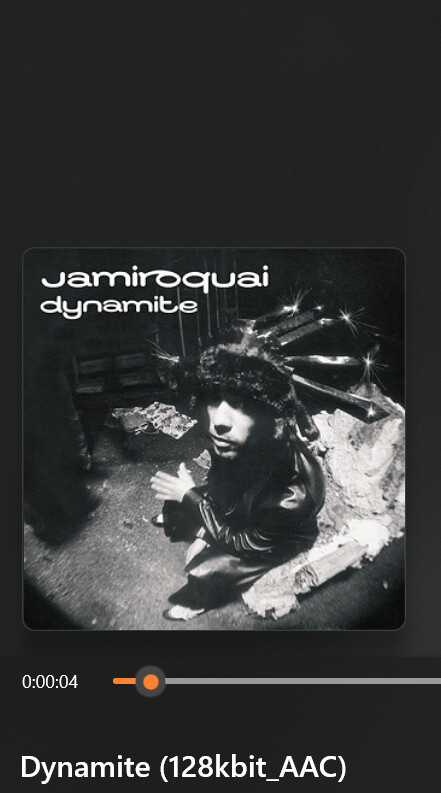
Hey everyone I'm new here, i've been using mp3 tag for 4 weeks now and its been going well. As of recently I tried to write tags the ususal way I do, and its saving the data onto the file but when I pull it up on my Windows Media player or car it doesn't show the info as it does below. When I check the file properties in Windows, all of the tag information such as the title, artist, album, and album artist appears to be saved correctly. However, Windows Media Player and my car's infotainment system sometimes display the filename instead of the tag information. For example, a song with the title tag set to "Dynamite" will display as "Dynamite (128kbit\_AAC)," which is the filename rather than the title tag.
I've confirmed that the tags are being written and saved, and this issue only started happening recently. Has anyone run into a similar problem or know of a setting that could be causing Windows Media Player to ignore the tags? Any help would be greatly appreciated.

---
### Author:  [@ohrenkino](https://community.mp3tag.de/u/ohrenkino)
#### Post date: [June 3, 2026, 2:46pm UTC](https://community.mp3tag.de/t/having-trouble-with-tags-not-being-applied/71392/2 "2026-06-03T14:46:20Z")
To update your WMP database ...
- select the files without tag data in WMP
- delete the files from WMP only (not from the file system)
- Use Extras\>Enhanced\>Restore deleted library items
and see if the tag data is now displayed
---
### Author:  [@karr](https://community.mp3tag.de/u/karr)
#### Post date: [June 3, 2026, 4:44pm UTC](https://community.mp3tag.de/t/having-trouble-with-tags-not-being-applied/71392/3 "2026-06-03T16:44:36Z")
It hasn't appeared sadly, and also it doesn't show up in my car system either while my older ones do.

---
### Author:  [@ohrenkino](https://community.mp3tag.de/u/ohrenkino)
#### Post date: [June 3, 2026, 6:52pm UTC](https://community.mp3tag.de/t/having-trouble-with-tags-not-being-applied/71392/4 "2026-06-03T18:52:56Z")
> [@karr](#):
>
> while my older ones do.
Different players (WMP, car) behave differently.
If you have older files that work, and newer ones that don't: what is the difference?
IF MP§tag shows the tag data but the player does not, then it looks like a player problem.
To be sure that the new files are OK, check them with the tools as suggested in this thread:
> [@Hints for asking Support Requests](https://community.mp3tag.de/t/hints-for-asking-support-requests/56190):
>
> If you need support using Mp3tag, you can help the community members that are about to support you in finding a solution or workaround to your problem, by following these simple guidelines. Be descriptive, also in what you’ve already tried Please give a short explanation what’s not working as expected or what you’re trying to achieve. It’s best to know any details about the problem at hand and especially, what steps you’ve already tried to solve it by yourself. Helpful information also includ…
---
### Author:  [@system](https://community.mp3tag.de/u/system)
#### Post date: [July 1, 2026, 6:53pm UTC](https://community.mp3tag.de/t/having-trouble-with-tags-not-being-applied/71392/5 "2026-07-01T18:53:54Z")
This topic was automatically closed 28 days after the last reply. New replies are no longer allowed.