# How do i get them to order
**URL:** https://community.mp3tag.de/t/how-do-i-get-them-to-order/12055
**Category:** Support
**Created:** [May 29, 2011, 8:18am UTC](https://community.mp3tag.de/t/how-do-i-get-them-to-order/12055 "2011-05-29T08:18:40Z")
**Posts on this page:** 4
**Page:** 1
### Author:  [@thorrrr](https://community.mp3tag.de/u/thorrrr)
#### Post date: [May 29, 2011, 8:18am UTC](https://community.mp3tag.de/t/how-do-i-get-them-to-order/12055/1 "2011-05-29T08:18:40Z")
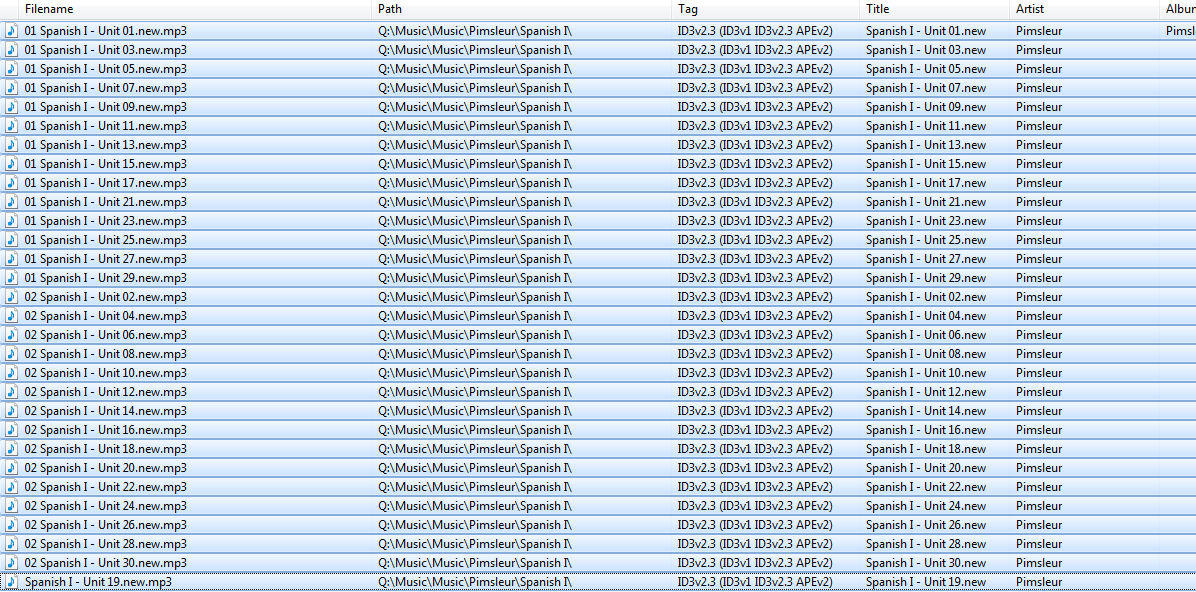
Hi guys please see attached image i am trying to get my mp3 to load into my iPhone in order. As you can see they do not follow order in the titles. IN iTunes they look ok but i am thinking as a newbie it is to do with numbers in the Filename (not sure)
Anybody help me in how i can get them to order correctly ? Please remeber i am a newbie with this product
Cheers 
---
### Author:  [@stevehero](https://community.mp3tag.de/u/stevehero)
#### Post date: [May 29, 2011, 9:37am UTC](https://community.mp3tag.de/t/how-do-i-get-them-to-order/12055/2 "2011-05-29T09:37:57Z")
> [@Thorrrr](#):
>
> Hi guys please see attached image i am trying to get my mp3 to load into my iPhone in order. As you can see they do not follow order in the titles. IN iTunes they look ok but i am thinking as a newbie it is to do with numbers in the Filename (not sure)
>
> Anybody help me in how i can get them to order correctly ? Please remeber i am a newbie with this product
> Cheers 
1. I think all you need to do is select all files from this position and go to menu: _file\>save tag._
2. Then open itunes and play each and every song, this will update the file name to the correct filename. \*\*TIP play 1st song, then hold onto the right arrow key to skip onto the next songs quickly
if this doesnt work. ( **BUT** it should)
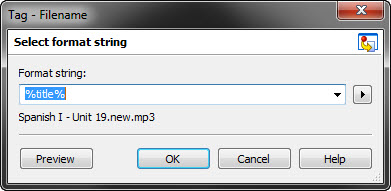
see atached image.
What you need to do is go to the menu: _convert\>Tag - Filename_. The use the string **_%title%_** in the format string box.
Your problem arises from the fact you have **01** and **02** at the start of the filename with the other number not working out properly e.g.
**01** Spanish I - Unit 01.new.mp3
02 Spanish I - Unit 02.new.mp3
**01** Spanish I - Unit 03.new.mp3
Another good tip would be to fill in the album artist field with **_Pimsleur_** also as this helps.
---
### Author:  [@thorrrr](https://community.mp3tag.de/u/thorrrr)
#### Post date: [May 29, 2011, 10:16am UTC](https://community.mp3tag.de/t/how-do-i-get-them-to-order/12055/3 "2011-05-29T10:16:13Z")
> [@stevehero](#):
>
> 1. I think all you need to do is select all files from this position and go to menu: _file\>save tag._
> 2. Then open itunes and play each and every song, this will update the file name to the correct filename. \*\*TIP play 1st song, then hold onto the right arrow key to skip onto the next songs quickly
>
> if this doesnt work. ( **BUT** it should)
>
> see atached image.
> What you need to do is go to the menu: _convert\>Tag - Filename_. The use the string **_%title%_** in the format string box.
> Your problem arises from the fact you have **01** and **02** at the start of the filename with the other number not working out properly e.g.
>
> **01** Spanish I - Unit 01.new.mp3
> 02 Spanish I - Unit 02.new.mp3
> **01** Spanish I - Unit 03.new.mp3
>
> Another good tip would be to fill in the album artist field with **_Pimsleur_** also as this helps.
Cheers thank you for your quick response
---
### Author:  [@system](https://community.mp3tag.de/u/system)
#### Post date: [February 9, 2026, 12:23pm UTC](https://community.mp3tag.de/t/how-do-i-get-them-to-order/12055/4 "2026-02-09T12:23:07Z")