# How do i remove specific text "-"
**URL:** https://community.mp3tag.de/t/how-do-i-remove-specific-text/71771
**Category:** Support
**Created:** [August 26, 2026, 9:19am UTC](https://community.mp3tag.de/t/how-do-i-remove-specific-text/71771 "2026-08-26T09:19:24Z")
**Posts on this page:** 7
**Page:** 1
### Author:  [@KEEBLER](https://community.mp3tag.de/u/KEEBLER)
#### Post date: [August 26, 2026, 9:19am UTC](https://community.mp3tag.de/t/how-do-i-remove-specific-text/71771/1 "2026-08-26T09:19:24Z")
so after reading a bunch of prior support documents. i am left with no working answer to this quagmire.
in the %TITLE% field
i want to replace " - " | note the space before and after
with " " | note that it is replaced with a single space
i have tried
$replace(%title%," - "," " )
$replace(%title%, - , )
both with no accurate result
the first one removed the spaces in the title around the -, but not the -
im pretty sure i am close, but missing it...
thank you 🙂
---
### Author:  [@LyricsLover](https://community.mp3tag.de/u/LyricsLover)
#### Post date: [August 26, 2026, 9:21am UTC](https://community.mp3tag.de/t/how-do-i-remove-specific-text/71771/2 "2026-08-26T09:21:48Z")
Please ensure, that the `-` is really the minus you expect.
Just copy & paste your hyphen directly from your `TITLE` for example to the input box on this website:
> **[What Unicode character is this ?](https://www.babelstone.co.uk/Unicode/whatisit.html)**
and press Identify.
The usual minus will be identified as
`U+002D : HYPHEN-MINUS {hyphen, dash; minus sign}`
However, there are many variations:
>
---
### Author:  [@KEEBLER](https://community.mp3tag.de/u/KEEBLER)
#### Post date: [August 26, 2026, 9:46am UTC](https://community.mp3tag.de/t/how-do-i-remove-specific-text/71771/3 "2026-08-26T09:46:27Z")
so how do i format the string to replace the hyphen/minus sign?
can i use the unicode?
$replace(%title%, `U+002D` , )
what about the leading and trailing spaces?
-- that did not work
---
### Author:  [@LyricsLover](https://community.mp3tag.de/u/LyricsLover)
#### Post date: [August 26, 2026, 10:02am UTC](https://community.mp3tag.de/t/how-do-i-remove-specific-text/71771/4 "2026-08-26T10:02:07Z")
What answer does the website give you?
If it is a "normal" hyphen, you can use
`$replace(%title%, - , )`
this is space hyphen space after the first comma
and after the second comma (= replace with):
space
You can easily test it with "Convert Tag - Tag" first and see the preview:
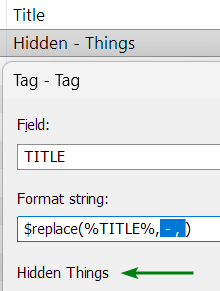
Please be aware that this will replace all instances of your search string with your replacement string, not just the first one.
---
### Author:  [@LyricsLover](https://community.mp3tag.de/u/LyricsLover)
#### Post date: [August 26, 2026, 10:21am UTC](https://community.mp3tag.de/t/how-do-i-remove-specific-text/71771/5 "2026-08-26T10:21:02Z")
> [@KEEBLER](#):
>
> can i use the unicode?
> $replace(%title%, `U+002D` , )
If you really like to replace an identified hex value for special characters (like U+`FF0D` : FULLWIDTH HYPHEN-MINUS), you could use $regexp and regular expressions.
`$regexp(%TITLE%, \x{FF0D} , )`
or for your above example with the usual hyphen:
`$regexp(%TITLE%, \x{002D} , )`
which is
space backslash x "left curly bracket" `002D` "right curly bracket" space
replaced with a space
---
### Author:  [@KEEBLER](https://community.mp3tag.de/u/KEEBLER)
#### Post date: [August 26, 2026, 12:40pm UTC](https://community.mp3tag.de/t/how-do-i-remove-specific-text/71771/6 "2026-08-26T12:40:56Z")
> [@LyricsLover](#):
>
> $regexp(%TITLE%, \x{002D} , )
the latter worked perfectly - thank you again!
---
### Author:  [@system](https://community.mp3tag.de/u/system)
#### Post date: [August 28, 2026, 12:41pm UTC](https://community.mp3tag.de/t/how-do-i-remove-specific-text/71771/7 "2026-08-28T12:41:42Z")
This topic was automatically closed 2 days after the last reply. New replies are no longer allowed.