# How to clear underlined text in Titles and Filenames
**URL:** https://community.mp3tag.de/t/how-to-clear-underlined-text-in-titles-and-filenames/64314
**Category:** Support
**Created:** [April 5, 2024, 8:30pm UTC](https://community.mp3tag.de/t/how-to-clear-underlined-text-in-titles-and-filenames/64314 "2024-04-05T20:30:22Z")
**Posts on this page:** 8
**Page:** 1
### Author:  [@reboots](https://community.mp3tag.de/u/reboots)
#### Post date: [April 5, 2024, 8:30pm UTC](https://community.mp3tag.de/t/how-to-clear-underlined-text-in-titles-and-filenames/64314/1 "2024-04-05T20:30:22Z")
I am trying to figure out if MP3Tag can replace underlined text with plain text equivalent. Example is that I wish for this title to NOT have any underlined characters.
André P̲r̲e̲vin'̲s̲ ̲trio̲ ̲j̲a̲z̲z̲ ̲̲–̲ ̲k̲i̲n̲g̲ ̲s̲i̲z̲e̲!̲ ̲(̲1̲9̲5̲9̲)̲ ---\> Andre Previn's trio jazz - King Size! (1959)
Any ideas?
---
### Author:  [@LyricsLover](https://community.mp3tag.de/u/LyricsLover)
#### Post date: [April 5, 2024, 8:44pm UTC](https://community.mp3tag.de/t/how-to-clear-underlined-text-in-titles-and-filenames/64314/2 "2024-04-05T20:44:37Z")
Mp3tag let you replace every character with another character.
The problem is that you have to copy every single character or word you want to replace.
For example
`$replace(%TITLE%,André P̲r̲e̲vin''̲s̲ ̲trio̲ ̲j̲a̲z̲z̲ ̲̲–̲ ̲k̲i̲n̲g̲ ̲s̲i̲z̲e̲!̲ ̲(̲1̲9̲5̲9̲)̲,André Previn''s trio jazz - king size (1959))`
---
### Author:  [@ohrenkino](https://community.mp3tag.de/u/ohrenkino)
#### Post date: [April 5, 2024, 8:45pm UTC](https://community.mp3tag.de/t/how-to-clear-underlined-text-in-titles-and-filenames/64314/3 "2024-04-05T20:45:02Z")
Try
Convert\>tag-tag for TITLE
Format String: `$replace(%title%,$char(818),)`

(I put the string in COMMENT to test it)
---
### Author:  [@LyricsLover](https://community.mp3tag.de/u/LyricsLover)
#### Post date: [April 5, 2024, 8:46pm UTC](https://community.mp3tag.de/t/how-to-clear-underlined-text-in-titles-and-filenames/64314/4 "2024-04-05T20:46:14Z")
Maybe there is a way to remove the "COMBINING LOW LINE" only?
```auto
U+0050 : LATIN CAPITAL LETTER P
U+0332 : COMBINING LOW LINE {underline, underscore}
U+0072 : LATIN SMALL LETTER R
U+0332 : COMBINING LOW LINE {underline, underscore}
U+0065 : LATIN SMALL LETTER E
U+0332 : COMBINING LOW LINE {underline, underscore}
U+0076 : LATIN SMALL LETTER V
U+0069 : LATIN SMALL LETTER I
```
As @ohrenkino already correctly wrote:
`$char(818)` is the equivalent of [U+0332](https://www.fileformat.info/info/unicode/char/0332/index.htm)
---
### Author:  [@reboots](https://community.mp3tag.de/u/reboots)
#### Post date: [April 5, 2024, 9:09pm UTC](https://community.mp3tag.de/t/how-to-clear-underlined-text-in-titles-and-filenames/64314/5 "2024-04-05T21:09:34Z")
Thank Ohrenkino! Convert \> TAG-TAG worked beautifully to start the cleanup process. I also followed up with Convert \> TAG-FILENAME to get that right as well. Cheers and Happy Friday!
---
### Author:  [@LyricsLover](https://community.mp3tag.de/u/LyricsLover)
#### Post date: [April 6, 2024, 11:03am UTC](https://community.mp3tag.de/t/how-to-clear-underlined-text-in-titles-and-filenames/64314/6 "2024-04-06T11:03:17Z")
For future readers:
If you don't want to search for (or calculate) the correct `$char` number,
you can also use `$regexp` and the syntax `\x{nnn}`
For example the
`U+0332 : COMBINING LOW LINE {underline, underscore}`
would be replaced in TITLE with nothing = deleted with
`$regexp(%TITLE%,\x{332},)`

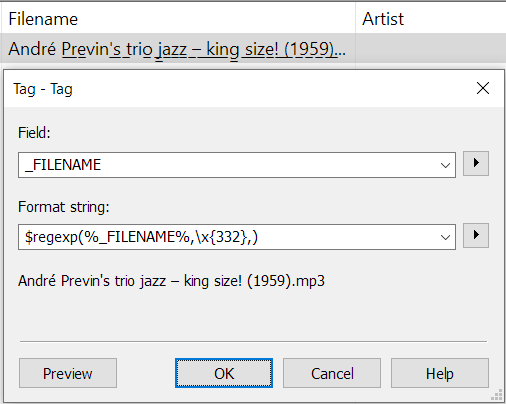
Of course, this also works in Convert TAG -\> TAG for the \_FILENAME:
`$regexp(%_FILENAME%,\x{332},)`
---
### Author:  [@reboots](https://community.mp3tag.de/u/reboots)
#### Post date: [April 6, 2024, 2:00pm UTC](https://community.mp3tag.de/t/how-to-clear-underlined-text-in-titles-and-filenames/64314/7 "2024-04-06T14:00:24Z")
Thanks LyricsLover, this also worked for me!
---
### Author:  [@system](https://community.mp3tag.de/u/system)
#### Post date: [May 6, 2024, 2:00pm UTC](https://community.mp3tag.de/t/how-to-clear-underlined-text-in-titles-and-filenames/64314/8 "2024-05-06T14:00:50Z")
This topic was automatically closed 30 days after the last reply. New replies are no longer allowed.