# How to combine multiple columns into one
**URL:** https://community.mp3tag.de/t/how-to-combine-multiple-columns-into-one/71772
**Category:** Support
**Created:** [August 26, 2026, 1:01pm UTC](https://community.mp3tag.de/t/how-to-combine-multiple-columns-into-one/71772 "2026-08-26T13:01:29Z")
**Posts on this page:** 9
**Page:** 1
### Author:  [@KEEBLER](https://community.mp3tag.de/u/KEEBLER)
#### Post date: [August 26, 2026, 1:01pm UTC](https://community.mp3tag.de/t/how-to-combine-multiple-columns-into-one/71772/1 "2026-08-26T13:01:30Z")
again after reading multiple entries - I was not privy to finding what i was wanting.
senario:
columns lyrics: and lyrics both contain well lyrics. (as well as several other columns at times)
but i want to have all lyrics in the %UNSYNCEDLYRICS% column
i have been identifying what tracks contain lyrics in each folder and moving copying them and then deleting them one at a time and it is very tenuous at best
i have most of the library with the lyrics in %UNSYNCEDLYRICS% and want to keep it that way. but depending on if i buy an album from amazon or youtube music the results can vary vastly. (trying to keep the library legal) including songs i rip from music cd's.
so to keep things uniform - i would like an action that can be clicked when i select tracks with lyrics in either of the above mentioned columns and move them to %UNSYNCEDLYRICS%
---
### Author:  [@ohrenkino](https://community.mp3tag.de/u/ohrenkino)
#### Post date: [August 26, 2026, 1:07pm UTC](https://community.mp3tag.de/t/how-to-combine-multiple-columns-into-one/71772/2 "2026-08-26T13:07:54Z")
To merge 2 fields, try an action of the typ "Format value" or Convert\>Tag-Tag for the target field e.g. UNSYNCEDLYRICS
Format string: `[%unsyncedlyrics% $char(13)$char(10)]%lyrics%`
---
### Author:  [@LyricsLover](https://community.mp3tag.de/u/LyricsLover)
#### Post date: [August 26, 2026, 1:13pm UTC](https://community.mp3tag.de/t/how-to-combine-multiple-columns-into-one/71772/3 "2026-08-26T13:13:28Z")
> [@KEEBLER](#):
>
> so to keep things uniform - i would like an action that can be clicked when i select tracks with lyrics in either of the above mentioned columns and move them to %UNSYNCEDLYRICS%
Just a quick note:
You never move the content of columns. You always treat one or more fields.
To combine the content of the `UNSYNCEDLYRICS` field with the content of the `LYRICS` field, you can use ohrenkino's suggestion.
This wouldn't delete the `LYRICS` content, though, as ' **move**' implies. It would only expand the existing content of `UNSYNCEDLYRICS`
---
### Author:  [@ohrenkino](https://community.mp3tag.de/u/ohrenkino)
#### Post date: [August 26, 2026, 1:19pm UTC](https://community.mp3tag.de/t/how-to-combine-multiple-columns-into-one/71772/4 "2026-08-26T13:19:27Z")
> [@LyricsLover](#):
>
> This wouldn't delete the `LYRICS` content
If that should be the result, the try an action of the type "Guess value"
Source format: `[%unsyncedlyrics% $char(13)$char(10)]%lyrics%==`
Guessing pattern: `%unsyncedlyrics%==%lyrics%`
---
### Author:  [@juvalu](https://community.mp3tag.de/u/juvalu)
#### Post date: [August 27, 2026, 4:59pm UTC](https://community.mp3tag.de/t/how-to-combine-multiple-columns-into-one/71772/5 "2026-08-27T16:59:38Z")
As explained in previous posts, columns cannot be "moved" or "copied."
My suggestion for working with the values contained in the "fields" with quick actions.
#### Move fields
- fields-A %LYRICS%
to
- fields-B %UNSYNCEDLYRICS%
* * *
ACTION 1
```auto
[#0]
T=5
1=\\\\$meta_sep(LYRICS,\\\\)\\\\$meta_sep(UNSYNCEDLYRICS,\\\\)
F=UNSYNCEDLYRICS
```
* * *
#### Move fields LYRICS to UNSYNCEDLYRICS - remove LYRICS
* * *
ACTION 2
```auto
[#0]
T=5
1=$meta_sep(LYRICS,\\\\\\\\)
F=UNSYNCEDLYRICS
[#1]
T=9
F=LYRICS
```
* * *
What's the difference between the two actions?
- The first action "move" the value from one field to the other, so Field B is overwritten by Field A.
- The second action "add" the value of A+B and delete A.
I hope I have understood your request correctly.
---
### Author:  [@LyricsLover](https://community.mp3tag.de/u/LyricsLover)
#### Post date: [August 27, 2026, 6:15pm UTC](https://community.mp3tag.de/t/how-to-combine-multiple-columns-into-one/71772/6 "2026-08-27T18:15:20Z")
Could you explain what this Action should do?
> [@juvalu](#):
>
> ACTION 1
>
> ```auto
> [#0]
> T=5
> 1=\\\\$meta_sep(LYRICS,\\\\)\\\\$meta_sep(UNSYNCEDLYRICS,\\\\)
> F=UNSYNCEDLYRICS
>
> ```
For those who would like to see it directly in the Mp3tag-GUI:
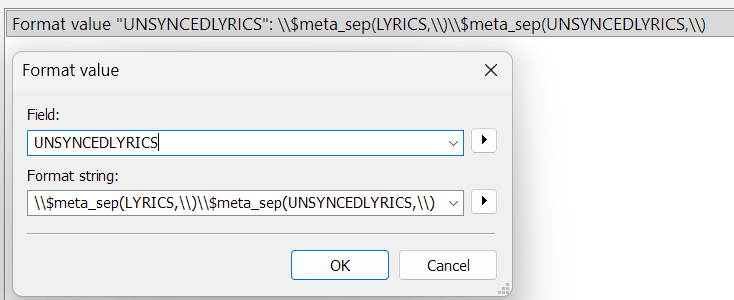
and
> [@juvalu](#):
>
> ACTION 2
>
> ```auto
> [#0]
> T=5
> 1=$meta_sep(LYRICS,\\\\\\\\)
> F=UNSYNCEDLYRICS
>
> [#1]
> T=9
> F=LYRICS
>
> ```
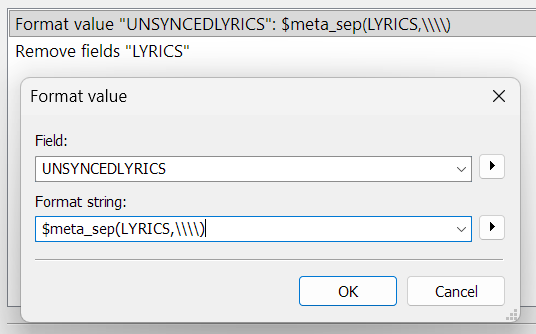
---
### Author:  [@juvalu](https://community.mp3tag.de/u/juvalu)
#### Post date: [August 28, 2026, 7:50am UTC](https://community.mp3tag.de/t/how-to-combine-multiple-columns-into-one/71772/7 "2026-08-28T07:50:18Z")
Sorry for the imprecision. I hope this post makes things clearer.
> The first action " **moves**" and " **adds**" the value from one field to another, in our example: %LYRICS% + %UNSYNCEDLYRICS% --\> **UNSYNCEDLYRICS**
> This action does not delete the %LYRICS% field.
> The second action " **moves**" the value from one field to another and **deletes the first field**. 1=$meta\_sep(LYRICS,\\\\)
> Example: move % **LYRICS** % --\> % **UNSYNCEDLYRICS** %
> deletes the % **LYRICS** % field.
- Combining the two actions you can obtain more variations.
---
### Author:  [@ohrenkino](https://community.mp3tag.de/u/ohrenkino)
#### Post date: [August 28, 2026, 8:20am UTC](https://community.mp3tag.de/t/how-to-combine-multiple-columns-into-one/71772/8 "2026-08-28T08:20:21Z")
Just a hint:
my suggestion
> [@ohrenkino](#):
>
> an action of the type "Guess value"
> Source format: `[%unsyncedlyrics% $char(13)$char(10)]%lyrics%==`
> Guessing pattern: `%unsyncedlyrics%==%lyrics%`
moves the data in 1 go and keeps any contents of the target field if there is any. The source field gets removed.
---
### Author:  [@system](https://community.mp3tag.de/u/system)
#### Post date: [August 31, 2026, 12:17pm UTC](https://community.mp3tag.de/t/how-to-combine-multiple-columns-into-one/71772/9 "2026-08-31T12:17:51Z")
This topic was automatically closed 2 days after the last reply. New replies are no longer allowed.