# How to format my columns?
**URL:** https://community.mp3tag.de/t/how-to-format-my-columns/71413
**Category:** Support
**Created:** [June 9, 2026, 4:51am UTC](https://community.mp3tag.de/t/how-to-format-my-columns/71413 "2026-06-09T04:51:59Z")
**Posts on this page:** 12
**Page:** 1
### Author:  [@Alegria](https://community.mp3tag.de/u/Alegria)
#### Post date: [June 9, 2026, 4:51am UTC](https://community.mp3tag.de/t/how-to-format-my-columns/71413/1 "2026-06-09T04:51:59Z")
Hi, I think I stupidely erased the column of "file name", and since the files I'm working with have a file name made of the hexadecimal ID of the sound and no other data, I would really like to sort them again by that value while I give them a proper title. But I can't find what to write in the fields after hitting "customize" and "new".
I'm also a bit annoyed because I tried making a custom value that I can make appear in the tag panel, but no way to make it a column
Additionnally, I started using the value Discnumber instead but I can't find a way to make that value appear in Windows's file browser, which renders that work pretty useless; that information is not the track number (which I'm using for another value), but I'd like to make those files able to be sorted by a numeric value, an hexadecimal value, the file's name or the title I gave them, that's why I need to make that value appear in the browser. Should I just move that over to the "comment" column?
I'm not super good with computers so go easy with me please and thank youuu!
---
### Author:  [@ohrenkino](https://community.mp3tag.de/u/ohrenkino)
#### Post date: [June 9, 2026, 5:43am UTC](https://community.mp3tag.de/t/how-to-format-my-columns/71413/2 "2026-06-09T05:43:54Z")
> [@Alegria](#):
>
> "file name " ...But I can't find what to write in the fields after hitting "customize" and "new".
Set only value, e.g. with `%_filename%`, `%_filename_ext%` or `%_path%`.
> [@Alegria](#):
>
> I tried making a custom value that I can make appear in the tag panel, but no way to make it a column
Please tell us the custom field name. Which field name did you choose for the tag panel?
> [@Alegria](#):
>
> I can't find a way to make that value appear in Windows's file browser
This is a Windows problem - there is no way that MP3tag can do anything about the functions in the Windows Explorer or Windows Media Player.
Here is a thread about Windows Explorer's displayed music file properties:
> [@Additional research results for the topic "Make tag fields readable by Windows Explorer"](https://community.mp3tag.de/t/additional-research-results-for-the-topic-make-tag-fields-readable-by-windows-explorer/54062):
>
> I have done some additional research on 1.) Filled a mp3 with every offered field from Mp3tag (ALT + T Reset fields, added every choosable field with describing content) 2.) Let exiftool read all this tags -\> It has some problems with proprietary tags like WFED, MVNM or GRP1 3.) Let my own tagviewer read all this tags -\> shows, which tags does not strictly belong to t…
---
### Author:  [@Alegria](https://community.mp3tag.de/u/Alegria)
#### Post date: [June 9, 2026, 11:52am UTC](https://community.mp3tag.de/t/how-to-format-my-columns/71413/3 "2026-06-09T11:52:15Z")
Thanks for your help! I simply called it "hexadecimal number"
---
### Author:  [@ohrenkino](https://community.mp3tag.de/u/ohrenkino)
#### Post date: [June 9, 2026, 12:13pm UTC](https://community.mp3tag.de/t/how-to-format-my-columns/71413/4 "2026-06-09T12:13:56Z")
> [@Alegria](#):
>
> hexadecimal number
For the column set as "Value" and as "Field" both: `%hexadecimal number%`
---
### Author:  [@Alegria](https://community.mp3tag.de/u/Alegria)
#### Post date: [June 9, 2026, 12:32pm UTC](https://community.mp3tag.de/t/how-to-format-my-columns/71413/5 "2026-06-09T12:32:39Z")
but that will still not appear in the file explorer, which is the whole point of adding that information to the files... so I'd better move the info of that column to "comments"?
---
### Author:  [@ohrenkino](https://community.mp3tag.de/u/ohrenkino)
#### Post date: [June 9, 2026, 12:35pm UTC](https://community.mp3tag.de/t/how-to-format-my-columns/71413/6 "2026-06-09T12:35:08Z")
> [@Alegria](#):
>
> but that will still not appear in the file explorer
Indeed. WMP and WE cannot show user-defined fields.
---
### Author:  [@Alegria](https://community.mp3tag.de/u/Alegria)
#### Post date: [June 9, 2026, 3:06pm UTC](https://community.mp3tag.de/t/how-to-format-my-columns/71413/7 "2026-06-09T15:06:50Z")
the file name column works fine and I'm starting to move the info over to "comments", but... why are the files sorted like this?
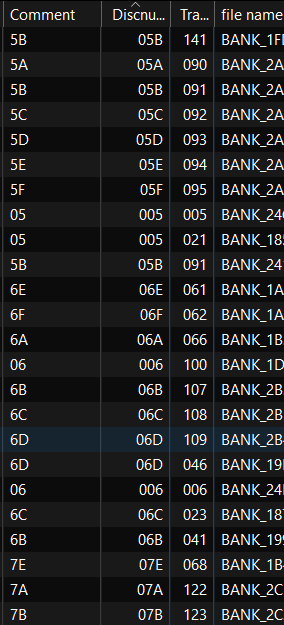
as you can see they're supposed to be sorted by discnumber, but it doesn't alphabetically or numerically make sense...
---
### Author:  [@MotleyG](https://community.mp3tag.de/u/MotleyG)
#### Post date: [June 9, 2026, 5:20pm UTC](https://community.mp3tag.de/t/how-to-format-my-columns/71413/8 "2026-06-09T17:20:46Z")
> [@Alegria](#):
>
> as you can see they're supposed to be sorted by discnumber, but it doesn't alphabetically or numerically make sense
Looks like it is sorted correctly to me, likely you have enabled the numerical check box for the column. However I would wonder why your disc numbers contain those non-integer letters. Most disc and track number formats expect only numbers, with the exception of the forward slash character `/` in some metadata formats to separate the current from the total for that field.
---
### Author:  [@ohrenkino](https://community.mp3tag.de/u/ohrenkino)
#### Post date: [June 9, 2026, 5:26pm UTC](https://community.mp3tag.de/t/how-to-format-my-columns/71413/9 "2026-06-09T17:26:18Z")
> [@Alegria](#):
>
> but it doesn't alphabetically or numerically make sense...
In a way it does: if you have set the column to contain numeric values (I assume that as the data is right-aligned) then everything that is non-numeric is ignored or sets the whole string to the value `0`. And if sort criteria do not discriminate properly, then the order of the previous sort is taken.
AFAIC see, all 5s and 6s are grouped together
---
### Author:  [@Alegria](https://community.mp3tag.de/u/Alegria)
#### Post date: [June 9, 2026, 5:32pm UTC](https://community.mp3tag.de/t/how-to-format-my-columns/71413/10 "2026-06-09T17:32:00Z")
like I said, it was supposed to be the hexadecimal value column.
I was confused as to why two 006 were so far apart, this answers it
---
### Author:  [@MotleyG](https://community.mp3tag.de/u/MotleyG)
#### Post date: [June 9, 2026, 6:08pm UTC](https://community.mp3tag.de/t/how-to-format-my-columns/71413/11 "2026-06-09T18:08:16Z")
> [@Alegria](#):
>
> like I said, it was supposed to be the hexadecimal value column
Right, you mentioned you had created a _separate_ field and column for this. But the %disc% and %track% fields specifically are integer fields. So those extra characters are ignored when sorting.
I am not aware of any music manager or player programs or mobile apps that use hex for anything. So it isn't a format I would recommend in your metadata.
---
### Author:  [@system](https://community.mp3tag.de/u/system)
#### Post date: [June 16, 2026, 6:09pm UTC](https://community.mp3tag.de/t/how-to-format-my-columns/71413/12 "2026-06-16T18:09:06Z")
This topic was automatically closed 7 days after the last reply. New replies are no longer allowed.