# How to get BPM,TORY,TLAN,… into MusicIP Mixer using MP3Tag
**URL:** https://community.mp3tag.de/t/how-to-get-bpm-tory-tlan-into-musicip-mixer-using-mp3tag/7314
**Category:** General Discussion
**Created:** [October 10, 2008, 1:51pm UTC](https://community.mp3tag.de/t/how-to-get-bpm-tory-tlan-into-musicip-mixer-using-mp3tag/7314 "2008-10-10T13:51:35Z")
**Posts on this page:** 3
**Page:** 1
### Author:  [@Moonbase](https://community.mp3tag.de/u/Moonbase)
#### Post date: [October 10, 2008, 1:51pm UTC](https://community.mp3tag.de/t/how-to-get-bpm-tory-tlan-into-musicip-mixer-using-mp3tag/7314/1 "2008-10-10T13:51:35Z")
With the advent of [MusicIP Mixer](http://musicip.com/mixer/index.jsp) v1.5, there came the possibility of »custom tags«. Since until now (v1.8) MusicIP doesn’t natively support the **TBPM** (BPM), **TORY** (Original Year) and **TLAN** (Language) ID3v2 tags, I've decided to find a workaround, for the time being.
We can actually use MusicIP Mixer in conjunction with a modern and flexible Tagger like _MP3Tag_ to do this. In this "How To" I will explain what's needed, using the BPM field as an example.
1. Activate MusicIP Mixer's HTTP API
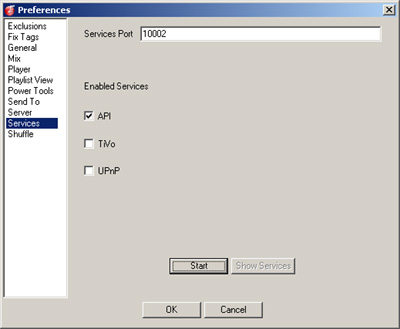
1. Download MusicIP's [MMMExec](http://www.musicip.com/downloads/mmmexec.exe) helper tool. Save in the MusicIP Mixer folder (usually "C:\Program Files\MusicIP\MusicIP Mixer").
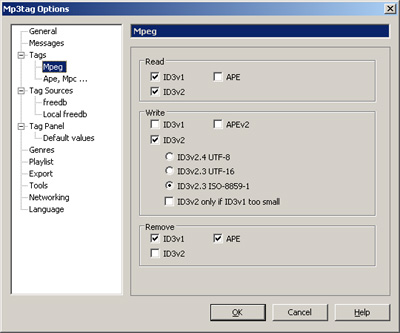
2. Get and install [MP3Tag](http://mp3tag.de/en/) if you don't have it already. Be sure to have set up all needed settings (i.e., the output encoding for writing MP3 Tags under "Tools/Options/Tags/Mpeg/Write")!
For instance (in case you use ID3v2 with ISO-8859-1 encoding):
Also, I recommend to use "View/Customize columns" to include a column for BPM. For this add a new column containing this data:
Name: BPM
Value: %bpm%
Field: %bpm%
Sort by: (leave empty)
[x] Numeric
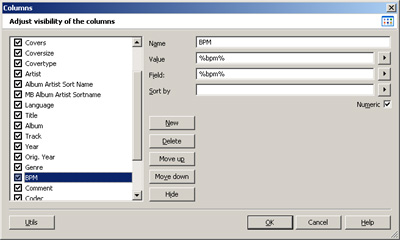
I usually put this next to the "Genre" column but of course this is entirely up to you.
1. Install _MMMExec_ as a "Tool" for MP3Tag.
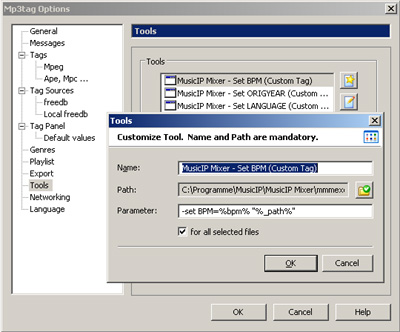
Under "Tools/Options/Tools", select "New" and enter the following:
Name: MusicIP Mixer - Set BPM (Custom Tag)
Path: (select location of "mmmexec.exe", see step (2))
Parameter: -set BPM=%bpm% "%\_path%"
[x] for all selected files
(You might want to check my [Actions to modify BPM: Double, Half, Round to Integer](https://community.mp3tag.de/t/7295/1) in order to have all BPM values formatted nicely _before_ adding them to MusicIP Mixer's library.)
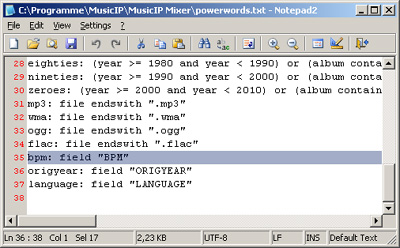
1. Find and edit your "powerwords.txt" file (in MusicIP Mixer's program folder) to include the follwing line:
1. To verify that all is working, use MP3Tag to select one or more songs you _already have in the MusicIP Mixer Library_, do a right-click and select "Tools/MusicIP Mixer - Set BPM (Custom Tag)" from the context menu.
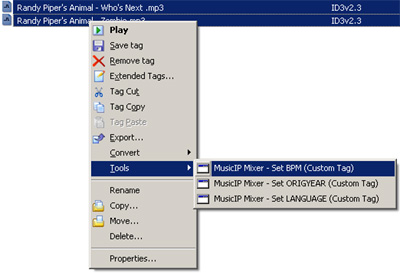
Voilà! The custom BPM field has been transferred into MusicIP Mixer's Library as a custom tag.
1. You should now be able to use BPM in MusicIP queries like
You can find more information at [MusicIP Mixer Help - Custom Tags](http://www.musicip.com/mixer/customtags.jsp).
1. If all this works, you can fill in the BPM for your whole library – either by selecting the whole library (Ctrl-A in Library view) and drag-/dropping it into MP3Tag, or by selecting the files you have in the MusicIP Mixer Library from MP3Tag (most people start their collections from a common "base folder" so that shouldn't be a problem).
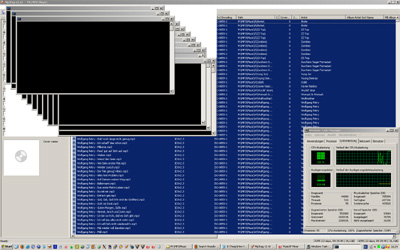
_Caveat:_ Try to do this in sensible "subsets" since MP3Tag will spawn a new _mmmexec_ process for each and every file which would probably overload your system, or clobber the HTPP API too much. (I just tested using a set of 4,255 files: Looks awful, all those DOS boxes popping up, did not really _break_ anything but the BPM entry on 21 files out of 4,255 was missing and had to be "tooled in" again.)
Looks a little crazy:
1. Until MusicIP come up with native BPM support, this will be one possible (and quite usable) workaround. It might also be a way to include TORY (use **-set ORIGYEAR=%origyear%** and **origyear: field "ORIGYEAR"** ) and TLAN (use **-set LANGUAGE=%language%** and **language: field "LANGUAGE"** ), for time being. (With MP3Tag, you can set up a maximum of 10 "tools" like this.)
_Note:_ You might be tempted to do all these in _one command_, like
```
-set BPM=%bpm% -set ORIGYEAR=%origyear% -set LANGUAGE=%language% "%_path%"
```
**This will _not_ work.** You _cannot_ use more than one **-set x=y** on the _mmmexec_ command line—only the _last_ one would actually be used!
Only remember that a) you have to keep your information updated manually, and b) MusicIP Mixer's HTTP API has to be enabled for this to work. **Remember:** In times of about a zillion different »music databases« and »media libraries«, the obvious place to store _all_ information is _the digital audio files themselves!_ So _all_ information about a piece of music can be stored next to it, moved around, transferred, backed up and _then_ any fancy libraries can also be re-built easily. (A-hem: Did I mention you should store MusicIP Mixer's Analysis Data inside your files?!)
Now the only thing that’s left over is [ask MusicIP nicely to support custom tags](http://forums.musicip.com/index.php?showtopic=3732) in _filters_ and in the _playlist view_ …
Enjoy!
---
### Author:  [@musikhoerer](https://community.mp3tag.de/u/musikhoerer)
#### Post date: [July 7, 2011, 5:15pm UTC](https://community.mp3tag.de/t/how-to-get-bpm-tory-tlan-into-musicip-mixer-using-mp3tag/7314/2 "2011-07-07T17:15:29Z")
Hello out there,
I was searching for mmmexec.exe all over the internet, but can not find it. Maybe someone can tell me where to find or is so kind to send it to me.
Thank you very much.
Sincerely
---
### Author:  [@claude1967](https://community.mp3tag.de/u/claude1967)
#### Post date: [February 8, 2012, 6:21pm UTC](https://community.mp3tag.de/t/how-to-get-bpm-tory-tlan-into-musicip-mixer-using-mp3tag/7314/3 "2012-02-08T18:21:27Z")
You can get it here :
[MIP\_BPM\_Import\_1.1](http://www.zshare.net/download/9902635555a28fa5/)
Note : this tool was designed for BPM tag, but can be used for any tag, using MMMExec as tool for MP3Tag.