# How to replace special characters when renaming directory?
**URL:** https://community.mp3tag.de/t/how-to-replace-special-characters-when-renaming-directory/71563
**Category:** Mac
**Created:** [July 3, 2026, 10:11pm UTC](https://community.mp3tag.de/t/how-to-replace-special-characters-when-renaming-directory/71563 "2026-07-03T22:11:15Z")
**Posts on this page:** 5
**Page:** 1
### Author:  [@aspnxl](https://community.mp3tag.de/u/aspnxl)
#### Post date: [July 3, 2026, 10:11pm UTC](https://community.mp3tag.de/t/how-to-replace-special-characters-when-renaming-directory/71563/1 "2026-07-03T22:11:16Z")
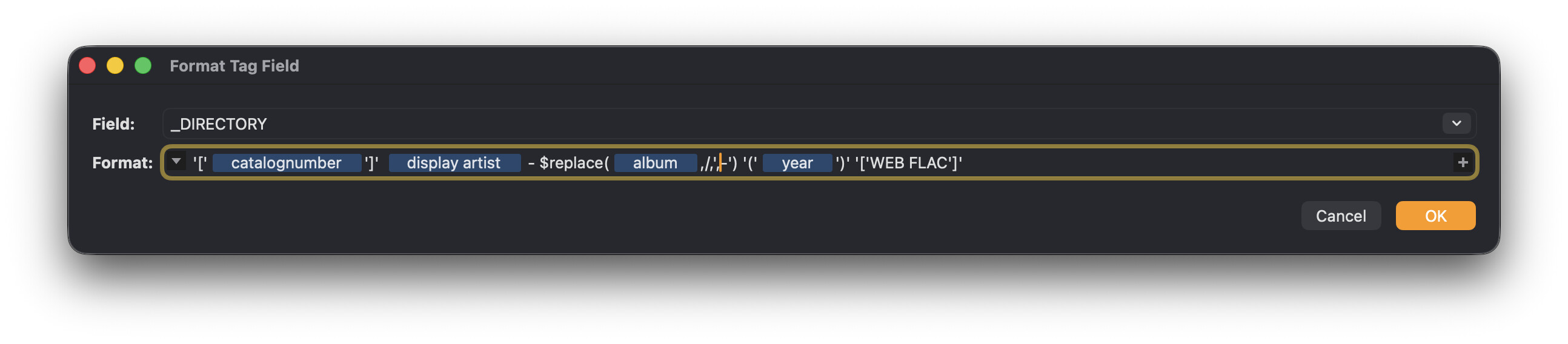
I am trying to replace backslash "/" characters with a dash "-" character when I rename a directory from the album name. By default MP3Tag will use an underscore "\_" but I want to use a dash instead. I tried using the technique from this thread but it's not having any effect. [Tag - Filename (Special Characters) - #4 by abdulkhan0567](https://community.mp3tag.de/t/tag-filename-special-characters/18539/4)
---
### Author:  [@ohrenkino](https://community.mp3tag.de/u/ohrenkino)
#### Post date: [July 4, 2026, 6:09am UTC](https://community.mp3tag.de/t/how-to-replace-special-characters-when-renaming-directory/71563/2 "2026-07-04T06:09:11Z")
I am not sure if the evaluation of the Mac directory formatting also takes care of characters that are valid but may create another folder.
In the windows version you find the settings for the replacement charcter in Options\>Files - the default is an underscore.
So it could be that you have to either modify this option or replace the underscore with the hyphen as the caretaker function has already replaced the slash with an underscore.
---
### Author:  [@aspnxl](https://community.mp3tag.de/u/aspnxl)
#### Post date: [July 4, 2026, 4:14pm UTC](https://community.mp3tag.de/t/how-to-replace-special-characters-when-renaming-directory/71563/3 "2026-07-04T16:14:42Z")
I don't think there is the same option on macOS to set custom replacement characters like you can on Windows unfortunately.
---
### Author:  [@Florian](https://community.mp3tag.de/u/Florian)
#### Post date: [July 5, 2026, 8:28am UTC](https://community.mp3tag.de/t/how-to-replace-special-characters-when-renaming-directory/71563/4 "2026-07-05T08:28:29Z")
Please try this command via Terminal.app
```auto
defaults write app.mp3tag.Mp3tag ConvertTagToFilenameReplacements -dict-add "/" "-"
```
---
### Author:  [@system](https://community.mp3tag.de/u/system)
#### Post date: [July 12, 2026, 8:28am UTC](https://community.mp3tag.de/t/how-to-replace-special-characters-when-renaming-directory/71563/5 "2026-07-12T08:28:36Z")
This topic was automatically closed 7 days after the last reply. New replies are no longer allowed.