# How to use two or more backslashes in a field without creating another field?
**URL:** https://community.mp3tag.de/t/how-to-use-two-or-more-backslashes-in-a-field-without-creating-another-field/65672
**Category:** Support
**Created:** [August 20, 2024, 3:24pm UTC](https://community.mp3tag.de/t/how-to-use-two-or-more-backslashes-in-a-field-without-creating-another-field/65672 "2024-08-20T15:24:50Z")
**Posts on this page:** 20
**Page:** 1
### Author:  [@mr\_bug](https://community.mp3tag.de/u/mr_bug)
#### Post date: [August 20, 2024, 3:24pm UTC](https://community.mp3tag.de/t/how-to-use-two-or-more-backslashes-in-a-field-without-creating-another-field/65672/1 "2024-08-20T15:24:50Z")
Hello,
I'm trying to tag a song's `TITLE` field with its name `abc\\\`. The problem is that the double backslash is creating an additional `TITLE` field, resulting in two: one with `abc` and the second with `\` as values.
How do I escape the backslashes so that a series of two backslashes won't automatically split the value into two separate fields?
Thanks.
Mp3tag v3.25 (outdated because I've not had time to update a script I rely upon which broke in newer versions)
---
### Author:  [@ohrenkino](https://community.mp3tag.de/u/ohrenkino)
#### Post date: [August 20, 2024, 3:42pm UTC](https://community.mp3tag.de/t/how-to-use-two-or-more-backslashes-in-a-field-without-creating-another-field/65672/2 "2024-08-20T15:42:03Z")
I do not think that you can really escape them.
You would have to look for characters that look similar but are not backslashes.
I wonder what the use-case would be.
---
### Author:  [@LyricsLover](https://community.mp3tag.de/u/LyricsLover)
#### Post date: [August 20, 2024, 3:51pm UTC](https://community.mp3tag.de/t/how-to-use-two-or-more-backslashes-in-a-field-without-creating-another-field/65672/3 "2024-08-20T15:51:44Z")
You could try it with Unicode characters looking similar like
U+2216 Set Minus
abc∖∖∖
or U+29F5 Reverse solidus operator
abc⧵⧵⧵

---
### Author:  [@mr\_bug](https://community.mp3tag.de/u/mr_bug)
#### Post date: [August 20, 2024, 3:52pm UTC](https://community.mp3tag.de/t/how-to-use-two-or-more-backslashes-in-a-field-without-creating-another-field/65672/4 "2024-08-20T15:52:12Z")
That's a shame. The use case is tagging the song with its title accurately which contains 3 backslashes. Of course, it's quite rare to find a song containing numerous consecutive backslashes in its title, but I think Mp3tag should be capable of writing any value. When it comes to the song's filename, I will replace the backslashes with underscores as Windows doesn't support the character on NTFS, but ideally the information could be accurately stored in the file instead under `TITLE`.
---
### Author:  [@mr\_bug](https://community.mp3tag.de/u/mr_bug)
#### Post date: [August 20, 2024, 3:55pm UTC](https://community.mp3tag.de/t/how-to-use-two-or-more-backslashes-in-a-field-without-creating-another-field/65672/5 "2024-08-20T15:55:08Z")
I will look into using a replacement character for backslashes. Thanks. The reason I don't like this approach however is that it's only because of a Mp3tag limitation, something not present in other software I believe. The other alternative is to temporarily use another music tagger to write the `TITLE` without issue (just tested with Picard and it worked). The downside of that is having to remain aware of this edge case and manually take action.
One option for Mp3tag could be to make double backslashes be escaped by another set of two, e.g. `\\\\` would write the literal `\\`. This would presumably work well because there are no values between the first and second set of backslashes in `\\\\`, so there'd be no reason to try and split the field into multiple anyway. This would allow me to use the value `abc\\\\\` which would be tagged as the desired `abc\\\`.
---
### Author:  [@ohrenkino](https://community.mp3tag.de/u/ohrenkino)
#### Post date: [August 20, 2024, 4:14pm UTC](https://community.mp3tag.de/t/how-to-use-two-or-more-backslashes-in-a-field-without-creating-another-field/65672/6 "2024-08-20T16:14:08Z")
Other players do not like the forward slash and use that as separatore. E.g. the WMP creates a group called AC and one called DC out of AC/DC.
Could you give a real example of a title that need the 2 backslashes so that I can check if that has gone wrong in my collection?
---
### Author:  [@mr\_bug](https://community.mp3tag.de/u/mr_bug)
#### Post date: [August 20, 2024, 4:26pm UTC](https://community.mp3tag.de/t/how-to-use-two-or-more-backslashes-in-a-field-without-creating-another-field/65672/7 "2024-08-20T16:26:01Z")
> [@ohrenkino](#):
>
> Could you give a real example of a title that need the 2 backslashes so that I can check if that has gone wrong in my collection?
I'm not sure what you're asking for. I doubt the song I'm dealing with is your collection. I'm not sure how to search for songs with multiple fields in Mp3tag, but in foobar2000 I'm using `"$meta_num(title)" GREATER 1` which is how I found the error in the first place. I guess you could do `title HAS \` in Mp3tag and look for any items where consecutive backslashes should be but have instead created multiple fields.
---
### Author:  [@ohrenkino](https://community.mp3tag.de/u/ohrenkino)
#### Post date: [August 20, 2024, 4:29pm UTC](https://community.mp3tag.de/t/how-to-use-two-or-more-backslashes-in-a-field-without-creating-another-field/65672/8 "2024-08-20T16:29:46Z")
You could filter for such files with
`"$meta(title,1)" PRESENT`
---
### Author:  [@LyricsLover](https://community.mp3tag.de/u/LyricsLover)
#### Post date: [August 20, 2024, 4:32pm UTC](https://community.mp3tag.de/t/how-to-use-two-or-more-backslashes-in-a-field-without-creating-another-field/65672/9 "2024-08-20T16:32:46Z")
There seems to be [a few TITLEs](https://musicbrainz.org/search?query=%5C%5C%5C&type=recording&method=indexed) with 3 backslashes in the name:

Source: [MusicBrainz.org](http://MusicBrainz.org)
I assume this also true for ARTIST and ALBUM names.
---
### Author:  [@ohrenkino](https://community.mp3tag.de/u/ohrenkino)
#### Post date: [August 20, 2024, 4:37pm UTC](https://community.mp3tag.de/t/how-to-use-two-or-more-backslashes-in-a-field-without-creating-another-field/65672/10 "2024-08-20T16:37:38Z")
It would be beneficial to replace the 2 backslashes with something else which looks like those characters as that step would be required as soon as the data from TITLE should be used as part of the filename.
$validate() does not remove those as the backslash is a valid character in paths and filenames. But I think the OS will protest if empty folder names should be attempted to be created.
---
### Author:  [@mr\_bug](https://community.mp3tag.de/u/mr_bug)
#### Post date: [August 20, 2024, 4:55pm UTC](https://community.mp3tag.de/t/how-to-use-two-or-more-backslashes-in-a-field-without-creating-another-field/65672/11 "2024-08-20T16:55:45Z")
> [@ohrenkino](#):
>
> It would be beneficial to replace the 2 backslashes with something else which looks like those characters as that step would be required as soon as the data from TITLE should be used as part of the filename.
In my case, I already rewrite any problematic symbols for Windows as underscores via _Tag - Filename_ (`$replace(%title%,\,_,/,_,?,_,*,_,",_,<,_,>,_,|,_,:,_)`) so it's not an issue. My expectation is that the metadata however should be able to accurately store the intended values (title, album, etc) without needing to make character substitutions.
---
### Author:  [@MotleyG](https://community.mp3tag.de/u/MotleyG)
#### Post date: [August 20, 2024, 5:50pm UTC](https://community.mp3tag.de/t/how-to-use-two-or-more-backslashes-in-a-field-without-creating-another-field/65672/12 "2024-08-20T17:50:08Z")
> [@mr\_bug](#):
>
> My expectation is that the metadata however should be able to accurately store the intended values (title, album, etc) without needing to make character substitutions.
This is an unfortunate reality. The double-backslash is a reserved function in mp3tag to separate multi-value fields and has been in place for a very long time. The fact that this one conflict has popped up since the inception is a good indicator that it is that rare of a condition.
Other software uses characters that are far more common. A semicolon ";" is often used, and even WMP uses a more often used forward slash "/" to separate fields. So this clash is far less impactful.
As suggested previously, the workaround in the current structure is to use alternative Unicode characters that are visually similar but do not impact the function.
---
### Author:  [@LyricsLover](https://community.mp3tag.de/u/LyricsLover)
#### Post date: [August 20, 2024, 6:08pm UTC](https://community.mp3tag.de/t/how-to-use-two-or-more-backslashes-in-a-field-without-creating-another-field/65672/13 "2024-08-20T18:08:49Z")
> [@mr\_bug](#):
>
> (just tested with Picard and it worked).
Just for the record:
Even if you can add a content like 3 backslashes in Picard, these values are not compatible with Mp3tag.
AFAIK, this Picard setting

let you add multiple TITLE content like this:
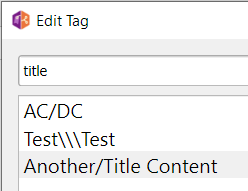
But this results in Picard as 1 TITLE content:
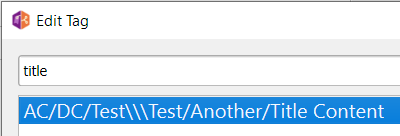
and will be displayed in Mp3tag as 1 TITLE content for a short moment only \*\*

\*\* as soon as you save such a file (without touching the TITLE) in Mp3tag, the 3 backslashes get lost and Mp3tag creates these two TITLE contents:
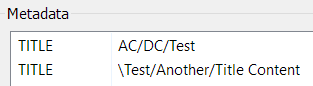
---
### Author:  [@mr\_bug](https://community.mp3tag.de/u/mr_bug)
#### Post date: [August 20, 2024, 6:57pm UTC](https://community.mp3tag.de/t/how-to-use-two-or-more-backslashes-in-a-field-without-creating-another-field/65672/14 "2024-08-20T18:57:53Z")
When I set `TITLE` to `abc\\\` in Picard I was able to re-save the file in Mp3tag and it didn't cause it to be reformatted it into 2 `TITLE`s, i.e. `abc` and `\`, which I was pleased about, so I'm not sure why it does for you. I just tested it again. I didn't try more than 1 `TITLE` in Picard or Mp3tag however.
---
### Author:  [@ohrenkino](https://community.mp3tag.de/u/ohrenkino)
#### Post date: [August 20, 2024, 7:20pm UTC](https://community.mp3tag.de/t/how-to-use-two-or-more-backslashes-in-a-field-without-creating-another-field/65672/15 "2024-08-20T19:20:17Z")
Apparently, the counting of Backslashes starts at the end.
With
> [@mr\_bug](#):
>
> abc\\
You create 2 fields: one with `abc\` and due to the `\\` as second empty one. But as there are no empty fields, you don't see it.
If the `\\` as part of the field data would be taken as is, then it would not be possible to distinguish files with 2 fields shown with the `\\` as separator or a single field with `\\` as part of the data in that field.
THe rule is simple in MP3tag: `\\` indicates a multi-value-field. Always.
If it is absolutely necessary to keep the backslash `\` (as it may be easier to enter) it may be an alternative idea to add a space between `\` and `\`. I am sure there are space characters around that have a reduced width so that they hardly show up.
---
### Author:  [@7stones](https://community.mp3tag.de/u/7stones)
#### Post date: [August 21, 2024, 12:48am UTC](https://community.mp3tag.de/t/how-to-use-two-or-more-backslashes-in-a-field-without-creating-another-field/65672/16 "2024-08-21T00:48:54Z")
> [@mr\_bug](#):
>
> When I set `TITLE` to `abc\\\` in Picard I was able to re-save the file in Mp3tag and it didn't cause it to be reformatted it into 2 `TITLE`s, i.e. `abc` and `\`, which I was pleased about, so I'm not sure why it does for you.
That is strange. Forgive me for asking the obvious - did you also look in View \> Extended tags, which is what @LyricsLover illustrated? There you can see multiple values listed without the double backslashes. Only looking at the columns and tag panel could delude you in this case.
---
### Author:  [@mr\_bug](https://community.mp3tag.de/u/mr_bug)
#### Post date: [August 21, 2024, 12:58am UTC](https://community.mp3tag.de/t/how-to-use-two-or-more-backslashes-in-a-field-without-creating-another-field/65672/17 "2024-08-21T00:58:20Z")
I've noticed the issue:
I didn't think there'd be a difference between saving multiple files at a time and just selecting the file with `abc\\\` as its title and pressing save. If multiple files are selected and save is pressed, the triple backslash is preserved. If only the triple backslash file is selected and save is pressed, `TITLE` is split into 2 fields with values `abc` and `\`.
---
### Author:  [@7stones](https://community.mp3tag.de/u/7stones)
#### Post date: [August 21, 2024, 12:07pm UTC](https://community.mp3tag.de/t/how-to-use-two-or-more-backslashes-in-a-field-without-creating-another-field/65672/18 "2024-08-21T12:07:37Z")
I can confirm that with multiple files selected, the triple backslash is preserved over here too - most of the times.
Cause whilst fiddling with it, I noticed that if you keep saving a couple of times, _sometimes_ one of the selected files loses the triple backslash while the rest keep it. Using v3.27 in Wine if it matters.
---
### Author:  [@ohrenkino](https://community.mp3tag.de/u/ohrenkino)
#### Post date: [August 21, 2024, 1:26pm UTC](https://community.mp3tag.de/t/how-to-use-two-or-more-backslashes-in-a-field-without-creating-another-field/65672/19 "2024-08-21T13:26:42Z")
The longer I look at this thread the more I get the impression that the automatism to split fields with `\\` should go.
Splitting fields should not happen automatically but only if triggered by an action of the type "Split fields by separator" or via the Extended tags dialogue.
This would circumvent any collisions with strange assortments of characters in tag fields.
It would be nice option to set whether multi-value fields should be displayed as such and what should be used as separator to indicate the various values.
As long as the automatism splits fields with `\\` there is no way around it but to replace these 2 characters.
---
### Author:  [@LyricsLover](https://community.mp3tag.de/u/LyricsLover)
#### Post date: [August 21, 2024, 1:32pm UTC](https://community.mp3tag.de/t/how-to-use-two-or-more-backslashes-in-a-field-without-creating-another-field/65672/20 "2024-08-21T13:32:24Z")
> [@ohrenkino](#):
>
> Splitting fields should not happen automatically but only if triggered by an action of the type "Split fields by separator" or via the Extended tags dialogue
I am of exactly the same opinion.
A little less complex would be an option to choose if the automatic creation of a multi-value field (by using two backslashes in a tag) should be enabled or disabled.
This seems the only way to be able to enter whatever character is needed - even three backslashes - in all the various tags.
[Next page](https://community.mp3tag.de/t/how-to-use-two-or-more-backslashes-in-a-field-without-creating-another-field/65672.md?page=2)