# ID3v1 not removed
**URL:** https://community.mp3tag.de/t/id3v1-not-removed/53679
**Category:** Mac
**Created:** [July 5, 2021, 5:20pm UTC](https://community.mp3tag.de/t/id3v1-not-removed/53679 "2021-07-05T17:20:23Z")
**Posts on this page:** 6
**Page:** 1
### Author:  [@rajanna](https://community.mp3tag.de/u/rajanna)
#### Post date: [July 5, 2021, 5:20pm UTC](https://community.mp3tag.de/t/id3v1-not-removed/53679/1 "2021-07-05T17:20:23Z")
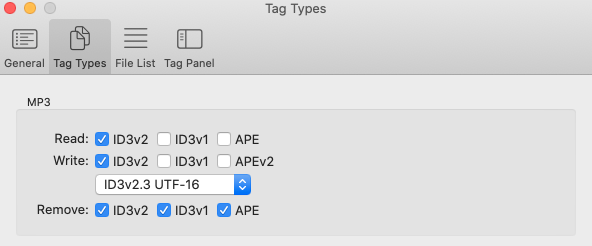
No matter how many times, I read and write the mp3. I am not able to remove ID3v1 tag from some mp3 in mac version.
I think this is a bug.

---
### Author:  [@Florian](https://community.mp3tag.de/u/Florian)
#### Post date: [July 5, 2021, 5:36pm UTC](https://community.mp3tag.de/t/id3v1-not-removed/53679/2 "2021-07-05T17:36:35Z")
It’s not automatically removed when saving tags but via ⌥⌘⌫ or _Edit \> Remove Tag_
---
### Author:  [@rajanna](https://community.mp3tag.de/u/rajanna)
#### Post date: [July 5, 2021, 6:08pm UTC](https://community.mp3tag.de/t/id3v1-not-removed/53679/3 "2021-07-05T18:08:18Z")
If we remove tag, it will remove all the tags.
I copied the tags, removed tags and pasted it back
But this is inconvenient to work on large number of songs.
with the preferences set to remove ID3v1, we should be able to remove the tags in v1 and copy it over to v3. remove v1 completely.
Or give an option to remove only v1 tags.
---
### Author:  [@ohrenkino](https://community.mp3tag.de/u/ohrenkino)
#### Post date: [July 5, 2021, 6:21pm UTC](https://community.mp3tag.de/t/id3v1-not-removed/53679/4 "2021-07-05T18:21:05Z")
If you set the options to delete nothing but V1 tags (and you don't write them afterwards again), then the function Cut tag will remove only the V1 tags.
This could be used for a lot of files and will leave all other tag versions in one piece (i.e. not remove them).
After you are done, set the option back to all the tags that you want to be able to remove.
---
### Author:  [@rajanna](https://community.mp3tag.de/u/rajanna)
#### Post date: [July 5, 2021, 6:47pm UTC](https://community.mp3tag.de/t/id3v1-not-removed/53679/5 "2021-07-05T18:47:32Z")
Thank you. It is an easy solution. It is not obvious.
It might be better to add submenu's to remove and cut -\> ALL/V1/V2/APE.
This is just a suggestion.
---
### Author:  [@system](https://community.mp3tag.de/u/system)
#### Post date: [August 4, 2021, 6:48pm UTC](https://community.mp3tag.de/t/id3v1-not-removed/53679/6 "2021-08-04T18:48:12Z")
This topic was automatically closed 30 days after the last reply. New replies are no longer allowed.