# Import from Discogs - Tracknumbers for wma
**URL:** https://community.mp3tag.de/t/import-from-discogs-tracknumbers-for-wma/70828
**Category:** Support
**Created:** [March 6, 2026, 7:55am UTC](https://community.mp3tag.de/t/import-from-discogs-tracknumbers-for-wma/70828 "2026-03-06T07:55:33Z")
**Posts on this page:** 15
**Page:** 1
### Author:  [@thbe51](https://community.mp3tag.de/u/thbe51)
#### Post date: [March 6, 2026, 7:55am UTC](https://community.mp3tag.de/t/import-from-discogs-tracknumbers-for-wma/70828/1 "2026-03-06T07:55:33Z")
Hi,
I’m currently digitazing my analog LP:s and 45:s (and my dads old 78:s for that matter) using Discogs for the metadata. As Discogs use A1, A2….. for tracknumbers I got an error when writing the data. When update it seems OK but the Track-field is empty. Do I something wrong here or can this be converted to 01, 02, 03…..??
Thanks for the great App!!
/Thomas
---
### Author:  [@LyricsLover](https://community.mp3tag.de/u/LyricsLover)
#### Post date: [March 6, 2026, 8:06am UTC](https://community.mp3tag.de/t/import-from-discogs-tracknumbers-for-wma/70828/2 "2026-03-06T08:06:57Z")
What music/audio format do you use for your tracks? mp3? flac? mp4? wav?
---
### Author:  [@thbe51](https://community.mp3tag.de/u/thbe51)
#### Post date: [March 7, 2026, 7:16am UTC](https://community.mp3tag.de/t/import-from-discogs-tracknumbers-for-wma/70828/3 "2026-03-07T07:16:03Z")
Hi again,
I’m digitazing to Windows 11 wav-file and keep that for some sort of master. No problems here.
After processing the audio (remove clicks and others with Adobe Audition) I save as .wma and here I got error on the tracks beeing A1, A2 a.s.o. After I update the screen it is saved but the track is 0 (zero).
I tested by saving to .mp3 and this works as expected. Seems that .wma only support numbers in this field.
Thanks for getting back top me 🙂
//Thomas
---
### Author:  [@LyricsLover](https://community.mp3tag.de/u/LyricsLover)
#### Post date: [March 7, 2026, 10:29am UTC](https://community.mp3tag.de/t/import-from-discogs-tracknumbers-for-wma/70828/4 "2026-03-07T10:29:23Z")
> [@thbe51](#):
>
> Seems that .wma only support numbers in this field.
If you search for information about WMA, you will quickly find the definition "WMA track number is a string". This was also mentioned 10 years ago, here
> [@\[X\] Can't copy some unusual TRACK tags from MP3 / FLAC to WMA](https://community.mp3tag.de/t/x-cant-copy-some-unusual-track-tags-from-mp3-flac-to-wma/17714/7):
>
> The Windows Media Format 11 SDK defines ...
> WM/Track g\_wszWMTrack WMT\_TYPE\_STRING
> [WM/TrackNumber](https://learn.microsoft.com/en-us/windows/win32/wmformat/wm-tracknumber) g\_wszWMTrackNumber WMT\_TYPE\_STRING
> ... _and therefore it seems to be allowed, to store non numerical values into a WMA tag_.
**However that definitely doesn’t apply to us as end users.**
* * *
**The Two-Layer Reality**
The confusion often arises because users see a **String** in the [SDK/API](https://learn.microsoft.com/en-us/windows/win32/wmformat/wm-tracknumber) and assume the underlying file format supports **Alphanumeric** values (like "A1" or "12-B"). However, the architectural truth is split into two layers:
| **Layer** | **Role** | **Data Type** |
| --- | --- | --- |
| **ASF Container (Physical)** | How data is written to the disk | **WORD** (16-bit Unsigned Integer) |
| **API / SDK (Interface)** | How software communicates with the file | **String** (WSTR) |
### Key Technical Points
- **The Physical Constraint:** The ASF (Advanced Systems Format, used for WMA audio files) specification explicitly defines the `WM/TrackNumber` attribute as a **WORD** (a 16-bit unsigned integer data type, not a human-readable word composed of letters!). This means the actual bits stored in the file header can only represent a whole number between **0** and **65'535**.
- **The API Abstraction:** The Windows Media SDK often passes metadata values as Strings for the sake of uniformity. When you "write/save" a track number via the API, the system takes your String (e.g., "10"), converts it to an Integer, and packs it into that 16-bit slot.
- **Why Alphanumeric Fails:** If you attempt to pass an alphanumeric value like **"A1"** to the API, the underlying writer will fail to convert it to a `WORD`. Since the physical container has no "String" field for this specific attribute, the data simply cannot be stored.
Thats also the reason why we see this error message in Mp3tag, if we try to save **"A1"** into a WMA file from the Tag Panel or try to fill the `TRACK` (WM/Tracknumber) from a WebSource Script like the one from Discogs or MusicBrainz:

I can confirm that a Websource Script leaves a zero (0) into TRACK after showing the above error message for a WMA file.
> [@thbe51](#):
>
> After I update the screen it is saved but the track is 0 (zero).
The same is true if you try it from the Tag Panel.
---
### Author:  [@MotleyG](https://community.mp3tag.de/u/MotleyG)
#### Post date: [March 7, 2026, 11:22am UTC](https://community.mp3tag.de/t/import-from-discogs-tracknumbers-for-wma/70828/5 "2026-03-07T11:22:39Z")
> [@LyricsLover](#):
>
> If you search for information about WMA, you will quickly find the definition "WMA track number is a string".
The MPEG-4 format also expects an integer. This applies to MP4, M4A, M4B, and M4V files.
My suggestion - While the traditional concept of album "sides" applies when comparing the track list on the cover to the corresponding record and side, this isn't the same for the audio files once they have been digitized. Options are to simply use a single run of track numbers from the first track to the last for the complete album. Or you can be creative and use the DISCNUMBER field to indicate separate records or even sides within each album along with the corresponding TRACK number.
---
### Author:  [@LyricsLover](https://community.mp3tag.de/u/LyricsLover)
#### Post date: [March 7, 2026, 11:31am UTC](https://community.mp3tag.de/t/import-from-discogs-tracknumbers-for-wma/70828/6 "2026-03-07T11:31:12Z")
> [@MotleyG](#):
>
> The MPEG-4 format also expects an integer. This applies to MP4, M4A, M4B, and M4V files
In my quick test, I was able to write "A1" or "B2" to both MP4 and M4A files using Mp3tag v3.34-beta.4.
What am I missing?
---
### Author:  [@MotleyG](https://community.mp3tag.de/u/MotleyG)
#### Post date: [March 7, 2026, 12:56pm UTC](https://community.mp3tag.de/t/import-from-discogs-tracknumbers-for-wma/70828/7 "2026-03-07T12:56:22Z")
Leading zeros and the slash "/" character are not saved as the field is expected to be an integer value. This applies to the DISC, TRACK, TOTALDISCS, and TOTALTRACKS fields for the MP4 tag format. This should exclude any alphabetical characters as well. This has been documented here previously. Not sure why this is saving on your side. I suspect this would cause issues for some players as well.
---
### Author:  [@LyricsLover](https://community.mp3tag.de/u/LyricsLover)
#### Post date: [March 7, 2026, 1:10pm UTC](https://community.mp3tag.de/t/import-from-discogs-tracknumbers-for-wma/70828/8 "2026-03-07T13:10:05Z")
> [@MotleyG](#):
>
> Not sure why this is saving on your side
As a test, please try to save **A1** in one of your MP4 or M4A files. Does it work, or do you get the same error as mentioned above for WMA?
> [@MotleyG](#):
>
> I suspect this would cause issues for some players as well.
I don't doubt that.
I'm just curious to know what Mp3tag currently allows as TRACK content. 😉
---
### Author:  [@MotleyG](https://community.mp3tag.de/u/MotleyG)
#### Post date: [March 8, 2026, 12:53am UTC](https://community.mp3tag.de/t/import-from-discogs-tracknumbers-for-wma/70828/9 "2026-03-08T00:53:25Z")
> [@LyricsLover](#):
>
> As a test, please try to save **A1** in one of your MP4 or M4A files. Does it work, or do you get the same error as mentioned above for WMA?
With mp3tag v3.34-beta4 I can confirm the TRACK and DISC can be set with alphabetical characters. This has not always been the case.
However as expected it leads to no track or disc information displaying in either iTunes or MusicBee on Windows for these files.
@Florian was something in the standard changed to allow non-integer characters in MPEG-4 DISC and TRACK fields?
---
### Author:  [@poster](https://community.mp3tag.de/u/poster)
#### Post date: [March 8, 2026, 6:21am UTC](https://community.mp3tag.de/t/import-from-discogs-tracknumbers-for-wma/70828/10 "2026-03-08T06:21:37Z")
> [@MotleyG](#):
>
> @Florian was something in the standard changed to allow non-integer characters in MPEG-4 DISC and TRACK fields?
The standard for ID3v2.3/4 does not allow this too.
> The 'Track number/Position in set' frame is a numeric string containing the order number of the audio-file on its original recording. This may be extended with a "/" character and a numeric string containing the total number of tracks/elements on the original recording. E.g. "4/9".
Anyway it is possible to use non-integer characters like A1.
---
### Author:  [@Florian](https://community.mp3tag.de/u/Florian)
#### Post date: [March 9, 2026, 8:46am UTC](https://community.mp3tag.de/t/import-from-discogs-tracknumbers-for-wma/70828/11 "2026-03-09T08:46:00Z")
> [@MotleyG](#):
>
> @Florian was something in the standard changed to allow non-integer characters in MPEG-4 DISC and TRACK fields?
No, and it's written as user-defined `TRACK` field in those cases where the value of the field cannot easily be transformed to an integer value (e.g., the string `01` can be transformed to integer `1`).
---
### Author:  [@MotleyG](https://community.mp3tag.de/u/MotleyG)
#### Post date: [March 9, 2026, 10:44am UTC](https://community.mp3tag.de/t/import-from-discogs-tracknumbers-for-wma/70828/12 "2026-03-09T10:44:01Z")
> [@Florian](#):
>
> No, and it's written as user-defined `TRACK` field in those cases where the value of the field cannot easily be transformed to an integer value
This explains why other programs may not be able to properly use the data. Essentially then this non-conforming data is only useful directly within mp3tag.
---
### Author:  [@Florian](https://community.mp3tag.de/u/Florian)
#### Post date: [March 9, 2026, 10:55am UTC](https://community.mp3tag.de/t/import-from-discogs-tracknumbers-for-wma/70828/13 "2026-03-09T10:55:23Z")
Or other programs that support user-defined fields, e.g., foobar2000.
---
### Author:  [@Doug\_Mackie](https://community.mp3tag.de/u/Doug_Mackie)
#### Post date: [March 9, 2026, 9:59pm UTC](https://community.mp3tag.de/t/import-from-discogs-tracknumbers-for-wma/70828/14 "2026-03-09T21:59:36Z")
> [@thbe51](#):
>
> I save as .wma and here I got error on the tracks beeing A1, A2 a.s.o. After I update the screen it is saved but the track is 0 (zero).
Perhaps you do not really need to store the A and B letters in the track field itself.
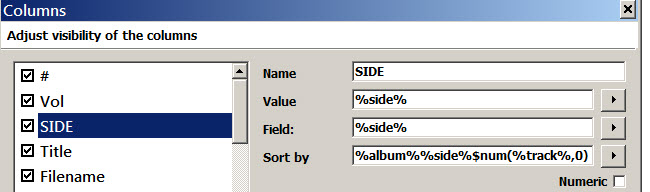
Instead, you could create a custom tag in Mp3tag to hold the LP side designators ( **A** or **B** ). Let's call this field "SIDE". Then, in the Mp3tag column sort setup for SIDE, you could sort first by the album name, second by the SIDE tag, and third by the track number.
This would allow you to create playlists that look like traditional song lists for vinyl LPs. And sorting by SIDE would allow you to sort the track numbers as integers, even when the numbers were stored in the audio file as strings. The conversion to integers can be done by a script function **`$num(%track%,0)`** :
---
### Author:  [@system](https://community.mp3tag.de/u/system)
#### Post date: [March 16, 2026, 9:59pm UTC](https://community.mp3tag.de/t/import-from-discogs-tracknumbers-for-wma/70828/15 "2026-03-16T21:59:54Z")
This topic was automatically closed 7 days after the last reply. New replies are no longer allowed.