# \\\\ in tag fields
**URL:** https://community.mp3tag.de/t/in-tag-fields/11061
**Category:** Support
**Created:** [November 4, 2010, 4:07am UTC](https://community.mp3tag.de/t/in-tag-fields/11061 "2010-11-04T04:07:39Z")
**Posts on this page:** 3
**Page:** 1
### Author:  [@Kewedriver](https://community.mp3tag.de/u/Kewedriver)
#### Post date: [November 4, 2010, 4:07am UTC](https://community.mp3tag.de/t/in-tag-fields/11061/1 "2010-11-04T04:07:39Z")
How do you remove \\ from your artist and title field
---
### Author:  [@mjcm](https://community.mp3tag.de/u/mjcm)
#### Post date: [November 4, 2010, 4:41am UTC](https://community.mp3tag.de/t/in-tag-fields/11061/2 "2010-11-04T04:41:03Z")
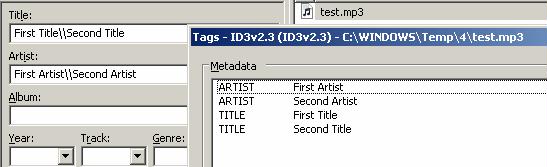
You first should check if you have Multiple Artist and or Title Fields through
Extended Tags or ALT + T. (multiple-valued fields are separated by \\).
If not, why not create a Replace Action
[https://docs.mp3tag.de/actions/replace](https://docs.mp3tag.de/actions/replace)
And if you want to combine Multiple fields into only 1, then
(Example uses the field ARTIST)
Create an Action Format value
Field: Artist
Format String: $meta(artist)
Update 13:22, Added Screen shot

---
### Author:  [@system](https://community.mp3tag.de/u/system)
#### Post date: [February 9, 2026, 12:22pm UTC](https://community.mp3tag.de/t/in-tag-fields/11061/3 "2026-02-09T12:22:39Z")