# Insert dashes for date
**URL:** https://community.mp3tag.de/t/insert-dashes-for-date/66212
**Category:** Support
**Created:** [October 9, 2024, 11:41pm UTC](https://community.mp3tag.de/t/insert-dashes-for-date/66212 "2024-10-09T23:41:25Z")
**Posts on this page:** 5
**Page:** 1
### Author:  [@Stev\_Jackson](https://community.mp3tag.de/u/Stev_Jackson)
#### Post date: [October 9, 2024, 11:41pm UTC](https://community.mp3tag.de/t/insert-dashes-for-date/66212/1 "2024-10-09T23:41:25Z")
Hi. I took a break from tagging files that I record off FM and I forgot my way of working.
I have the date recorded in the comment field as "20240314" (which would be YYYYMMDD).
I want to rename the files from "20240314" - Title to "2024-03-14 - Title"
So is there something I can do with Tag-\>Filename to rename the files?
---
### Author:  [@LyricsLover](https://community.mp3tag.de/u/LyricsLover)
#### Post date: [October 10, 2024, 6:18am UTC](https://community.mp3tag.de/t/insert-dashes-for-date/66212/2 "2024-10-10T06:18:45Z")
> [@Stev\_Jackson](#):
>
> 20240314
> So is there something I can do with Tag-\>Filename to rename the files?
You can try
`$regexp(%COMMENT%,(\d{4})(\d{2})(\d{2}),$1-$2-$3) - %TITLE%`

This only works correctly if the numbers in COMMENT are really arranged as YYYYMMDD.
---
### Author:  [@Casual\_Tea](https://community.mp3tag.de/u/Casual_Tea)
#### Post date: [October 10, 2024, 10:29am UTC](https://community.mp3tag.de/t/insert-dashes-for-date/66212/3 "2024-10-10T10:29:22Z")
Since I love regex I thought I'd try to improve yours a bit.
```auto
^((?:19|20)\d{2})((?:0[1-9]|1[0-2]))(\d{2})$
```
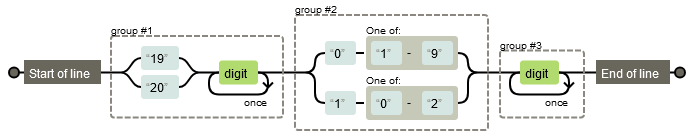
This only matches when the first 4 digits start with 19 or 20 (for 19th and 20th century) and the 2 digits that follow must be between 01 and 12 for months.
The only cases where this still might fail is when you have switched days and months and the day is within the 01-12 range.
---
### Author:  [@Stev\_Jackson](https://community.mp3tag.de/u/Stev_Jackson)
#### Post date: [October 10, 2024, 11:41am UTC](https://community.mp3tag.de/t/insert-dashes-for-date/66212/4 "2024-10-10T11:41:19Z")
I tried LyricsLover's idea and it worked perfectly. Thank you
---
### Author:  [@system](https://community.mp3tag.de/u/system)
#### Post date: [November 9, 2024, 11:41am UTC](https://community.mp3tag.de/t/insert-dashes-for-date/66212/5 "2024-11-09T11:41:48Z")
This topic was automatically closed 30 days after the last reply. New replies are no longer allowed.