# ITUNESADVISORY Tag in MP3TAG v3.33
**URL:** https://community.mp3tag.de/t/itunesadvisory-tag-in-mp3tag-v3-33/70560
**Category:** Support
**Created:** [January 24, 2026, 4:20am UTC](https://community.mp3tag.de/t/itunesadvisory-tag-in-mp3tag-v3-33/70560 "2026-01-24T04:20:16Z")
**Posts on this page:** 11
**Page:** 1
### Author:  [@davidi](https://community.mp3tag.de/u/davidi)
#### Post date: [January 24, 2026, 4:20am UTC](https://community.mp3tag.de/t/itunesadvisory-tag-in-mp3tag-v3-33/70560/1 "2026-01-24T04:20:16Z")
Hello, I came across an issue with the ITUNESADVISORY tag and the Apple Music App for Windows 11 and iOS 26 where the E no longer shows in either app.
For example, if I put a 1 in that tag like I normally do for explicit content, Apple Music does not show the E.
I tried to troubleshoot and here is what I found:
If I use MP3TAG v3.31a, ITUNESADVISORY works as expected. Once I import the file in Apple Music, the E shows up fine.
If I use MP3TAG v3.33, ITUNESADVISORY does not work as expected and the E does not initially show up unless I do this process…
1. Put a 0 in that field & save it
2. replace the 0 with a 1 & save it
3. Finally, import the .m4a file in Apple Music and the E will show up.
I thought this was a fluke, so I tried it with another .m4a file and I had to go through the same process in order for the E to show up in Apple Music when I use MP3TAG v3.33. If I use MP3TAG v3.31a, everything works fine and I do not have to do that process.
I do not know what examples or other information you need from me, but I am more than happy to provide more information if needed.
---
### Author:  [@Florian](https://community.mp3tag.de/u/Florian)
#### Post date: [January 25, 2026, 9:58am UTC](https://community.mp3tag.de/t/itunesadvisory-tag-in-mp3tag-v3-33/70560/2 "2026-01-25T09:58:52Z")
If you editing this directly on the files already managed in your Apple Music library, you usually need to trigger a refresh of the data.
**Get Info** (or **Show Info** in some versions) from the right-click menu works reliably for the modified data to be visible to Apple Music / iTunes.
---
### Author:  [@davidi](https://community.mp3tag.de/u/davidi)
#### Post date: [January 25, 2026, 2:00pm UTC](https://community.mp3tag.de/t/itunesadvisory-tag-in-mp3tag-v3-33/70560/3 "2026-01-25T14:00:46Z")
Hi 😀
I am editing the tags before I import the .m4a in Apple Music. I made sure to delete the .m4a out of Apple Music before each step during troubleshooting.
---
### Author:  [@Florian](https://community.mp3tag.de/u/Florian)
#### Post date: [January 25, 2026, 3:57pm UTC](https://community.mp3tag.de/t/itunesadvisory-tag-in-mp3tag-v3-33/70560/4 "2026-01-25T15:57:41Z")
It's working here and shows the E in latest Apple Music on Windows and macOS after importing the file to the library.
Not really sure if I can help you any further.
---
### Author:  [@davidi](https://community.mp3tag.de/u/davidi)
#### Post date: [January 26, 2026, 12:49am UTC](https://community.mp3tag.de/t/itunesadvisory-tag-in-mp3tag-v3-33/70560/5 "2026-01-26T00:49:28Z")
Hmm, I wonder what’s causing it then. Only 2 things changed, I upgraded to the newest version of MP3TAG and the newest version of dbpoweramp. All I am doing is going from FLAC to ALAC, updating some tags and then importing it in Apple Music.
I wonder if it’s an issue with the conversion process. But, why would MP3TAG v3.31a work and not 3.33 on the same file. It’s not a huge deal I guess since I can just write an action to do the process I mentioned. Hmm. I am puzzled lol
---
### Author:  [@MotleyG](https://community.mp3tag.de/u/MotleyG)
#### Post date: [January 26, 2026, 1:07am UTC](https://community.mp3tag.de/t/itunesadvisory-tag-in-mp3tag-v3-33/70560/6 "2026-01-26T01:07:22Z")
> [@davidi](#):
>
> All I am doing is going from FLAC to ALAC, updating some tags and then importing it in Apple Music.
Are you doing the conversion in DBPA after the edits in mp3tag? Or copying and pasting the tags from FLAC to ALAC after the conversion?
I use both programs myself. And have found DBPA drops some fields when converting from FLAC to ALAC and the other way as well. There has been some discussion about this on their forum. Maybe a solution is coming. But this is not an issue from mp3tag I believe.
---
### Author:  [@davidi](https://community.mp3tag.de/u/davidi)
#### Post date: [January 26, 2026, 1:36am UTC](https://community.mp3tag.de/t/itunesadvisory-tag-in-mp3tag-v3-33/70560/7 "2026-01-26T01:36:14Z")
I am using mp3tag after the conversion from FLAC to ALAC. Initially when I purchase music, I use mp3tag to properly tag the FLAC files. So, when I do the conversion, DBPA already tags the ALAC file, at this point I use mp3tag to clean up the ALAC file because not every tag survives the conversion process.
---
### Author:  [@Florian](https://community.mp3tag.de/u/Florian)
#### Post date: [January 29, 2026, 3:24pm UTC](https://community.mp3tag.de/t/itunesadvisory-tag-in-mp3tag-v3-33/70560/8 "2026-01-29T15:24:08Z")
I've received an example file via PM and was able to track down the reason for the field not being recognised by Apple Music.
Here comes the lengthy explanation (which I already shared via PM, but want to also describe publicly for transparency):
I made some fairly big internal changes to the MP4 code end of August (v3.31b) and one of which was reusing internal fields (MP4 atoms) upon rewriting the tag if the content hasn't changed.
It now happens that the `ITUNESADVISORY` field in this file is not stored as `rtng` atom as required by Apple Music, but as a user-defined field with the name `ITUNESADVISORY` (caused by adding this field already to the FLAC file and the conversion process not being aware of the semantics of this field).
Previously, on v3.31, Mp3tag always rewrote the entire tag and would have translated this user-defined field named `ITUNESADVISORY` to the `rtng` atom. Not so in v3.33, which only does this if the field content is changed (e.g., from `1` to `0` and back again) or when the tag is rewritten completely (as with cutting and pasting).
* * *
I've just released [Mp3tag v3.34-beta.1](https://community.mp3tag.de/t/455) which reverts back to the previous v3.31 behaviour and doesn't try to reuse MP4 atoms and instead writes the tags according to Mp3tag's [mappings](https://docs.mp3tag.de/mapping/).
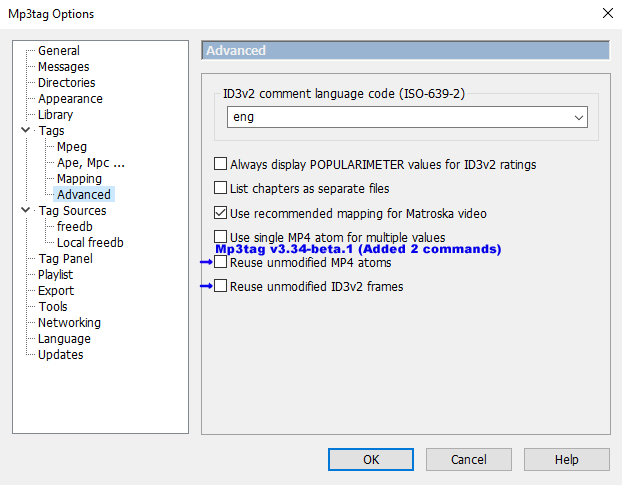
If someone needs minimal changes applied to the tag, there is now an option **Reuse unmodified MP4 atoms** at **Options → Tags → Advanced** , which also has the implications described above.
---
### Author:  [@Sergius](https://community.mp3tag.de/u/Sergius)
#### Post date: [January 29, 2026, 5:03pm UTC](https://community.mp3tag.de/t/itunesadvisory-tag-in-mp3tag-v3-33/70560/9 "2026-01-29T17:03:36Z")
A big thank you to @Florian for this change! I had an issue with tag transfer using the Actions command, which has been fixed in this version Mp3tag v3.34-beta.1 . 😊 👍
See my screenshot for the two commands Florian added:
Continuing the discussion from [Mp3tag Development Build Status](https://community.mp3tag.de/t/mp3tag-development-build-status/455):
> [@Mp3tag Development Build Status](https://community.mp3tag.de/t/mp3tag-development-build-status/455/1):
>
> - CHG: reverted previous change to reuse unmodified ID3v2 frames and added an advanced configuration option to enable reuse.
> - CHG: reverted previous change to reuse unmodified MP4 atoms and added an advanced configuration option to enable reuse.
---
### Author:  [@davidi](https://community.mp3tag.de/u/davidi)
#### Post date: [January 31, 2026, 1:15am UTC](https://community.mp3tag.de/t/itunesadvisory-tag-in-mp3tag-v3-33/70560/10 "2026-01-31T01:15:51Z")
I just want to say, thank you @Florian ! The new beta works great and solves this issue!
---
### Author:  [@system](https://community.mp3tag.de/u/system)
#### Post date: [March 2, 2026, 1:16am UTC](https://community.mp3tag.de/t/itunesadvisory-tag-in-mp3tag-v3-33/70560/11 "2026-03-02T01:16:39Z")
This topic was automatically closed 30 days after the last reply. New replies are no longer allowed.