# Just wanted to share a discovery within the app (Adjust cover)
**URL:** https://community.mp3tag.de/t/just-wanted-to-share-a-discovery-within-the-app-adjust-cover/71266
**Category:** General Discussion
**Created:** [May 13, 2026, 7:06pm UTC](https://community.mp3tag.de/t/just-wanted-to-share-a-discovery-within-the-app-adjust-cover/71266 "2026-05-13T19:06:13Z")
**Posts on this page:** 4
**Page:** 1
### Author:  [@johnnos12](https://community.mp3tag.de/u/johnnos12)
#### Post date: [May 13, 2026, 7:06pm UTC](https://community.mp3tag.de/t/just-wanted-to-share-a-discovery-within-the-app-adjust-cover/71266/1 "2026-05-13T19:06:13Z")
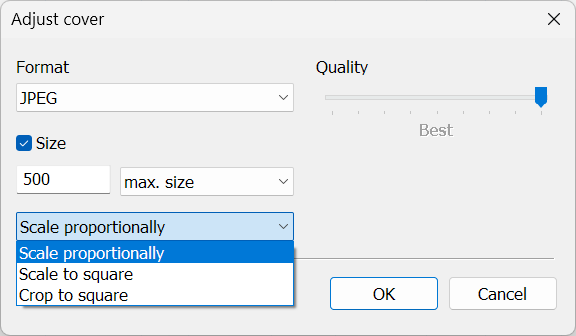
I have gratefully discovered an function within the MP3tag that I wanted to share about and let you know that it is something that as small and seemingly inconsequential as it may sound, is extremely helpful. It lies within the image box in the left hand panel. When you copy and paste an album cover in it and then right click there appears a choice called "adjust cover". I'm excited about this because I have always been going outside of the program or snipping it to get a smaller size of the album cover. This little discovery will save me tons of time. So I just wanted to express my thanks, so thank you...johnnos12
---
### Author:  [@poster](https://community.mp3tag.de/u/poster)
#### Post date: [May 14, 2026, 5:27am UTC](https://community.mp3tag.de/t/just-wanted-to-share-a-discovery-within-the-app-adjust-cover/71266/2 "2026-05-14T05:27:14Z")
You can also do this for many marked files in a batch with an action:
> **[Adjust Cover – Mp3tag Documentation](https://docs.mp3tag.de/actions/adjust-cover/)**
>
> Documentation on the Adjust Cover action type that can be performed as Quick Action or as reusable workflow from Action Groups. Mp3tag is the universal Tag Editor.
---
### Author:  [@LyricsLover](https://community.mp3tag.de/u/LyricsLover)
#### Post date: [June 10, 2026, 7:20am UTC](https://community.mp3tag.de/t/just-wanted-to-share-a-discovery-within-the-app-adjust-cover/71266/3 "2026-06-10T07:20:47Z")
> [@johnnos12](#):
>
> I'm excited about this because I have always been going outside of the program or snipping it to get a smaller size of the album cover. This little discovery will save me tons of time.
AFAIK, "Adjust cover" is available since Mp3tag v3.01 (released in March 2020):
> [@Mp3tag v3.01 released](https://community.mp3tag.de/t/mp3tag-v3-01-released/48328):
>
> Mp3tag v3.01 released The world is in another place since the last time I've written release notes in this section. I hope that all of you are staying safe and healthy. I’ve used my time working from home and practicing social distancing to create a new version of Mp3tag and wanted to take the opportunity to detail some of the new features and changes for you. Support for the WebM file format This new version adds support for the WebM file format (file extension \*.webm), a container format tha…
In the meantime, you can also adjust your copy & pasted cover "proportionally", "scale to square" and "crop to square" in addition to its size and quality.
---
### Author:  [@system](https://community.mp3tag.de/u/system)
#### Post date: [July 8, 2026, 7:21am UTC](https://community.mp3tag.de/t/just-wanted-to-share-a-discovery-within-the-app-adjust-cover/71266/4 "2026-07-08T07:21:27Z")
This topic was automatically closed 28 days after the last reply. New replies are no longer allowed.